

42% of 320 small-business owners and managers estimated in 2025 that missed customer calls cost their business more than USD 500 a month, according to a survey on the cost of missed calls reported by Zadarma. In the same survey, 22% said they had put an AI voice agent on the line. Read the two figures together and a clear picture appears: most small firms still lose calls because the one person who could answer is already on another one.
That turns small business telephone solutions into a workflow question rather than a shopping list. Who answers each call, what survives the call as a written record, and whether the call arrives with enough audio quality and legal clarity to be worth acting on. Per-seat pricing and feature grids come after those answers.
Four setups cover nearly every small firm, and each one can be tested the same way. Start with who picks up, then work down to the network and the consent rule.
Table of Contents
- Four Telephone Setups Small Businesses Use
- When Missed Calls Justify Extra Coverage
- Call Quality Targets to Check Before You Commit
- Security and Emergency Calling Checks
- Recording Consent Across Canada and the United States
- How Mobile Call Capture Works Step by Step
- Confirm Fit and Test Before You Switch
Four Telephone Setups Small Businesses Use
The phone is not a legacy channel that small firms keep out of habit. More than 90% of IT decision-makers in an Ipsos survey of over 350 respondents counted phones as a main communication tool, and 58% of companies with fewer than 100 employees named the phone their primary method, against 44.4% at organizations with 100 to 999 employees, as RingCentral's business communication trends research reports. The smallest firms leaned on voice hardest.
That pattern fits work where a conversation closes the deal. A mortgage broker clarifies a rate buy-down, an insurance advisor confirms beneficiaries, a field rep settles a delivery dispute, and in each case the client wants a person rather than a web form.
What each setup actually is
- Desk landline. A fixed line tied to one desk. It rings whether or not anyone sits there, and the only record of the call is whatever the person wrote down afterwards.
- Cloud phone system. Calls travel over the internet instead of copper, so staff get extensions, call queues, and a shared log of who called whom. It suits a team of three or more who all answer the main number.
- Mobile-first call capture. The professional keeps the cell number clients already dial, and calls forward to a service that transcribes them. No second number, no desk phone, and no change for the caller.
- Answering service. A live operator picks up when nobody in the business can, takes a message, and sends it on. The coverage is human, but the person answering doesn't know your files.
| Setup | Best for | Keeps existing number | Call documentation | Setup effort |
|---|---|---|---|---|
| Desk landline | Offices with fixed desks and few calls away from base | Yes | Usually none built in | Low to moderate, often needs on-site wiring |
| Cloud phone system | Teams with several staff and shared extensions | Usually, through number porting | Call logs; recordings depend on plan | Moderate |
| Mobile-first call capture | Solo professionals and field staff who call from a cell phone | Yes, the existing mobile number | Transcripts and summaries | Low, mainly call forwarding |
| Answering service | Firms that need live cover after hours | Yes, through call forwarding | Message notes from the operator | Low to moderate |
How to read the table
Match the row to two facts about your week, not to a feature count. The first is how many people answer calls. The second is whether those people work away from a desk. One advisor working from a car fits the mobile-first row. Three staff sharing a reception desk fit the cloud system.
Before comparing plan prices, it helps to know what changes between tiers. Nutmeg Technologies keeps a useful VoIP features, costs and security breakdown that shows which items are bundled and which are sold back to you later.
Forwarding deserves its own check, because most setups above rely on it somewhere. The call forwarding options carriers actually support explain the difference between forwarding on no answer and forwarding on busy, and that difference is where most missed calls happen.
Treat this table as a shortlist, not a decision. A setup that fits your team can still fail on audio quality, on emergency location, or on recording consent, and those three tests are worth running before anyone signs a contract.
When Missed Calls Justify Extra Coverage
Start with what customers do. In a 2019 BrightLocal survey of 500 U.S. consumers, 60% preferred calling a small business by phone, ahead of email at 16% and an in-person visit at 15%, as Small Business Trends reports in its customer contact statistics. Businesses meet them partway: a 2022 survey of 601 small-to-medium-sized businesses found 72% made themselves reachable by phone, against 77% by email and 56% by text.
So the channel customers prefer most is also the channel that goes unanswered when the owner is on another line. The question worth answering before you buy anything is narrower: when does better call capture pay for itself?

The checklist below is the version an owner can run without a consultant.
Put a number on your own missed calls
- Log every missed call for one month, with the time of day and the caller type. Your phone's recent-calls list is enough if you check it weekly.
- Mark which missed callers were new inquiries rather than regulars, using the call log and your CRM. A missed call from an existing client is a service problem, not a revenue problem.
- Multiply probable conversions by the value of one client. Say a broker logs 14 missed calls in a month and judges that two would have started an application. Compare that with the monthly fee of whatever coverage you're considering.
The middle step is the honest one, and most owners overestimate it. Ask what share of missed callers call back on their own. For a referral-driven practice that number is low, because the caller moves to the next name on their list.
Which calls deserve a human
- New inquiries and referral calls: live answer, or a callback inside the hour.
- Urgent servicing: a policy lapse, a closing date, a delivery on site today. Take these yourself.
- Routine messages: documents received, confirmation of an appointment. Voicemail with a transcript is enough.
- Open requests with no deadline: a callback queue, answered in a fixed block each afternoon.
- Everything else: a transcript and summary, so nothing depends on memory.
Rule of thumb: add coverage when recovered clients outnumber the monthly fee. Not before.
Replacing the receptionist outright is a bigger step than most firms need. For mortgages, insurance, and financial advice, callers often want the professional they already know, and an automated handler can create disclosure and misrouting problems that a familiar voice never has.
Volume data helps here more than feature comparisons. The phone call statistics small businesses track show which hours carry the load, and that pattern tells you whether you need live cover all day or just a reliable callback promise.
Call Quality Targets to Check Before You Commit
Call quality is a network measurement, not a matter of how the handset sounds. Microsoft's operational guidance for real-time communication sets three targets that a small deployment can check with a free network test, per Microsoft's quality of experience review guide.
| Metric | Typical target | Effect when exceeded |
|---|---|---|
| Received jitter | Below 30 ms | Above 30 ms can make speech sound robotic |
| Packet loss | Below 2% | Above 10% causes missing syllables and dropouts |
| Round-trip time | Below 200 ms | Delay stacks in both directions, so each speaker starts before the other finishes |
Why packets behave this way
Voice is chopped into small packets that have to arrive in order and on time. A late packet forces the receiving device to hold everything back in a buffer, which adds delay to the whole conversation. A lost packet can't be rebuilt, so the listener hears a gap.
The targets above are the operating range. A call that sits just outside them sounds tiring rather than broken, which is why owners blame the phone rather than the connection.
The check to run before you commit
- Measure per location and per network. Office Wi-Fi, a home connection, and cellular are three different paths, and a softphone that works at the desk may fail in the car.
- Isolate the usual suspects when a limit is exceeded. Wi-Fi congestion, a VPN that adds delay, and a cellular dead zone cause most of the failures in small deployments.
- Prioritize voice traffic with QoS when backups, video calls, or large file transfers run on the same connection. Microsoft notes this is especially worth doing once delays already affect voice.
Write the numbers down before you sign, one row per location, with the date and the network tested. A provider conversation goes faster when you can say which metric failed and where.
Clear calls preserve names, amounts, and commitments, and those are exactly the details that later feed call records, summaries, and follow-up messages. An unclear call costs twice: once on the line, and again when someone reconstructs it from memory.
Security and Emergency Calling Checks
A small business telephone solution has two channels to protect. Think of them as the instructions that set up a call and the conversation that follows. Secure one and leave the other exposed, and the call still has a weak point.
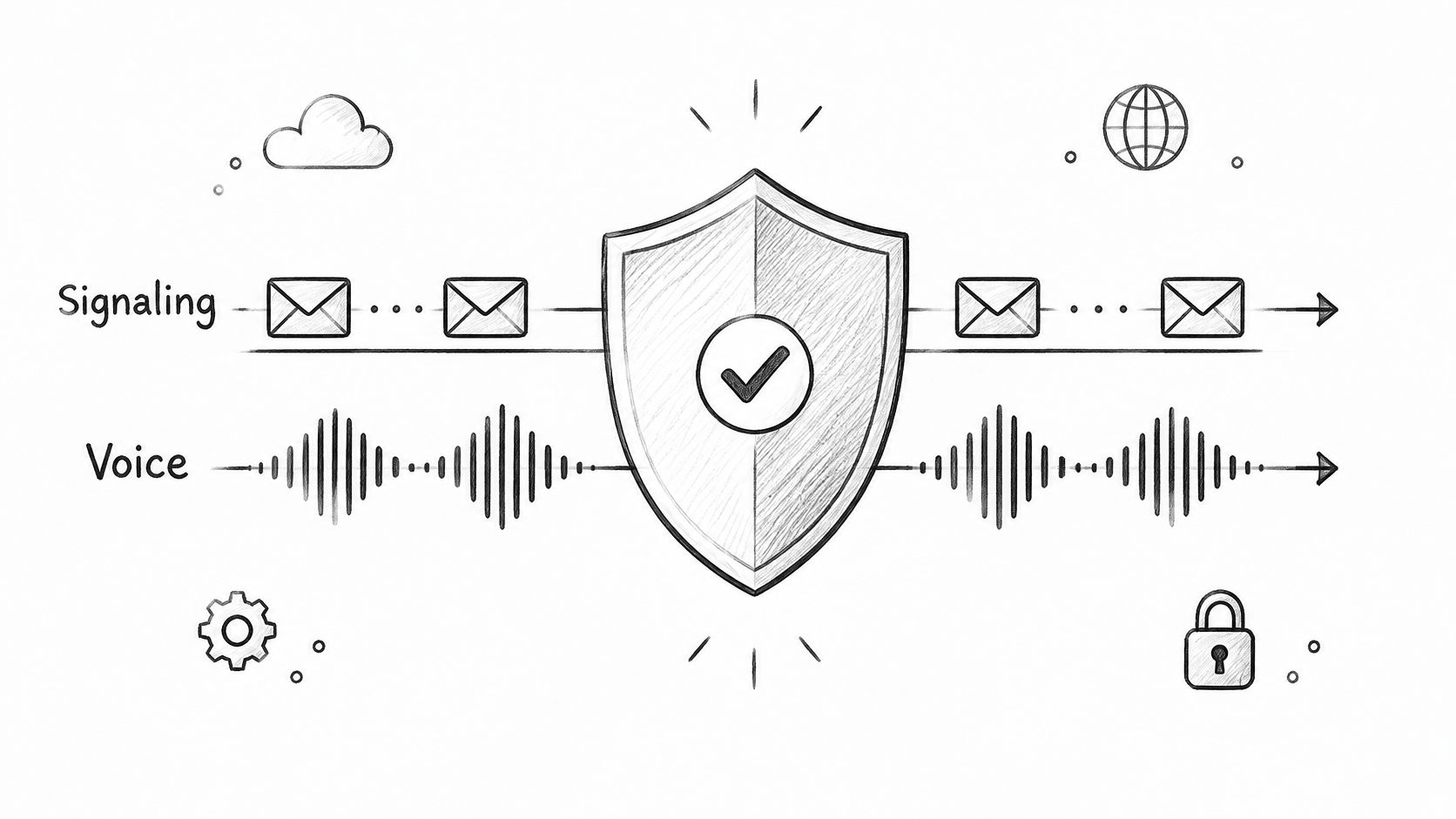
NIST's VoIP security publication recommends TLS for user-agent signaling and identifies SRTP as the layer that provides confidentiality, message authentication, and replay protection for voice traffic. In plain terms, TLS for user-agent signaling protects the instructions that control a call. SRTP protects the audio itself. The distinction matters because clear audio does not prove that the call setup was protected, and a protected setup does not make the conversation private on its own.
For a second layer of security, the same broad pairing appears in secure SIP over TLS or IPsec alongside SRTP. Emergency calling needs its own check. VoIP providers in the U.S. are generally expected to support enhanced 911, which passes caller identity and location to the dispatch center.
Six questions to put in writing before launch
- Is encryption applied in transit to both signaling and media, and can the provider name the protocols?
- Who holds the certificates and keys, and what happens when one expires on a Friday night?
- Which access logs exist, and can you see who listened to or downloaded a recording?
- What are the retention controls, and can you set automatic deletion rather than clean up by hand?
- What exactly happens to emergency calls when a number is forwarded, including the address that reaches dispatch?
- Does a forwarded call still carry the correct callback number and a dispatchable location, or does it appear to come from somewhere else?
Call forwarding is where the last two questions get awkward. Routing a call from an established mobile number can change the apparent endpoint, so the location that reaches dispatch may need provider-specific setup rather than arriving by default. Ask for the exact flow: which number dispatch sees, which address is attached, and who updates it when the business moves.
A short walkthrough of how these pieces fit together helps before you sit down with a provider.
Validate security and emergency calling before deployment. A familiar phone screen proves nothing about what happens to a 911 call placed through a forwarded line at 11 pm.
Recording Consent Across Canada and the United States
Recording is the feature owners switch on first and think about last, and it's the one most likely to cause a problem six months later. The complication isn't the technology. It's jurisdiction, and a professional answering a call can't know where the caller sits before saying hello.
Canadian guidance expects callers to be told that recording will occur and why. U.S. rules split between one-party and all-party consent, and several states require every participant's agreement, as Outreach's summary of call recording laws in the U.S. and internationally sets out.
| Call situation | General rule | Practical step |
|---|---|---|
| Canadian client call | Callers are expected to be told that recording will occur and why | Give a verbal disclosure at the start |
| U.S. call in a one-party consent state | One participant's consent can be enough | Still disclose, so one standard covers all calls |
| U.S. call in an all-party consent state | Every participant must consent | Get explicit consent before recording |
| Caller declines recording | Recording should not continue | Stop recording and take manual notes |
| Cross-border call, location unknown | Rules depend on where each party is | Use the stricter disclosure for every call |
A script you can read in five seconds
Disclosure line: I record our calls so the details land in your file accurately. This covers today's call and future calls between us. If you'd rather I didn't record, tell me and I'll take notes by hand.
Reading the same line at the start of every call is compliant across all 50 states, which removes the need to work out where the caller is. It also has a practical benefit: a business client who agrees once is covered for the current call and later calls, so you're not repeating the negotiation every time the phone rings.
When a caller declines, stop the recording and write notes. Having a fallback decided in advance keeps the refusal from turning into an argument mid-conversation.
Set the rules before you record anything
Decide six things in writing: whether the call is incoming or outgoing, where each party is located, the exact wording used, how long records are kept, who can open them, and whether copies go into a CRM.
Automatic transcripts keep sensitive financial and health details long after the business need has ended. Set the deletion rule on day one, not after the first privacy question.
One standard for every call beats guessing at each caller's location. The rules follow the call whether it runs over a landline, a cloud system, or a mobile number, so a new app doesn't reset your obligations.
How Mobile Call Capture Works Step by Step
The mechanics are simpler than the feature lists suggest. Calls to the number you already give out are forwarded to a capture line, the phone rings as usual, someone answers, and a transcript is produced without anyone pressing a button during the conversation.
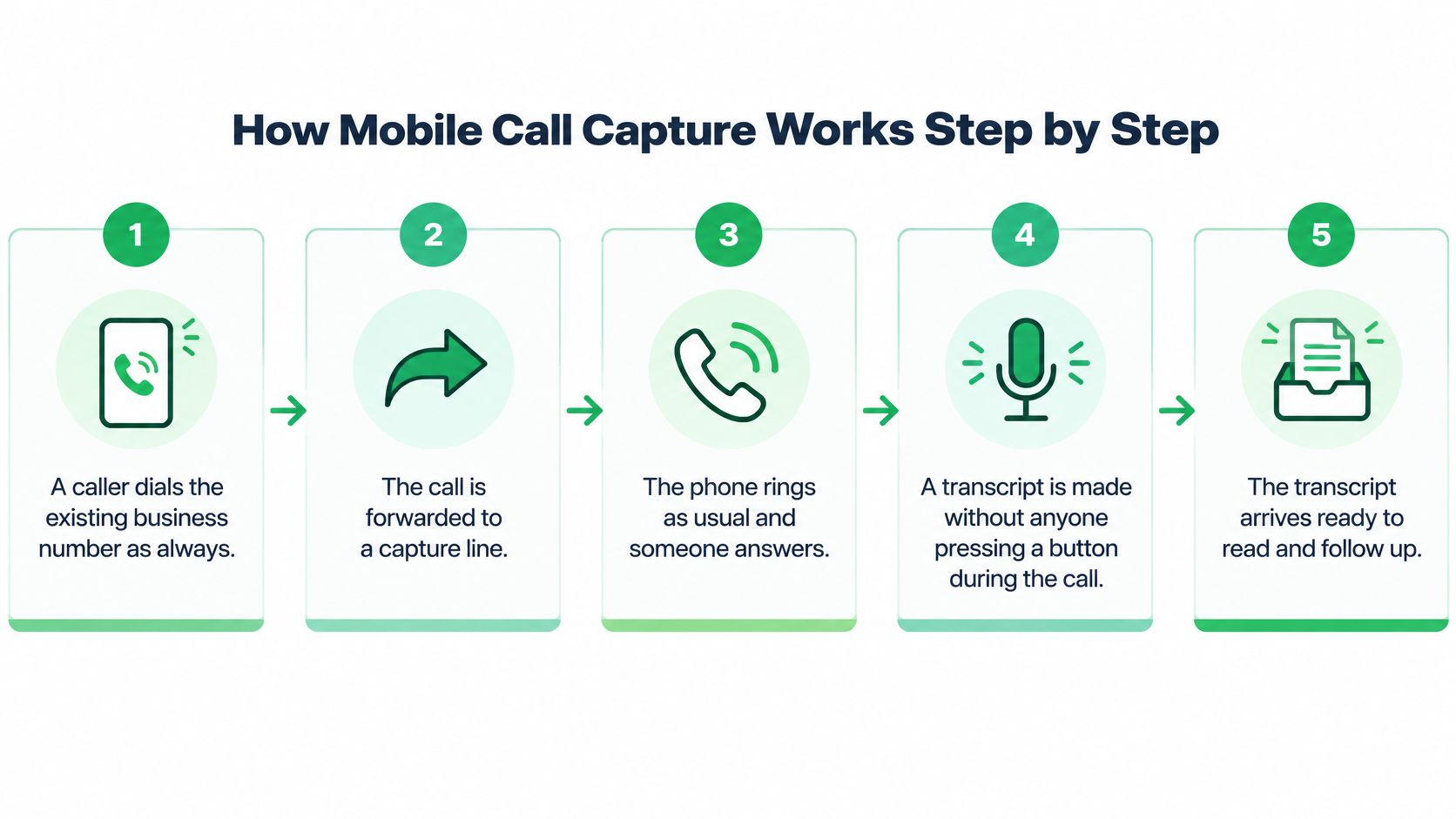
Clients need no app, link, or installation to be on a call. It reaches them like any other call, which is the main reason this setup survives contact with real clients.
Seven steps, with the slip that catches most people
- Confirm the number clients already dial. Check your business card, email signature, website, and Google listing, then pick the number that receives calls. Common slip: adding a second number and then losing track of which line a client used.
- Turn on conditional call forwarding for no answer and busy. In iPhone settings or your carrier's menu, forward when unanswered, when busy, and when unreachable. Common slip: setting no-answer forwarding only, so calls that arrive while you're already talking never reach the capture line.
- Install the app and sign in on the phone that holds the number. Incoming calls are captured once forwarding is live, and outgoing calls are dialled from the app so they're transcribed too. Common slip: dialling from the native phone app and wondering why half the conversations have no record. If the forwarding mechanics are new to you, the guide to adding call documentation to a phone number you already use covers the sequence.
- Call yourself from another phone. Speak for thirty seconds, hang up, and confirm the transcript appears. Common slip: testing only with an outgoing call from the app, which leaves the inbound path unchecked.
- Place a test outgoing call from the app. The client should see your usual number, not a new one. Common slip: a strange number showing up because the app wasn't set to present your own line.
- Check that the summary reaches your inbox. It should arrive minutes after the call with names, amounts, decisions, and next steps. Common slip: checking only inside the app and missing a summary that a spam filter held back.
- Write your disclosure line into a note and read it at the start of every call. Common slip: deciding to remember it and dropping it on the first busy morning.
A working setup looks unremarkable from the outside. Incoming and outgoing calls sit in one log, summaries land within minutes, and clients keep dialling the number they've always used. Nothing about their experience changes, which is the point.
Confirm Fit and Test Before You Switch
Decide on four facts: how many people answer calls, where they sit, which call types need a human, and which jurisdictions your clients are in. Then test the choice before your main number depends on it.
- Write down how many people answer calls and where they work, including the car and the home office.
- Pick the setup type from the comparison table that matches, and confirm in writing whether it keeps your existing number.
- Use your missed-call estimate to set the coverage level, call type by call type, rather than buying the top tier and hoping.
- Measure latency, jitter, and packet loss on the networks you use, and get the encryption and emergency-location answers in writing.
- Adopt one disclosure script and one deletion rule, then apply them to every call regardless of where the client is.
- Run a seven-day test on real calls before moving your main number, and keep the old setup running in parallel.
Ask every provider the same five questions: whether the existing number is kept, how forwarding behaves on busy and unreachable calls, what gets recorded and stored and for how long, what emergency location reaches dispatch on a forwarded call, and whether there's a contract or a seat minimum.
We built VoxNote around those answers. It runs on your own number for incoming and outgoing calls, so clients keep dialling the number they know, both plans include unlimited calls, and there's no contract or seat minimum.
A clear test beats a feature list every time. Book the trial, run it on your realest calls for a week, and check the summaries against what you remember. If the record is thinner than your notes, the setup isn't earning its place.
VoxNote transcribes and summarizes incoming and outgoing calls on the number you already give clients, so a broker working from a cell phone ends each conversation with a summary in the inbox instead of a page of handwriting. Both plans include unlimited calls and a 7-day free trial, with no contract and no seat minimum, which makes the seven-day test above easy to run on your realest calls. Visit VoxNote to start the trial and see what your own calls look like when they're written down.