

You've just ended a client call in the car park. You remember the main request, but not the exact figure, the document promised, or who agreed to call back. Your client already has your mobile number saved, so replacing it with a new business line would create another problem.
If you searched for “Call on Doc phone number,” you may also be trying to reach a doctor rather than document a business call. Those are different tasks, but both need the same discipline: verify the number, protect private information, and check the record before acting on it.
Table of Contents
- Keep Your Existing Number and Log Every Call
- What to Leave on a Doctor's Voicemail
- Set Up Forwarding and Start Your First Week
- Incoming and Outgoing Calls Compared
- What Each Call Record Contains
- Checking Records and Meeting Consent Rules
Keep Your Existing Number and Log Every Call
You can keep your current mobile number and document client calls without publishing a separate business line. The setup needs to route eligible calls through a capture service while preserving the number clients already recognise. Keeping the number is straightforward in principle; making sure every intended call takes the right route requires testing.
Phone continuity matters for client-facing work. In 2025, 62% of people seeking financial advice preferred communicating with their advisor by phone, according to TIAA and MIT AgeLab research cited by SmartAsset. Asking those clients to learn a replacement number introduces friction where there doesn't need to be any.
That applies to independent mortgage brokers, life insurance advisors, investment advisors and financial planners. Field sales representatives, technical salespeople and entrepreneurs face the same practical issue: clients call the person whose number they've saved, not whichever system the business has just adopted.
Your number is an address, not a handset
Think of your phone number as a street address and your handset as the car parked there. You can change cars without changing where deliveries arrive. The analogy isn't a technical description, but it explains why replacing a device doesn't have to mean replacing your public contact details.
Under the North American Numbering Plan, a number has ten digits, a three-digit area code followed by a seven-digit local number, within an integrated system serving 20 North American countries and territories, as described by NANPA. The number sits within a shared telecommunications framework rather than belonging permanently to a particular handset.
That structure supports continuity across devices and, where portability is available, carriers. It doesn't guarantee that every carrier plan supports every forwarding arrangement. Treat number retention and call routing as separate checks.
Practical rule: Keep the public number stable. Change the handling behind it only after you've tested the full caller experience.
Preserve the client's familiar route
For incoming capture, forwarding sends calls from the established number into the service's call-handling route. The client still dials the saved contact. They shouldn't need to find another number or follow special joining instructions.
The useful test isn't whether forwarding appears enabled. Check what happens when someone calls, when you don't answer, and when you return the call. A setup that records conversations but sends missed calls to an unexpected greeting isn't ready for client use.
Before changing anything, write down the behaviour you want to preserve:
- Recognition: Keep the established number on your website, email signature and client records.
- Answering: Make sure calls reach your phone in a familiar way.
- Missed calls: Confirm that callers hear the intended voicemail greeting.
- Recovery: Keep the carrier's instructions for disabling forwarding available.
Avoid treating “log every call” as permission to record every conversation indiscriminately. Personal contacts, confidential discussions and calls without the required consent need deliberate handling. Complete documentation means knowing which calls belong in the record, not collecting everything without distinction.
The best arrangement leaves clients with a familiar calling experience while giving you a reliable way to recover the details afterward. Continuity comes first; capture supports it.
What to Leave on a Doctor's Voicemail
Dialling a doctor's number solves little if the call reaches voicemail. Someone else may hear the message, especially on a shared phone or after a wrong-number call.
U.S. HHS guidance permits providers to leave messages, but recommends limiting disclosed information, such as the provider's name, phone number, appointment information or a callback request. That's permission to communicate carefully, not a reason to leave detailed results.
Keep the message narrow
The 2025 Health PEI voicemail guidance warns that even a patient's name, appointment date and appointment time can constitute protected health information, particularly on shared voicemail or when the number is wrong, according to Health PEI. A safer patient message gives a first name, a callback number and a request to confirm an appointment, without naming a diagnosis, test or medication.
Voicemail: what to say and what to avoid
| Message element | Safe to include | Avoid |
|---|---|---|
| Caller name | First name and callback number | Full name alongside appointment details |
| Appointment | Request for a callback about an appointment | Specific date, time or service, which may be protected health information |
| Health detail | None | Diagnosis, test, medication or condition |
| Callback | Your number and best time to call | Asking for results to be left on voicemail |
| Wrong number | Hang up and verify the listing | Leaving the message anyway |
These are conservative choices, not a guarantee of privacy. When the office calls back, staff should verify identity before sharing sensitive information and confirm the preferred contact method and permission for voicemail.
For an office greeting, use professional voicemail greeting examples to make callback instructions clear without encouraging callers to leave clinical details. If you suspect a wrong number, hang up, check the official office listing and call again before leaving anything.
Set Up Forwarding and Start Your First Week
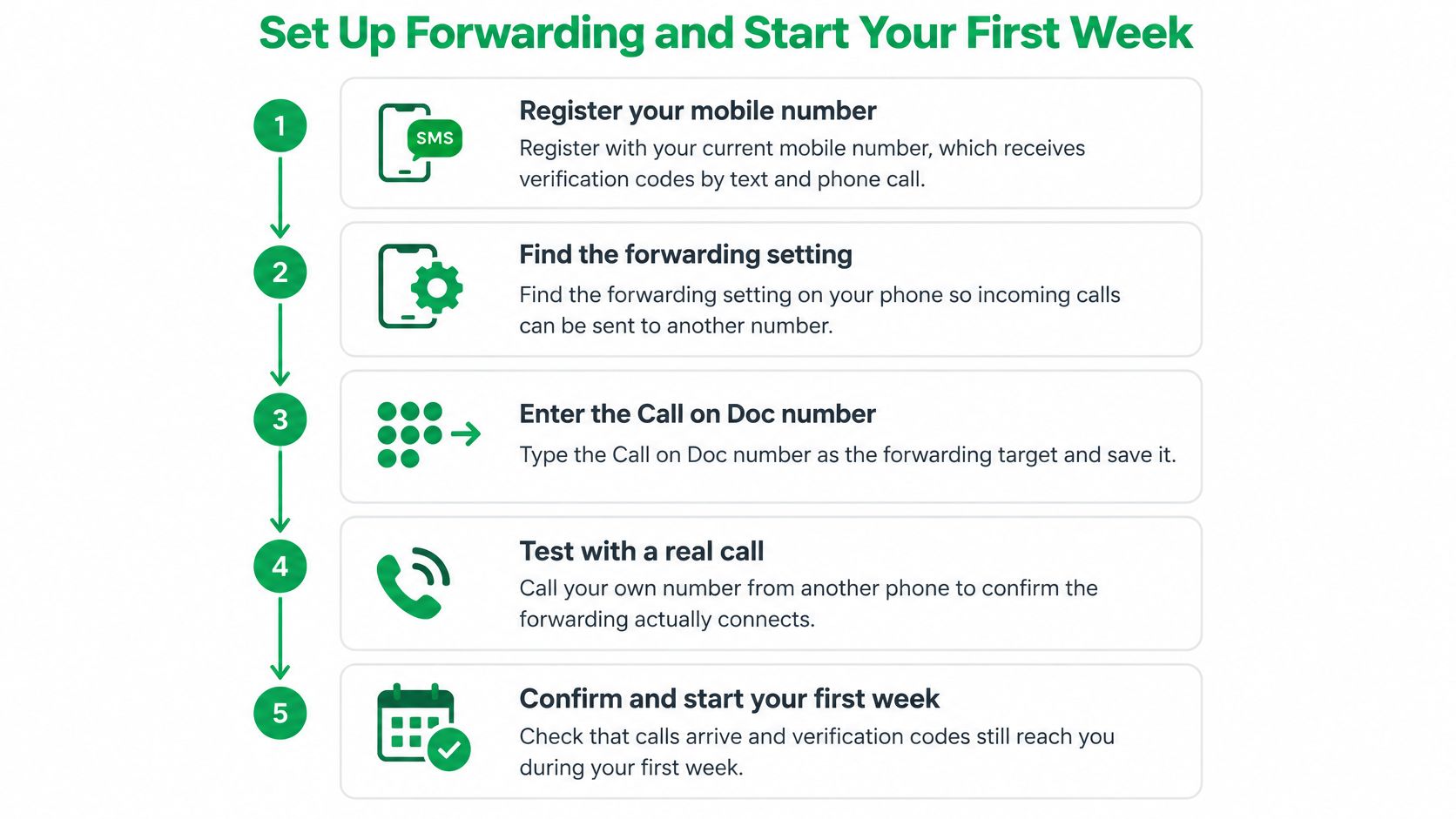
Start with a controlled test, not a live client conversation. Have another phone available, keep your carrier account details nearby, and leave time to undo the change if calls don't reach the right destination.
Use the visual sequence as an orientation, but enter only the forwarding destination supplied inside your account. Don't mistake an illustration or a doctor's contact number for a capture-service destination.
Connect and test the route
Register with your current mobile number. We use that number for verification codes delivered by text message and phone call. Complete verification before changing the call route so you know the number is reachable.
Find your forwarding setting or obtain the carrier's instructions. Phone menus and dialling codes aren't interchangeable across networks. Confirm the activation method, the cancellation method and any forwarding charges with your carrier before applying a code.
Enter the forwarding number shown in the app. Copy it carefully rather than guessing or using a number from an unrelated guide. A missing digit can send calls somewhere you didn't intend.
Place a test call from another phone. Confirm that your phone rings as expected, the conversation connects and capture starts. Use harmless test content rather than a client name, account number or confidential scenario.
End the test and check your email. Confirm that the first summary arrives and belongs to the call you just made. Also check that verification messages and ordinary phone use still work as expected.
Our guide to call forwarding options can help you distinguish forwarding arrangements before you change settings. In particular, forwarding only unanswered calls isn't the same as routing answered calls through capture.
Don't assume forwarding is free. Ask the carrier how your plan treats forwarded calls, including calls received while travelling. A working technical setup can still be the wrong financial choice if the plan bills that route unexpectedly.
For a video walkthrough, use the demonstration alongside the settings shown in your own account.
Keep the first week deliberate
Exclude family members and personal friends before your next client conversation. Prepare your recording disclosure, then review the first few records against the audio before sending follow-up messages. Check whether the system captured decisions accurately, not merely whether it produced readable prose.
A medical practice may need someone to answer and route calls, rather than just document them. For that separate requirement, the TOOLii virtual receptionist for Australian practices is a relevant resource to assess. Reception and transcription solve different problems.
VoxNote works on your own number for incoming and outgoing calls, with a summary in the Notes tab seconds after you hang up and a follow-up email draft for you to review, adjust and send. Consent and professional judgment remain your responsibility.
Incoming and Outgoing Calls Compared
An incoming call on a correctly forwarded number is captured automatically. Your phone rings as usual, and there's nothing to press during the conversation. The important work happens before the call: connecting the route and deciding which contacts to exclude.
Outgoing capture follows a different path. Dial from our app, rather than assuming a call placed through another dialler will enter the same record. Your client still sees your existing number and answers like any other call.
Choose the right route for the conversation
Clients don't need an app, a joining link or an installation. That removes a common source of confusion, but it doesn't remove the need to tell participants about recording and obtain any required consent.
What happens in each call scenario
| Scenario | Captured in the record? | What the client sees | What you do |
|---|---|---|---|
| Incoming call on forwarded number | Yes, automatically | Your existing number | Answer as usual |
| Outgoing call dialled in the app | Yes | Your existing number | Dial from the app |
| Contact excluded in advance | No | Your existing number | Exclude the contact before the call |
| Transcription stopped mid-call | Only up to the stop point | Your existing number | Stop transcription in the app |
| Incoming call on a line that is not forwarded | No | Your existing number | Check forwarding after any plan change |
The incoming and outgoing rows describe different habits. For incoming calls, you answer normally once routing is connected. For outgoing calls, you deliberately choose the app's keypad or contact entry.
Excluding a contact is the cleaner option when you already know the conversation should stay outside the record. It prevents capture from starting, rather than relying on you to remember a control while discussing something sensitive.
Stopping transcription mid-call isn't the same as excluding the whole conversation. Treat anything captured before the stop point as an existing record.
That distinction matters when a routine business call turns personal. Stop transcription before continuing into material that shouldn't be captured, and handle the existing record under your retention and privacy procedures. Don't assume the stop control erases earlier content.
A line without forwarding won't capture incoming calls through this route. After changing your carrier, plan or phone configuration, test an incoming call again instead of relying on the previous setup.
Successful conversation doesn't prove successful capture. You can hear a client perfectly while the documentation route is disconnected. Confirm the resulting record when you make a routing change.
What Each Call Record Contains
Memory isn't a dependable client-file system. In the MEMCONS study, participants who took contemporaneous notes recalled more conversation details, but only 4.7% of conversation details were recalled by both partners after a one-week delay. That finding concerns shared recall, not a claim that everyone forgets nearly everything.
A useful record separates the conversation's wording from the actions you need to take. You need both: enough detail to check a disputed point and a short account you can use before returning a call.
Match the record to the task
Parts of a call record and how to use them
| Record part | What it holds | Best use | Check before sending |
|---|---|---|---|
| Full transcript | Word-for-word text of the call, subject to recognition errors | Finding exact wording | Verify figures and names against the audio |
| Summary | Title, key points, numbers, decisions and next steps | Quick recall before the next contact | Confirm amounts and dates |
| Follow-up email draft | Message built from call context and agreed actions | Starting point for a reply | Review and edit before sending |
| Web history | Past summaries, transcripts and emails on a computer | Copying details into client files | Confirm the file matches the record |
Use the full transcript when a client asks what was discussed. Search for the relevant document, product or topic, then check the surrounding exchange. An isolated sentence may omit the condition that followed it.
Read the summary before a callback. For a mortgage discussion, that might mean identifying the requested income documents, the application question still unresolved and who promised to contact the lender. Keep proposed options separate from decisions the client accepted.
Turn context into accountable follow-up
The email draft saves reconstruction work, but it isn't a finished commitment. Remove unsupported promises, distinguish estimates from agreed terms, and make each next action clear. If the client only asked about a product, don't send wording that implies they authorised a purchase.
Our web history makes previous summaries, transcripts and follow-up emails available on a computer. Use it when updating client files, but confirm that you've selected the right person and conversation before copying anything.
A concise file note should explain the decision, its conditions and the next owner. Copying an entire transcript into every field makes review harder and can spread sensitive information more widely than necessary. Store what the workflow needs, and verify what the professional decision depends on.
Checking Records and Meeting Consent Rules
A transcript is a draft to check, not an unquestioned source of truth. Say a recogniser substitutes a digit in an interest rate. If you approve the generated email without checking, a transcription error becomes a statement your client may rely on.
The NIST OpenASR20 evaluation plan defines word error rate using substituted, deleted and inserted words relative to a human reference transcript. Cellular audio, overlapping speakers, accents and specialist vocabulary all deserve attention when reviewing telephone speech. Readability alone doesn't establish accuracy.
Verify the details that change an outcome
What to verify before a record leaves your hands
| Information type | Risk if wrong | Review rule |
|---|---|---|
| Dollar amounts, rates and premiums | High: changes the terms of a deal | Confirm against the audio before any CRM entry or email |
| Dates and deadlines | High: missed or wrong commitments | Confirm against the transcript, then audio if unclear |
| Names, policy or account numbers | High: wrong person or record | Confirm spelling and identifiers before filing |
| Next steps with an owner | Medium: unclear responsibility | Confirm who owns each action |
| General discussion and routine topics | Low | Can flow into notes automatically |
Use this checklist to keep review focused on accuracy, consent and controlled access.
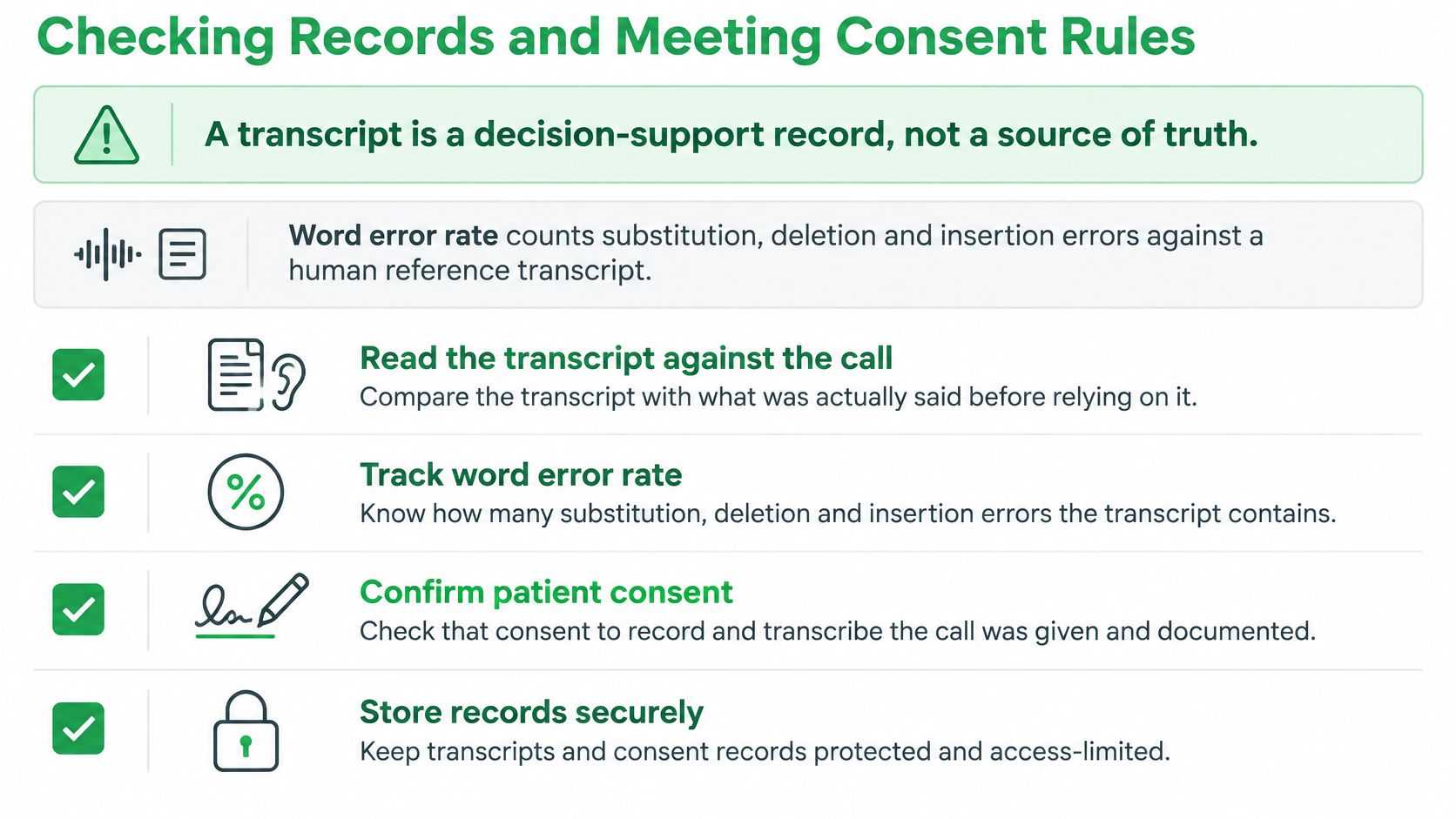
You don't need to calculate a formal error score for every client call. You do need to catch errors in the details that affect advice, payment, coverage or deadlines. If the audio itself is ambiguous, ask the client to confirm rather than selecting the most plausible wording.
Obtain consent before capture
Before recording with our service, inform all participants and obtain any legally required consent. Tell recipients that the call uses the app and may be recorded and stored for the service. A disclosure should explain what happens, not hide recording behind vague language about improving quality.
Our verbal disclosure can be used with a business client to seek consent for the current call and future calls. Whether that consent is legally sufficient, how long it remains effective and whether it must be renewed depend on the applicable rules. Don't treat continuing consent as universal permission.
Review boundary: Automation can prepare a record. It can't decide whether you have authority to create, retain or share it.
You're responsible for the transcription rules that apply to your location and profession. Limit access, document consent, and define retention and deletion practices before routine use. When assessing call recorder software, give those controls as much attention as transcript quality.
VoxNote captures calls on the number clients already know and prepares transcripts, summaries and follow-up drafts for your review. Visit VoxNote to explore the setup, then test your call route and consent process before documenting your next client conversation.