
You've finished a client call, opened the file, and realized you're unsure about a detail. Did the client promise to send the policy documents tomorrow, or did you promise to request them? Your handwritten notes don't settle it, and another call is already coming in.
Call recorder software can help, but saving a conversation isn't the same as creating a dependable client record. The useful workflow combines clear consent, understandable storage rules, and a habit of checking important details before they become advice, commitments, or follow-up messages.
Table of Contents
- What Call Recorder Software Does for Your Calls
- Recording, Transcripts and Summaries Compared
- How a Call Recorder Captures and Processes a Call
- How Much to Trust a Call Transcript
- Consent Rules and a Script for Every Recorded Call
- What to Check Before You Choose a Recorder
What Call Recorder Software Does for Your Calls
Call recorder software is an app or service that captures phone-call audio, stores it, and makes it findable later. You return to what was saved instead of reconstructing the conversation from memory.
A mortgage broker finishes a call with a borrower, then needs to confirm which statement the borrower will send and who contacts the accountant. A recorded call answers those questions. A half-finished note does not.
Recording is routine wherever calls carry business weight. Contact centers, insurance practices, investment firms, and field sales teams all treat saved conversations as part of normal documentation, and the size of the operation matters less than the cost of forgetting a detail.
The basic jobs behind the app
A recorder handles more than a record button:
- Capture the conversation. Save both sides clearly enough for later review.
- Store it under access rules. Keep client information away from people who don't need it.
- Make it retrievable. Organize calls by date, phone number, or contact name so a specific conversation takes seconds to find.
The basic flow looks like this.
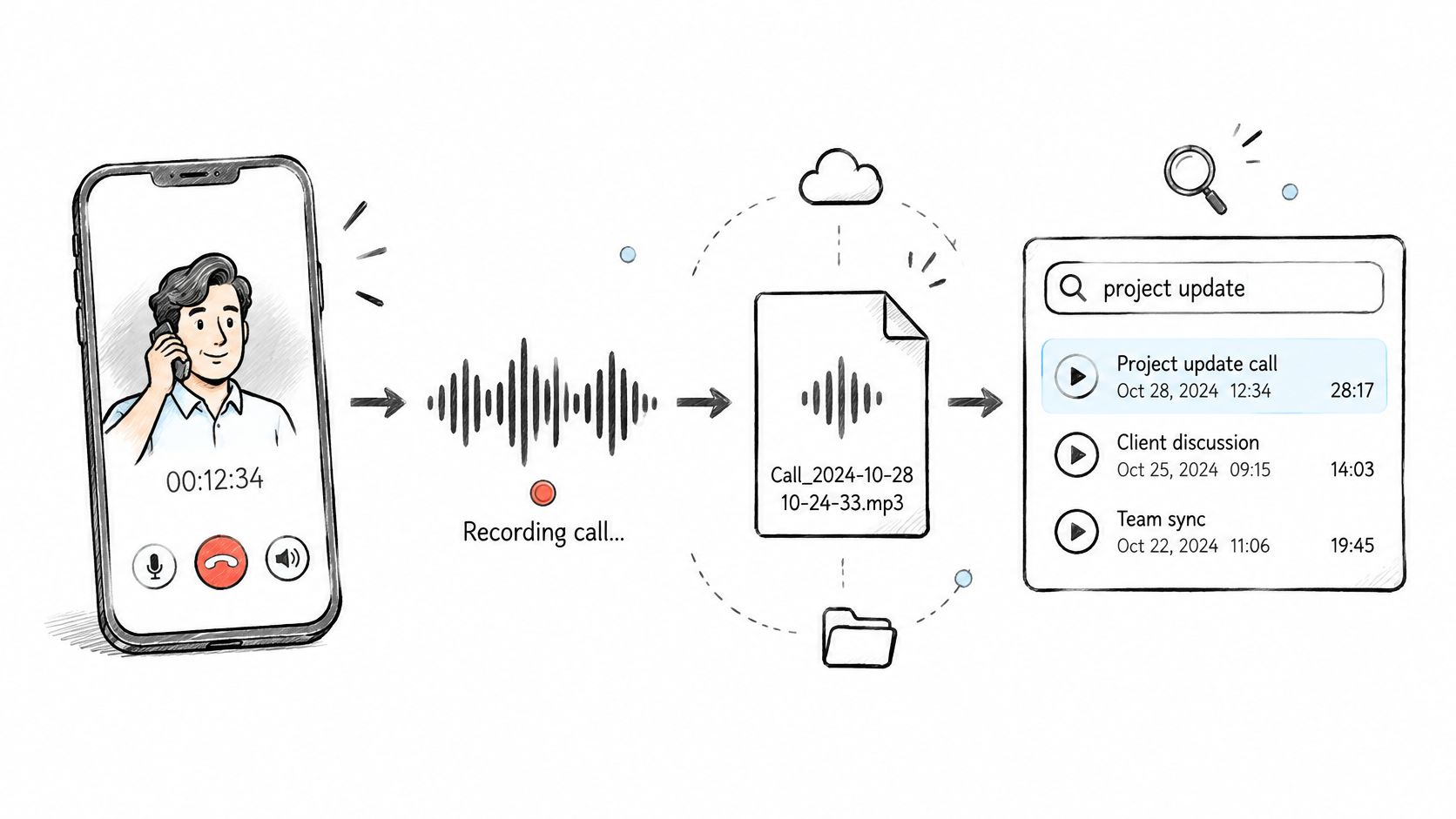
Many services go further and turn the audio into written material: notes, action items, follow-up drafts. An AI call assistant uses the conversation as input for that extra work. Whatever form the output takes, treat it as a draft you can search and check, not a certified account of the call.
Cloud services can connect to a professional's existing number, though the connection method differs between products. Before choosing one, decide whether you need an audio archive, written documentation, or both. They solve different problems, and the storage and consent decisions that apply to a recording apply to every transcript and summary made from it.
Recording, Transcripts and Summaries Compared
A recording is the audio of a conversation. A transcript is written text produced from that audio. A summary is a shorter account of the important points, decisions, and next steps.
Think of the recording as a photograph, the transcript as a typed description made from it, and the summary as the caption. Each transformation makes the information easier to use, but it can also leave something out.
Recordings, transcripts and summaries compared
| Feature | Call recording | Transcript | Summary |
|---|---|---|---|
| What you get | Audio file of the whole conversation | Written text of what was said | Short list of points, decisions, and next steps |
| Searchable | By date, number, or contact; spoken content requires listening without an index | Yes, by keyword or phrase | Yes, if stored with the call |
| Main accuracy risk | Missing, distorted, or incomplete captured audio | Errors in names, figures, dates, and accented speech | Omissions and changes in meaning |
| Storage need | Largest for the same conversation | Small | Smallest when kept as a brief note |
| Best use | Reviewing disputes, supporting compliance review, and coaching | Locating wording to verify against audio | Quick follow-up and customer-file notes |
The distinction matters when someone asks what a client agreed to. A summary might say that a borrower accepted the proposed timeline, while the conversation included a condition about receiving an appraisal first. The shorter note is convenient, but it isn't a substitute for the underlying exchange.
A transcript is a searchable draft, not an automatically authoritative legal record. Search can locate a phrase quickly, but you should verify it before treating it as an exact quotation.
Practical rule: Use text to find the relevant moment. Use the available original material to establish what was said.
Choose the output for the task
For routine follow-up, a corrected summary may be the most useful document. For coaching, tone and pauses can make the recording more informative than text. For a disputed commitment, you'll want the fullest lawful record available.
If you're testing written output separately from a phone service, you can browse transcription tools with free plans through Rankozo. Use an approved, nonsensitive sample rather than uploading a client conversation to an unfamiliar service.
When a call may be disputed or audited, choose a system whose audio preservation options match your obligations. Don't assume that a service producing transcripts also provides a customer-accessible recording archive.
How a Call Recorder Captures and Processes a Call
A call recorder needs a working route between your phone, the other caller, and the processing service. Installing an app alone doesn't prove that the whole route works.
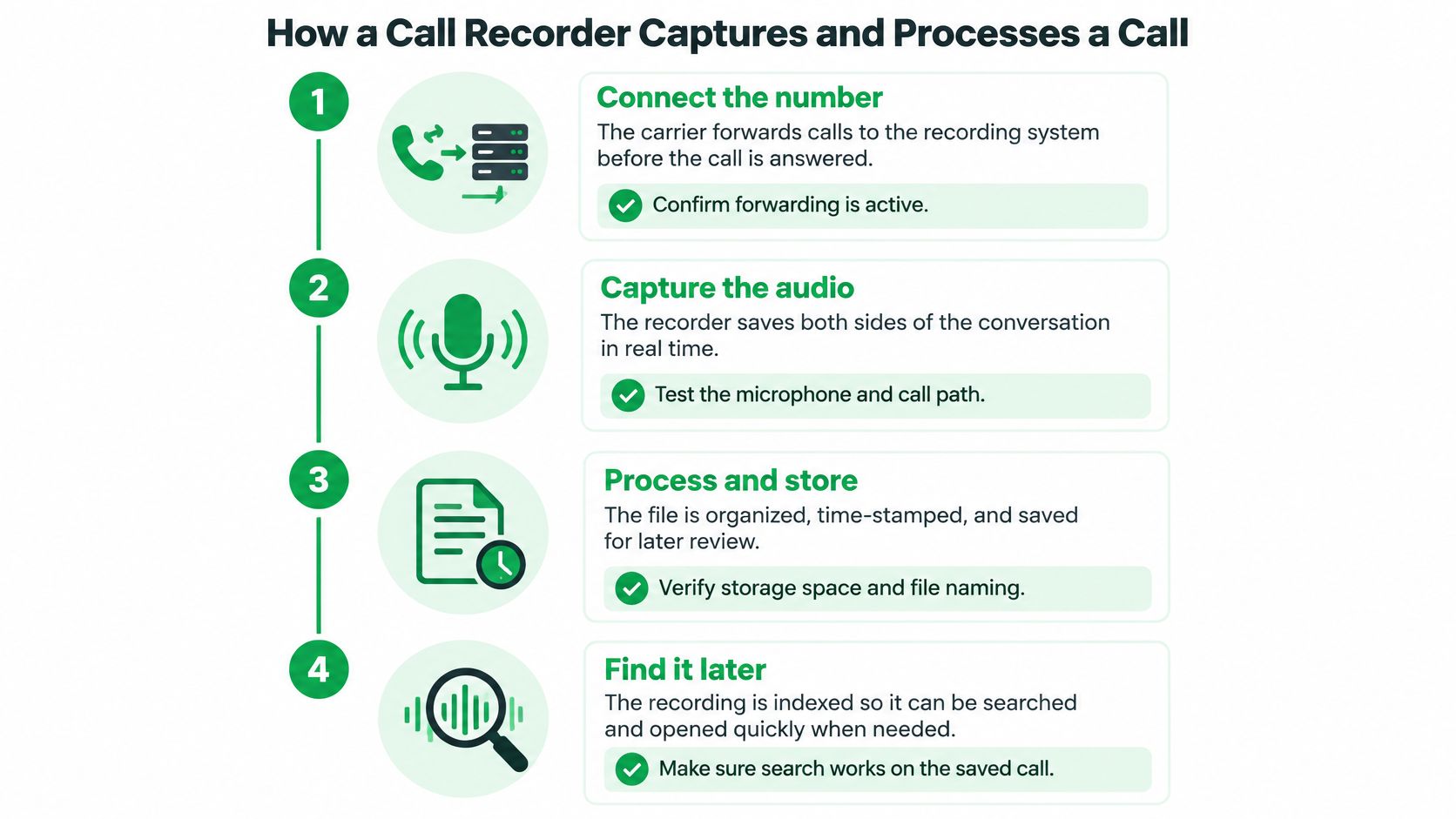
This illustration shows the basic capture-and-retrieval process.
Follow the call through the system
Connect the number. Incoming calls may reach the service through carrier forwarding, while outgoing calls may need to start inside its app. Our explanation of call forwarding covers that connection; check that forwarding is active before using it for client calls.
Capture both sides. With VoxNote, recording starts automatically when a recording-enabled call begins to generate the transcript and summary; incoming calls are captured after forwarding is connected, and outgoing calls are placed through our app using your existing number. There's nothing to press during the conversation, but test both voices and your chosen audio device before relying on it.
Carry the audio. Telephone paths can use narrowband 8 kHz audio or support 16 kHz wideband audio, with wideband preserving more speech detail, as explained by the codec requirements discussed in the IETF WebRTC audio specification. Check the available quality settings, because converting audio formats, a weak connection, or Bluetooth processing can affect what reaches the transcription system.
Turn speech into text. Speech recognition converts the captured sound into words, and our automatic language detection supports multilingual conversations. Compare a representative test transcript with what you said, including language switches and technical vocabulary.
Generate and deliver the notes. Our summaries reach the app and inbox seconds after the call ends, with follow-up drafts available for review; the Pro plan also supports CRM delivery through integrations built by our team. Confirm the destination and client association, so an otherwise useful note doesn't land in the wrong file.
Apply the storage schedule. Audio and generated text can have different deletion rules, so processing completion shouldn't be confused with permanent archiving. Check what remains available after processing, and arrange an appropriate alternative if your work requires retained audio.
Diagnose the right problem
A garbled word can begin as an audio problem rather than a text problem. If both voices sound muffled in an available recording, investigate the call path first; if the sound is clear but specialist terms are wrong, investigate recognition and vocabulary handling.
Keep a note of the device and connection used during tests. That makes troubleshooting more useful than reporting that a transcript was inaccurate.
How Much to Trust a Call Transcript
Automatic notes can create false confidence. Clean punctuation and professional formatting can make a mistaken sentence look settled, particularly when you read it after several other calls.
The measure to ask about is word error rate, usually shortened to WER. It counts substitutions, missing words, and extra words against a reference transcript, rather than relying on an unexplained accuracy claim.
The supplied telephone-speech findings associated with NIST's speech-evaluation material put typical English automatic-speech-recognition word error rates at approximately 15–30%. That isn't a forecast for your calls: audio conditions, vocabulary, and the testing method all matter.
Test the details that could change an outcome
An overall score doesn't tell you whether the system captured a particular premium, closing date, or account identifier correctly. A transcript can be readable while still getting the most consequential detail wrong.
Say a client says they can provide a document after their accountant returns. If the summary turns that into a firm delivery promise, the problem isn't merely spelling. The note now describes a commitment the client didn't make.
Use a review routine focused on consequences:
- Verify figures and identifiers. Check monetary amounts, dates, policy numbers, and account references against available audio or authoritative client records.
- Confirm names and ownership. Make sure the right person is assigned each task.
- Review conditions and uncertainty. Preserve words such as may, subject to, and pending approval.
- Correct before exporting. Don't send an unchecked summary into a customer relationship management system, or CRM, where colleagues may treat it as final.
Use realistic test calls
Include the conditions you work in: car Bluetooth, office noise, interruptions, weak cellular reception, and accented or bilingual speech. Don't judge a mobile workflow only from a quiet desk demonstration.
A focused note-taking routine can complement automation. During the conversation, flag consequential details and repeat them back to the client rather than trying to write everything down.
A readable transcript isn't proof that every important detail is correct.
Two useful provider questions are whether uncertain words receive confidence indicators and whether original audio remains available for review. If either feature is absent, build your verification process around that limitation rather than assuming you can resolve uncertainty later.
Consent Rules and a Script for Every Recorded Call
Before discussing a client's file, explain what you're collecting and give them a genuine choice. Recording, transcription, and AI-generated summaries belong in the same disclosure, because each involves handling the conversation.
Keep the approved wording beside your phone so you don't improvise it during a sensitive call.
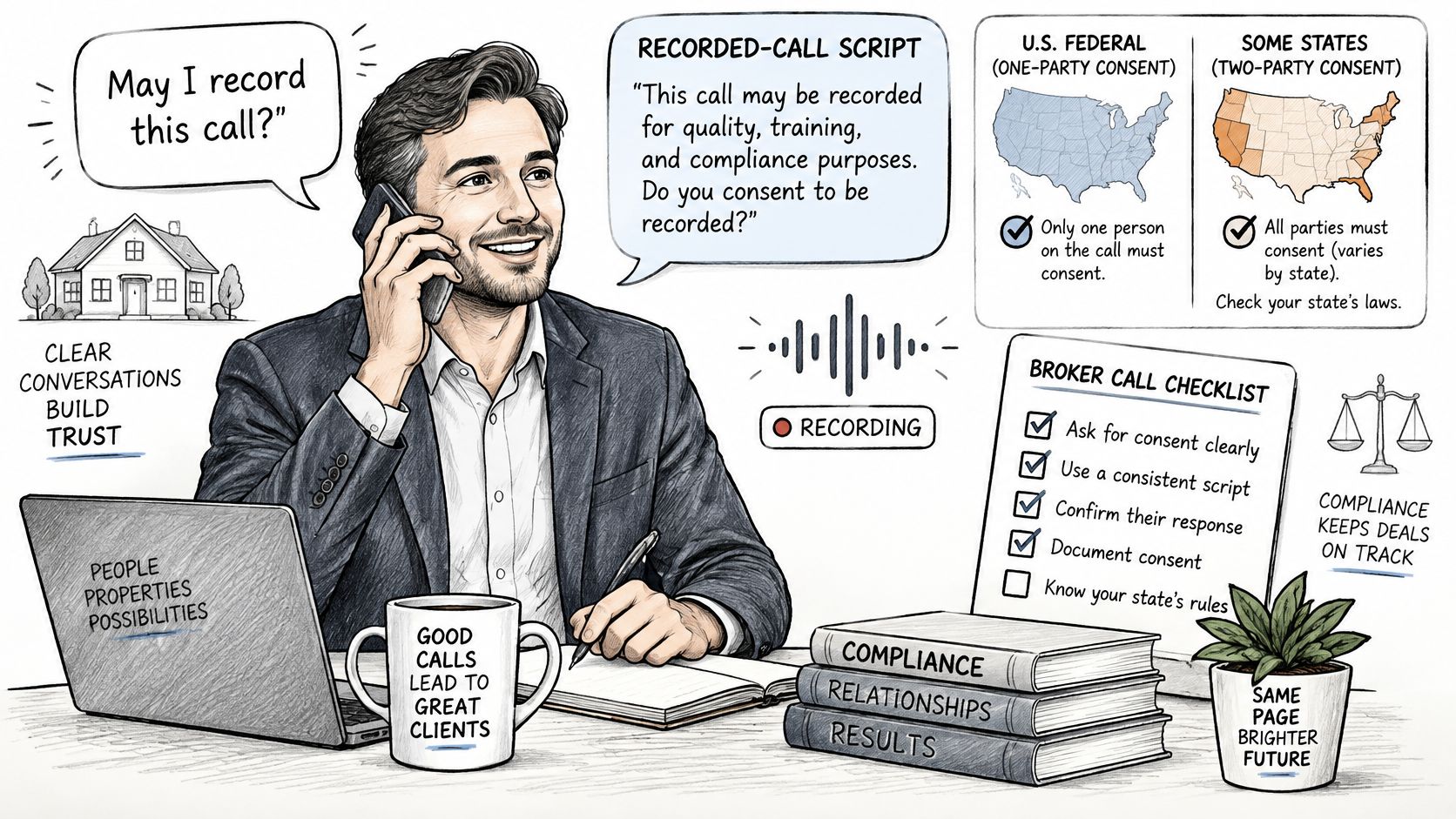
A disclosure and refusal workflow
Adapt this wording to your actual purpose and approved privacy policy. It's an operational starting point, not a universally sufficient legal script.
I use a service to record and transcribe this call and create an AI-generated summary so I can document our discussion and follow up accurately. Authorized people handling your file may use those notes, and our privacy policy explains how long we keep them. Are you comfortable proceeding?
Our recommendation is verbal disclosure at the start of each call, stating that it's recorded and transcribed, explaining why, and asking whether the other person wishes to proceed.
- Get a clear answer. Record the consent decision in the call record without adding unnecessary personal information.
- Respect refusal immediately. You can keep a call out of our service by excluding the contact ahead of time or stopping transcription mid-call.
- Provide an alternative. Continue through an approved unrecorded route or arrange another communication method.
- Explain actual access. Identify the people who need the record, including any shared-call access that applies.
Stopping transcription shouldn't be described as deleting material already collected. Confirm the applicable handling process separately.
Because automatic capture starts when a call begins, disclosure and consent timing need attention before launch. Where consent must precede capture, arrange a legally appropriate pre-call consent process or an unrecorded route. A spoken announcement after automatic recording has started may not resolve that requirement.
Why location alone doesn't settle consent
Allo's call-recording compliance guide explains that U.S. federal law generally follows one-party consent while some states impose stricter requirements; Canadian privacy guidance expects notice, an explanation of purpose, and meaningful consent, with Quebec also requiring explanations of collection purposes and related privacy rights.
Those are starting points, not a complete legal assessment. A caller's location, your location, the purpose of collection, and applicable privacy or professional rules can all matter.
Use consistent disclosure for incoming and outgoing calls rather than assuming your office address determines the answer. For cross-border clients or regulated advice, have counsel approve the wording and timing.
Use the accompanying video alongside your written procedure, not as a replacement for jurisdiction-specific advice.
Retention applies to more than audio
Set separate rules for recordings, transcripts, summaries, tasks, and exported copies. Deleting sound doesn't remove the personal information contained in a written account.
Our ordinary call audio is deleted from temporary provider systems after the transcript is created, normally shortly after processing, although operational incidents or legal obligations can delay deletion. Our recording policy also states that phone-call recordings are securely stored and completely deleted and destroyed after 30 days. Don't interpret that period as a promise of a replayable customer audio archive.
Call metadata, transcripts, summaries, and related generated tasks are retained for up to 36 months, unless deleted earlier or a longer period is legally required. Other users of our service who participated in the same call may access its shared record, which should be considered when explaining access.
Before rollout, test an incoming and outgoing call with a consenting colleague. Confirm the disclosure, refusal path, delivery destination, and access permissions. Involve counsel for cross-border uncertainty, professional retention duties, or disputes, and use the stricter applicable consent standard as your operational default.
What to Check Before You Choose a Recorder
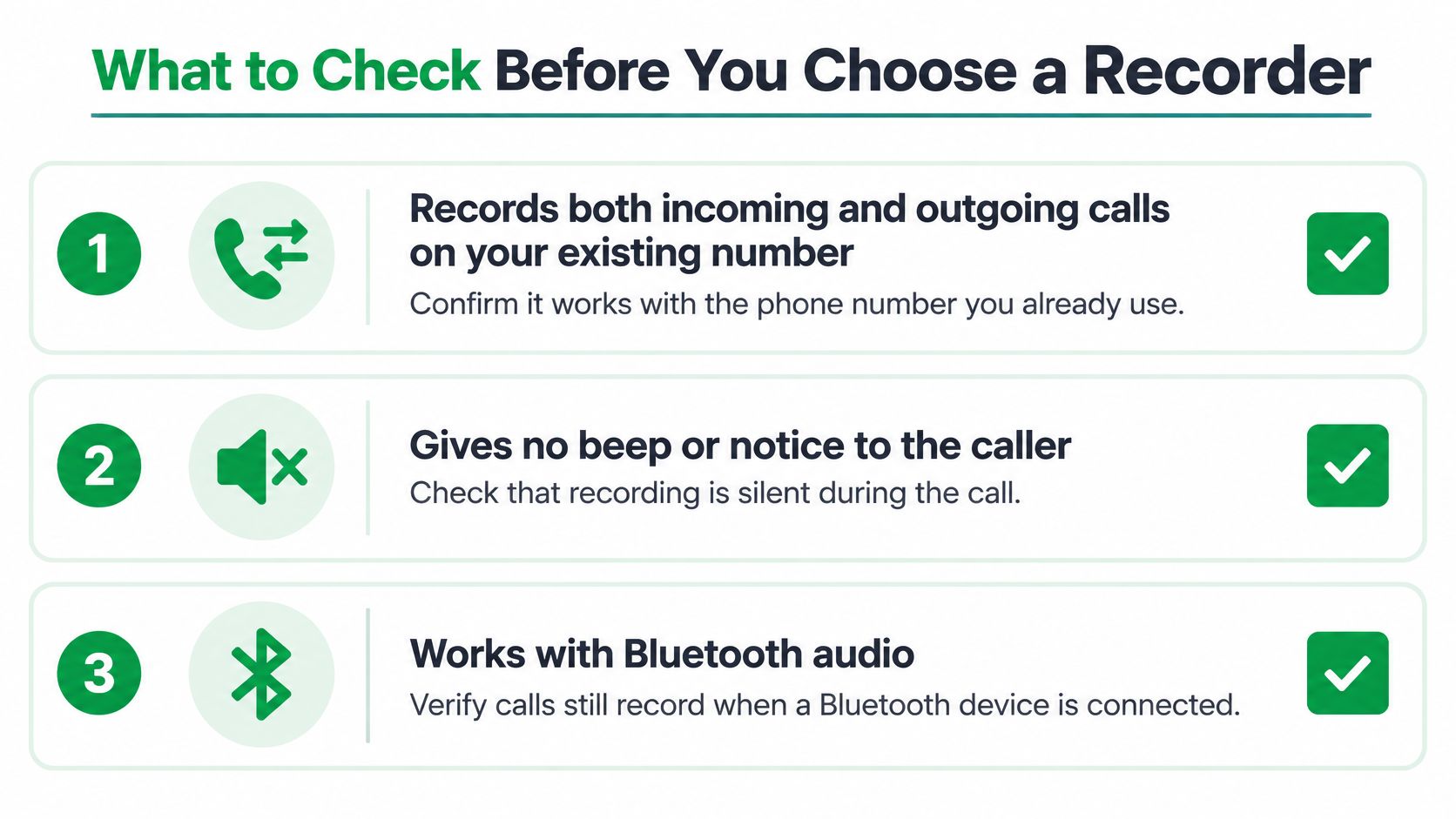
A recorder can look flawless in a ten-minute demo and still fail on a busy Tuesday, when the call comes in on your mobile, you're wearing AirPods, and the summary needs to land in the right client file. Choose by testing your workflow, and add a consent check to every silent-recording test.
Match features to your daily work
- Number and call direction. Test incoming and outgoing calls on the number clients already know. With VoxNote, outgoing calls are dialed from the app, and your client still sees your own number.
- Audio devices. VoxNote works with AirPods and other Bluetooth audio devices, and switching devices mid-call does not interrupt the recording.
- Caller experience. VoxNote sends no beep, recording notice, or bot to the client's side of the call. That silence means your own spoken disclosure carries the full weight of consent.
- Keeping a call out. You can exclude a contact ahead of time or stop transcription mid-call. Test both paths before a sensitive conversation happens live.
- Delivery and export. Test email delivery and, where needed, CRM association before wider rollout.
- Security and access. VoxNote encrypts transcripts and summaries. Review team permissions and shared-call visibility so the right people see the right records.
- Review and retention. Decide whether you need replayable audio, confidence signals, bilingual support, or a longer-lived archive, then check the service against that list.
VoxNote plan prices compared
The prices below are as stated for October 2026.
| Plan | Price | What's included |
|---|---|---|
| Essential monthly | US$19.99 per month | 500 minutes of notes a month, billed monthly |
| Essential annual | US$199.99 per year | 500 minutes of notes a month, billed annually |
| Pro annual | US$349.99 per year (about US$29.17 per month) | CRM delivery of summaries, colleague invitations, and team access management |
Estimate your monthly call minutes first, then compare them against the 500-minute allowance. Check how extra usage is handled and whether the plan you pick includes the export workflow your team needs.
Treat every transcript as a searchable draft that still needs a human check, and pick the service that fits how you review and file those drafts. A low subscription price helps only if you can retrieve what you need, apply your deletion policy, and keep consent consistent across every call. Choose the least complicated option that meets all three.
VoxNote creates transcripts, summaries, and follow-up drafts from incoming and outgoing calls on your existing number. Visit VoxNote to review the service and plans, then test a consenting colleague's call before using it in your client workflow.