
You're halfway through a client call when it happens. The client gives you a rate, a deadline, and a document request in one sentence, and you're still writing the previous answer. You say "mm-hm" to buy time, miss the hesitation in their voice, and hang up with a page of notes that still doesn't tell you who does what next.
Focused note taking solves a different problem than neat handwriting. It helps you listen, choose what matters, and leave the call with a record you can act on.
Table of Contents
- High-Risk Details to Record and Verify After a Call
- The Fields People Skip Most
- Where Automated Capture Still Fails
Focused Note Taking Methods at a Glance
For most client calls, the short answer is simple. Write only fragments of decisions, figures, and next steps while you listen. Then turn those fragments into a clean record within ten minutes of hanging up.
Don't try to get every word. You're building a filter, not a transcript by hand.
Note-Taking Methods Compared for Live Conversations
| Method | What You Capture | Attention Demand | Best For | Main Risk |
|---|---|---|---|---|
| Verbatim typing | Nearly every word spoken | High, eyes stay on the screen | Record-keeping and disputes | Copies speech without selecting what matters |
| Longhand notes | Key words and abbreviations | High, hand competes with listening | Short meetings and interviews | Falls behind and leaves gaps |
| Cornell layout | Ideas, cue questions and a summary | Medium, needs a review pass | Lectures and training sessions | Too much setup for quick calls |
| Decision and action capture | Decisions, figures, owners and deadlines | Low to medium | Client calls and sales calls | Misses context if written too briefly |
| Transcript plus structured summary | Full transcript and a five-field summary | Low while listening | Regulated or multi-party calls | Names and numbers need checking |
Say a mortgage broker is quoting a renewal. Decision and action capture fits, because the rate, the hold expiry, and the next document matter more than the client's full story about the house.
An insurance adviser reviewing coverage needs more care with terms. A transcript plus structured summary helps, as long as every limit and exclusion gets checked afterward. A field sales representative handling objections needs the opposite. Short fragments keep their eyes on the buyer, not the keyboard.
Choose the simplest method that keeps you looking at the person for most of the call, and add a verification step only where the stakes are high.
If your attention keeps drifting before notes even enter the picture, it can help to look at your wider setup, including AI tools for more focused work that reduce distractions around the call itself. The method still comes first. A quiet screen won't fix notes that try to capture everything.
Why Writing Less Helps You Stay Engaged
Writing during a call is a dual task. You're listening, interpreting what the person means, planning your reply, and watching their tone at the same time. Each job pulls from the same limited attention.
That's why a full page can still be a poor record. You captured words, but you missed meaning.
The Filter, Not the Photocopier
Think of good capture as a filter. A fast typist often works like a photocopier, copying speech before they've decided if it's important. A slower writer can't do that, so they must choose.
That choice is where the processing happens. You hear a long explanation, you turn it into "wants lower payment, not shorter term," and you've understood it in a way a copied sentence doesn't prove.
The same limit explains why some people forget a call minutes later even with notes open. If you're interested in how short-term holding capacity affects work like this, working memory insights from Jan Kutschera give useful context for why offloading the right few items matters.
What Classroom Findings Suggest
These findings come from classrooms, so don't treat them as a promise for client calls. They do show a consistent pattern about attention.
In one classroom sample reported in the Applied Cognitive Psychology synthesis, 56% of 137 participants primarily used laptops, 26% used pen and paper, and 18% used tablets. Handwriters were significantly less likely than laptop users to report distraction, with an odds ratio of 0.30.
Separate findings summarized by the University of New Brunswick point in a similar direction. Handwritten notes produced significantly better performance on conceptual questions, although differences for factual questions were small.
That distinction matters for calls. A factual detail, like a postal code, needs accuracy. A conceptual point, like why a client fears a variable rate, needs understanding. Focused note taking protects the second without pretending the first takes care of itself.
- Decide your filter before you dial: numbers, commitments, reasons, and open questions.
- Ignore the rest on purpose: greetings, repetition, and side stories rarely need ink.
- Write the meaning, not the sentence: three clear words beat a copied paragraph you won't reread.
You're not writing less because notes don't matter. You're writing less so you can stay in the conversation.
The Cornell Layout Adapted for Conversations
Walter Pauk, an education professor at Cornell University, developed the Cornell Note-Taking System during the 1950s, and he described it in his 1962 book, How to Study in College, as Cornell's alumni account of Cornell Notes explains. The page still works because it separates capture from questions and from summary.
Here's the layout in its classic form before you adapt it for calls.
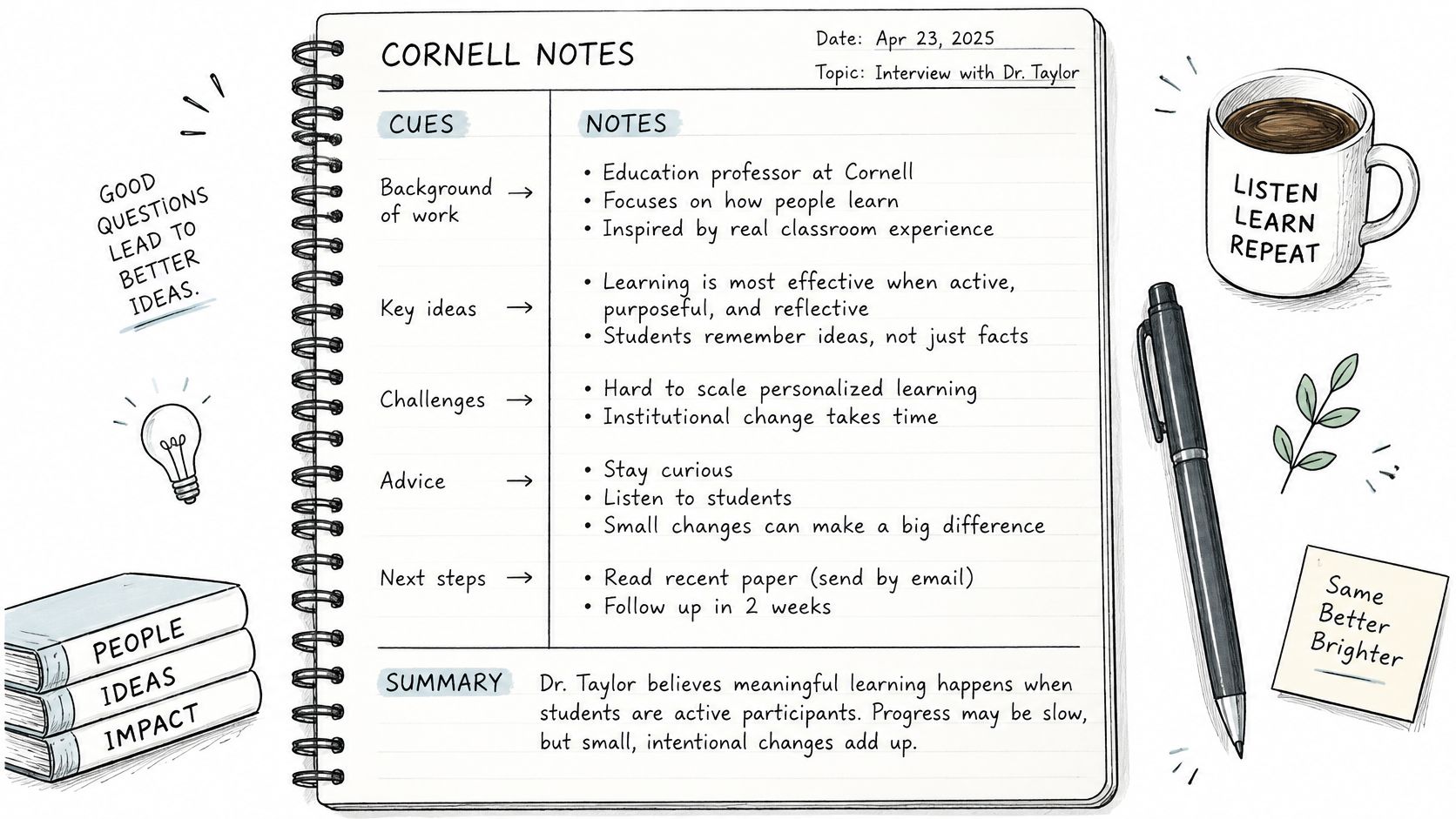
Three Zones on One Page
Draw a wide space on the right for short notes. Leave a narrow cue column on the left for questions. Save a strip across the bottom for your summary.
On a call, the right side holds decisions, figures, and reasons as fragments. The left side holds the question that must be answered before the call ends, or a check to run later. The bottom holds three lines you write within ten minutes of hanging up.
Those three lines are the decision, the next action, and the open question. You'll add the owner and due date when you convert the notes later in your routine.
One Renewal Call on the Page
Say a broker is discussing a renewal. On the right, they write a fragment with the quoted rate and the client's reason for preferring a shorter term. They don't write the client's whole explanation about a possible move.
In the cue column, they write, "When does the rate hold expire?" That question stays visible, so it doesn't get lost when the conversation shifts to documents.
At the bottom, after hanging up, they write the summary. One line says they'll send renewal options by Friday. Another line names the question the client still has to confirm with a partner.
Draw this page once and reuse it as a template. Carry any unanswered cue question to the top of the next call's page, so uncertainty doesn't disappear.
Consent Before You Record a Call
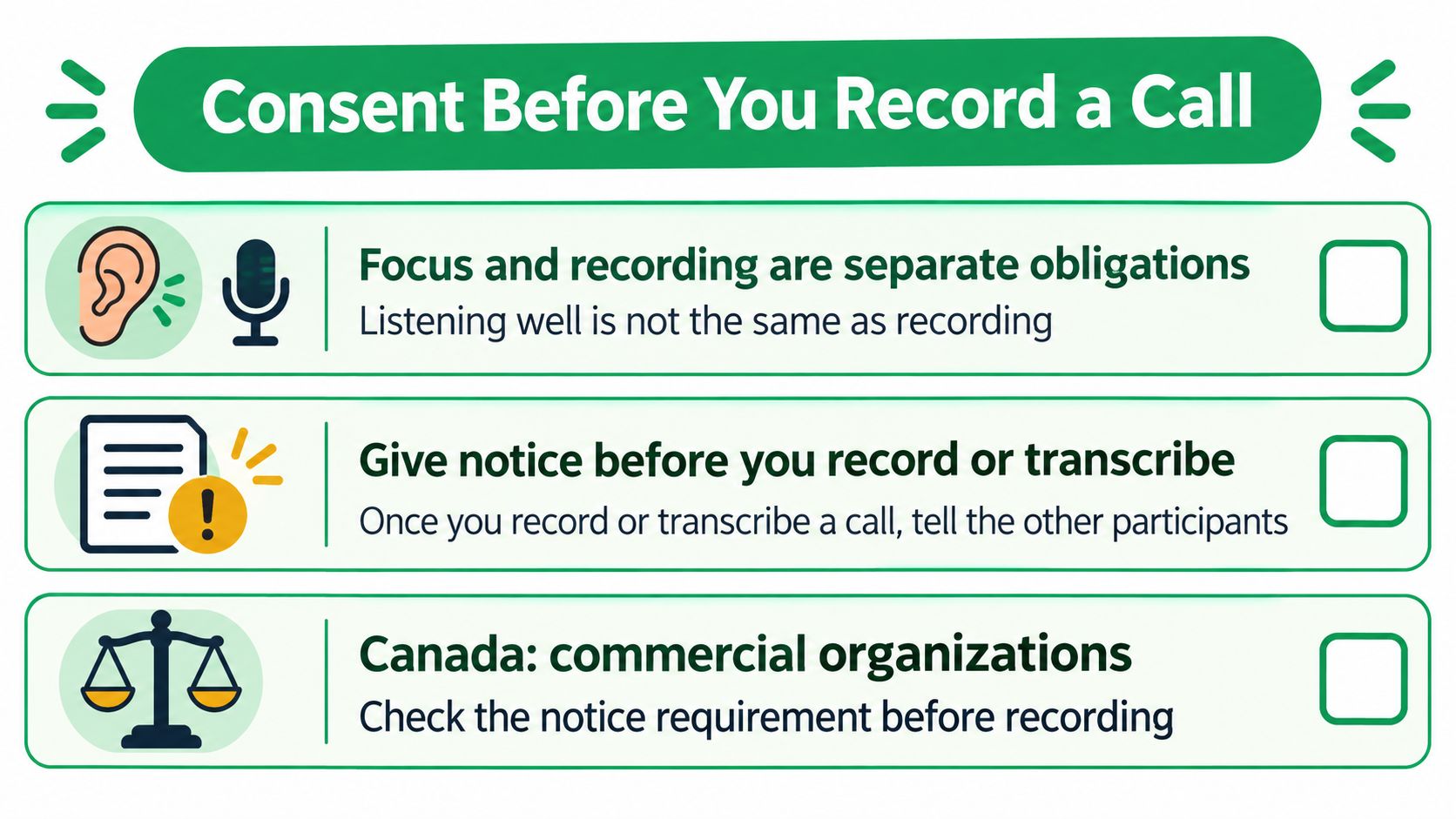
Listening well and recording a call are separate obligations. You can take focused notes by hand without telling anyone. Once you record or transcribe, you owe the other participants notice.
Many professionals skip this because the tool makes recording feel automatic. That assumption creates the risk.
This checklist shows the order to handle notice before capture starts.
Consent Rules by Jurisdiction Before Recording
| Jurisdiction | Consent Rule | What To Say First |
|---|---|---|
| Canada, commercial organizations | Notify callers, explain the purpose, obtain consent under privacy guidance | State that the call is being recorded and why |
| United States, federal law | One-party consent permitted | Check state rules before recording |
| United States, several states | All-party consent required | Get every participant's consent before recording |
| Calls crossing provinces or states | Apply the stricter rule | Get legal advice for regulated work |
As Fireflies' guide to recording legality summarizes, in Canada commercial organizations generally need to notify callers that a conversation is being recorded, explain the purpose, and obtain consent under privacy guidance. In the United States, federal law permits one-party consent, but several states impose stricter all-party-consent rules.
A Short Opening Script
We recommend verbal disclosure at the start of each call. State that the call is recorded and transcribed, give its purpose, and ask whether the other party wishes to proceed.
You can say, "I record and transcribe my client calls so I don't miss figures or next steps. Are you comfortable proceeding on that basis?" Then wait for an answer before you discuss personal details.
Before recording a call with VoxNote, the customer is responsible for informing all participants and obtaining any legally required consent. The software doesn't carry that duty for you, and a new participant joining mid-call needs the same notice.
For a fuller walkthrough of setups and limits, read our guide to phone call recording before you build recording into your routine.
- Log the consent: write "consent given" in your cue column with the time.
- Skip recording when needed: exclude contacts who shouldn't be recorded.
- Stop if they decline: end transcription mid-call and return to brief hand notes.
Practical rule: when a call crosses provincial or state lines, check the stricter rule before recording, and get legal advice for regulated work.
How to Capture Key Points Step by Step
Set up before you dial. Your page should already tell your attention what to listen for, so you're not deciding on structure while someone's talking.
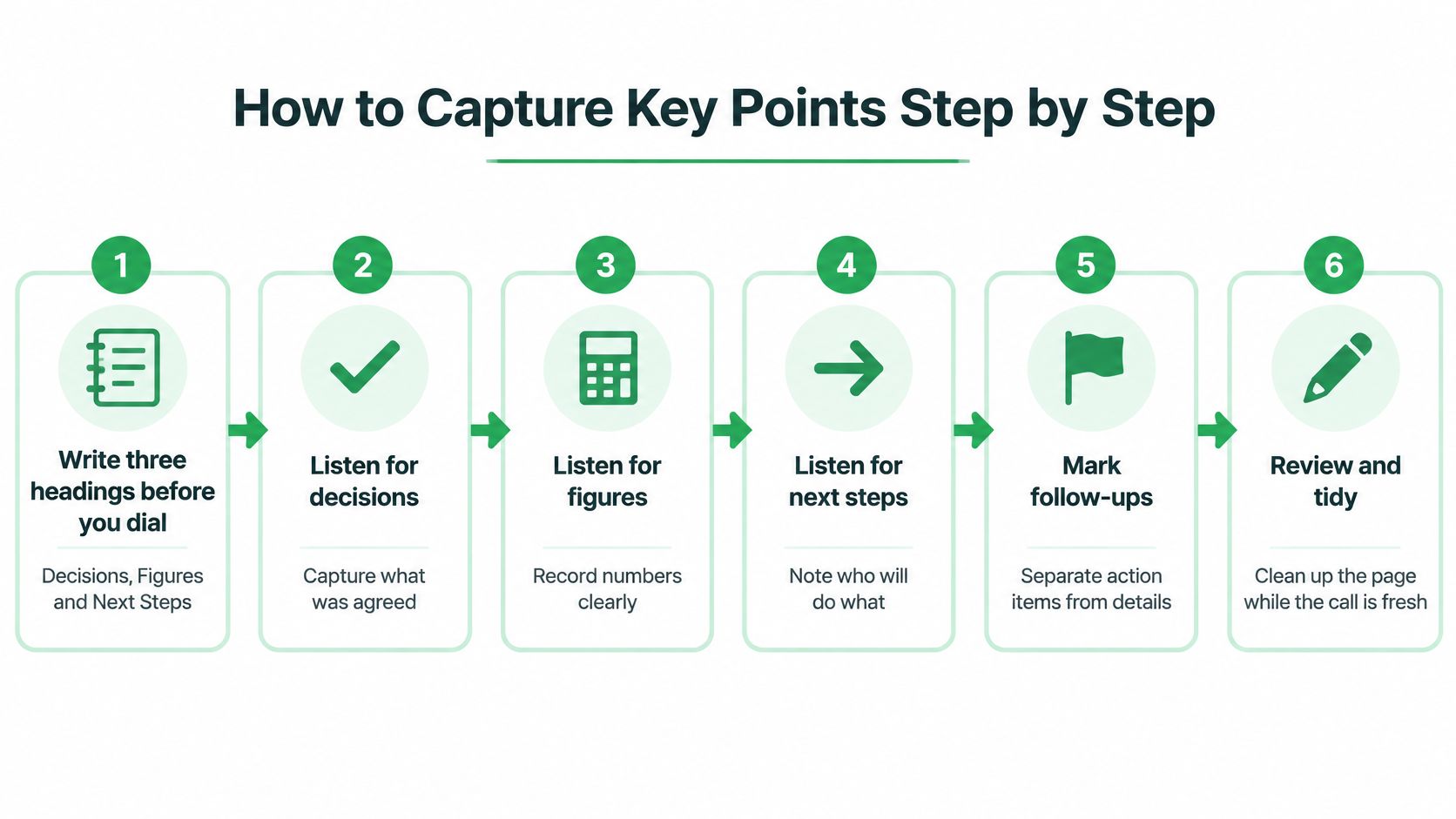
These six steps move from setup to a finished record.
Steps 1 to 3 During the Call
1. Write three headings before you dial. Use Decisions, Figures, and Next Steps. The headings act as a filter, so a passing comment doesn't get the same space as a commitment.
2. Listen for signal phrases. Phrases like "we agreed," "the deadline is," "send me," and "the number is" tell you a key fact is coming. Write only the fact that follows. The common slip is writing the speaker's full sentence and losing the next one.
3. Use abbreviations and fragments. A note like "rate 4.19, hold 120 days" in a hypothetical quote is enough to act on later. Your eyes return to the speaker faster, and you keep the thread of the conversation.
This step is where focused note taking becomes generative, not copied. As Cambridge's Language Teaching review on note-taking explains, generative notes transform spoken information into summaries and paraphrases, which requires you to select important information instead of merely copying words. In a controlled organic-chemistry lecture study, participants who generated or transformed information completed later tasks faster than participants assigned to copy it.
The short video below shows the same idea in practice, with capture kept brief while the speaker is talking.
Steps 4 to 6 Before and After You Hang Up
4. Mark anything uncertain with a question mark. Don't guess a name, a rate, or a date to make the page look finished. A visible "?" tells you exactly what to check, and it protects the client from a confident error.
5. Read the decision back before hanging up. Say, "So we send the revised quote Friday, correct?" That one sentence catches mismatched dates and owners while correction is still easy. The common slip is skipping it when the call runs long, which is when you need it most.
6. Convert the notes within ten minutes. Turn your fragments into five fields, decision, reason, next action, responsible person, and due date. The common slip is waiting until tomorrow, when you remember the topic but not who promised the document.
If you use a transcript as your safety net, our explanation of how speech to text works can help you judge where that text still needs your check. Treat any summary as a draft until figures and names are verified.
A good output is plain. You get five short lines, each with a name or a date. No line should need the full recording to make sense.
Fields Worth Recording on Every Call
Use this checklist to scan your notes after a call, not as a form you must fill in completely every time.
High-Risk Details to Record and Verify After a Call
| Detail | Example | Why It Matters | How to Verify |
|---|---|---|---|
| Decision | Agreed to a 10-year term instead of 5 | Drives the next step and any paperwork | Read it back on the call |
| Figures | Loan amount, premium, rate or fee | Errors cost money and trust | Check against the source document |
| Dates | Document deadline or rate hold expiry | Missed dates delay the file | Write the calendar day and time |
| Documents requested | Pay stubs, policy copy or ID | Prevents a second call | Name each item exactly |
| Commitments and owners | Who sends what, and by when | Unclear owners stall the deal | Name one person per action |
| Open questions | Items the other party must confirm | Keeps uncertainty visible | Mark with a question mark |
The Fields People Skip Most
Decisions and commitments come first because they drive the next step. They're also easy to lose, since people often state them casually near the end of a call.
Figures come next. A small error in a rate, fee, or premium damages trust quickly, even when the rest of your advice is sound. Don't copy a figure into a follow-up until you've checked it against the source document or the audio.
Dates need a calendar day and time, not "next week." Documents need exact names, such as pay stubs or a policy copy, so the client doesn't guess wrong and trigger a second call.
Owners need one name per action. "We'll send it" stalls files because everyone assumes someone else owns the task.
Keep open questions visible with a question mark rather than smoothing them into facts.
Where Automated Capture Still Fails
A transcript can help you stay present, but it isn't automatically accurate. A 2025 synthesis of 97 studies reported in the ASRC conference review found productivity and cognitive-load benefits, while also identifying persistent weaknesses with noise, multiple speakers, and accent variation.
That limit matters most for names, numbers, rates, and commitments. For multilingual, accented, or hearing-impaired participants, check any garbled name or figure against the audio. Mark it with a question mark instead of correcting it, so the next person who reads the file sees the uncertainty too.
Set Up Your Focused Note Routine This Week
Start small this week. Pick decision and action capture, sketch the Cornell page with its three zones, and practice on two low-stakes scheduling calls.
After each call, count two things. Count how many of the five fields you filled, and count how many details you had to verify. Those counts show you where your attention went.
Your One-Week Practice Plan
- Days 1 to 2: practice on scheduling calls where an error costs little.
- Days 3 to 5: keep a fixed ten-minute window after each call for conversion.
- End of week: review your counts and name the one field you skip most often.
Keep the routine until your counts stay consistent across three calls. Then add one layer only, such as a second review pass or a jurisdiction check for calls that cross provincial or state lines.
Set a single reminder for the field you skip. If you want help turning small repeated actions into a steady system, prebuilt routines for daily tasks can give you a simple structure to copy. Don't add five reminders, because you'll start ignoring all of them.
Once the routine is steady, use it first where a missed detail costs the most, such as rate quotes and renewal deadlines. Keep your own verification step before any follow-up goes out, whatever method or tool you use, and use our guide to sending a professional follow-up email to turn your five fields into a clear message.
If you later add automatic capture, our Essential plan includes unlimited calls, 500 minutes of notes a month, and summaries and transcripts on your phone and on the web. We also offer a booking of a demo with the founder if you want to see the workflow before you change yours.
If your focused note taking routine still leaves you rewriting calls from memory, VoxNote can record and transcribe calls on your existing number and turn them into summaries and follow-up drafts you review before sending. Visit us to see how that fits the five-field check you built this week, so you can listen first and verify the record after.