
Turning on a switch in your phone settings feels like the whole job. It isn't. The carrier, not the handset, decides where that call goes, and a green toggle can sit there while calls still ring your phone, drop into voicemail, or land on a number you typed months ago.
So how does call forwarding work if the setting on the screen is only half the story? The network keeps a routing rule on your number. Callers still dial the number they already know. You only know the rule is real after you test it from another phone.
That's the gap most guides skip. They hand you a menu path and stop. A rule you never test is a guess.
Table of Contents
- How a Forwarded Call Reaches Another Phone
- The Four Forwarding Types and When Each Applies
- How to Set Up Forwarding on iPhone and Android
- Why Forwarding Fails and How to Test It
- What to Know Before Connecting an Existing Number
- A Practical Example for a Mobile Broker
- Decide Whether Forwarding Fits Your Phone Setup
How a Forwarded Call Reaches Another Phone
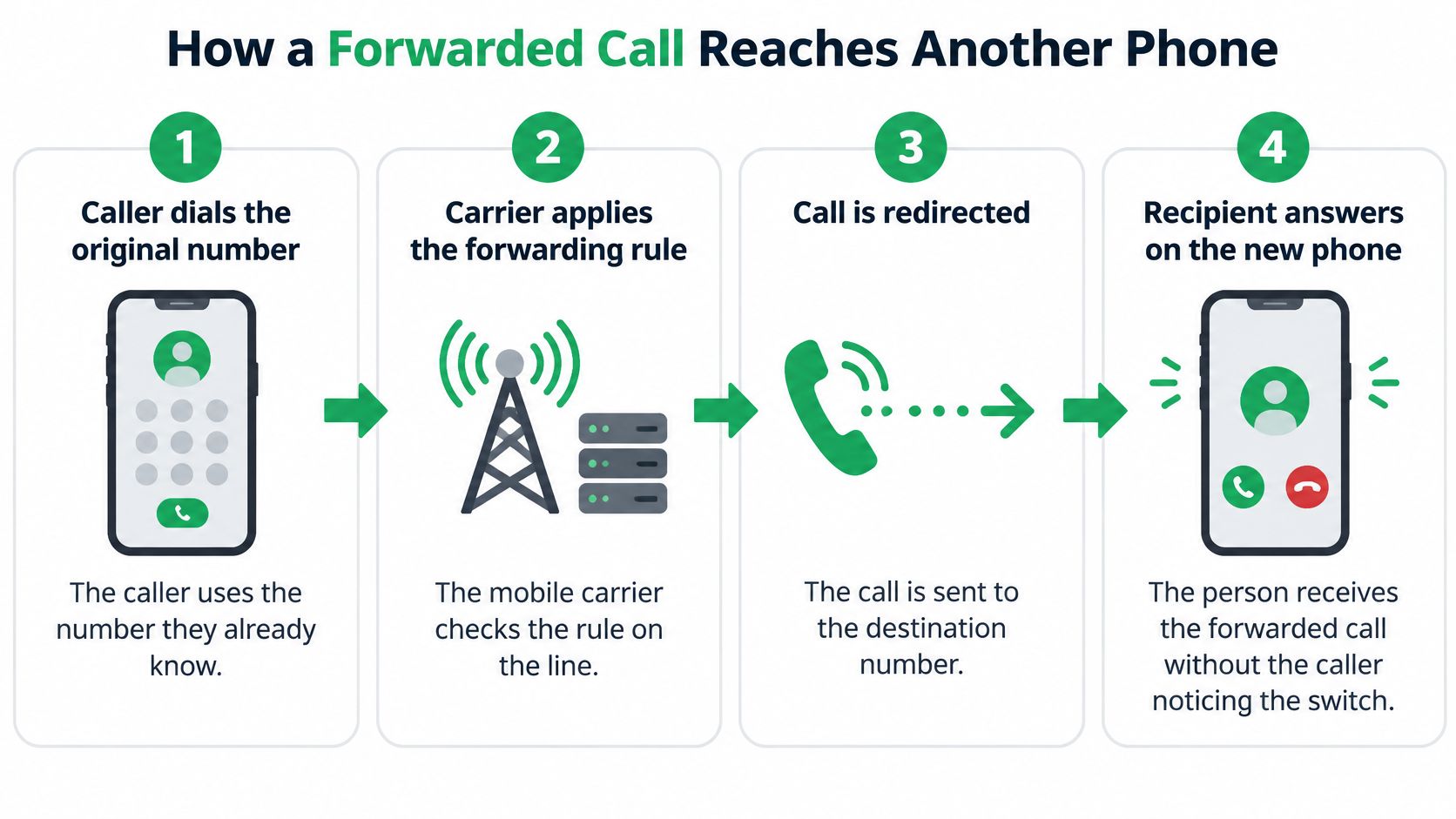
A client dials the mobile number on your business card. Two rings later, the call picks up on a completely different phone, and the client never knows anything was rerouted. That invisible detour is call forwarding: a routing rule your carrier attaches to your number, applied inside the network before your handset is even consulted.
The path from caller to destination has five steps.
- The caller dials your established number. Their phone sends the call to your carrier exactly as it would on any other day.
- The network checks the rule stored on that number before it completes the call.
- If a rule applies, the network builds a second call leg to the destination. That destination can be another mobile, an office line, or a voicemail system.
- The destination answers, and the network joins the two legs into one conversation.
- If no rule applies, or the rule's condition is not met, your own phone rings as usual.
Every step after the first happens on carrier equipment. That is why forwarding keeps working when your phone is switched off or out of coverage, and why the toggle in your settings is best understood as a request sent to the network rather than the mechanism itself.
A rule on the number, not a recorder on the phone
Forwarding is a subscription feature, not a device clipped to the handset. The Apple iPhone guide shows the split clearly: on GSM networks you can configure forwarding in the phone settings, while on CDMA networks the carrier has to supply the setup. Standard telecom terminology names the forwarding modes Call Forwarding Unconditional, Call Forwarding Busy, and Call Forwarding No Reply, and in every mode only the incoming side changes. Placing calls works the same as before.
Forwarding also moves the call rather than copying it. The feature cannot record or transcribe anything on its own. A separate service only hears the conversation if the forwarded leg reaches it and something there answers.
A desk line handed to a receptionist works the same way. Callers only ever dial the desk. The receptionist sends the call to your mobile. Your public number never changes.
Because the rule lives on the network, nothing on the handset proves it is live. A configured setting only becomes a route you can trust once a test call lands where you sent it. Once a number is connected this way, incoming and outgoing calls on your existing number still run through the number clients already have, and services like VoxNote depend on exactly this mechanism: the forwarded leg is how a transcription service receives an inbound call on a personal number at all.
The Four Forwarding Types and When Each Applies
Unconditional forwarding sends every incoming call away at once, so your phone stays silent. Conditional forwarding waits for a trigger, busy, no answer, or unreachable, and only then builds that second leg.
People treat forwarding as one switch. It isn't. Professionals who want to keep answering on their own number, and only send missed calls elsewhere, need the conditional modes. Verizon's call forwarding FAQs describe immediate forwarding as distinct from forwarding after the phone has already rung, and they limit destinations to active, voice-capable lines. Across Canada, the United States, and other markets, activation codes, allowed destinations, and billing differ by carrier. The phone menu may only expose a service the carrier controls. Busy, no-answer, or unavailable forwarding can need the carrier to turn the feature on before any phone setting will stick.
What triggers each mode
Unconditional (CFU) is the most predictable. Every call leaves as it arrives. Your handset never rings. Use it when you want a full redirect to an office line or a service for a set period, then switch it off.
Busy (CFB) applies only while you're already on another call. If you're free, your phone rings normally. It keeps a second caller from hearing a busy tone.
No reply (CFNR) lets your phone ring for a set count, then redirects. Many carriers let you choose that count. It catches calls you miss while you're in a meeting or driving.
Not reachable (CFNRc) covers a phone that is off, out of coverage, or not registered on the network. There's nothing to ring, so the network sends the call on.
| Mode | Forwards when | Your phone rings first? | Typical use |
|---|---|---|---|
| Unconditional (CFU) | Every incoming call | No, your phone stays silent | Full redirect to an office line or service |
| Busy (CFB) | You are already on another call | Only if you are not on a call | Keep callers from getting a busy tone |
| No reply (CFNR) | You do not answer after several rings | Yes, for the ring period | Catch calls you miss while away from the phone |
| Not reachable (CFNRc) | Phone is off, out of coverage or not registered | No, when unreachable | Backup when the signal drops |
Practical rule: Pick the mode that matches the calls you want sent away. A working "forward all" setup does not prove the conditional rules work.
Each condition fires on its own, and each one is carrier-dependent. Test busy, no-answer, and unreachable separately. A star code that works on one network can do something else on the next, so get the exact codes from your operator rather than copying a list from the web.
How to Set Up Forwarding on iPhone and Android
Three things have to be true before you touch a menu. The phone needs cellular coverage during setup. The carrier has to support the mode you want. The destination number has to be ready, including the country code if the line isn't local.
GSM and CDMA phones don't share one setup path, and carriers don't share one set of star codes. Your operator is the source for those codes. Don't guess them.
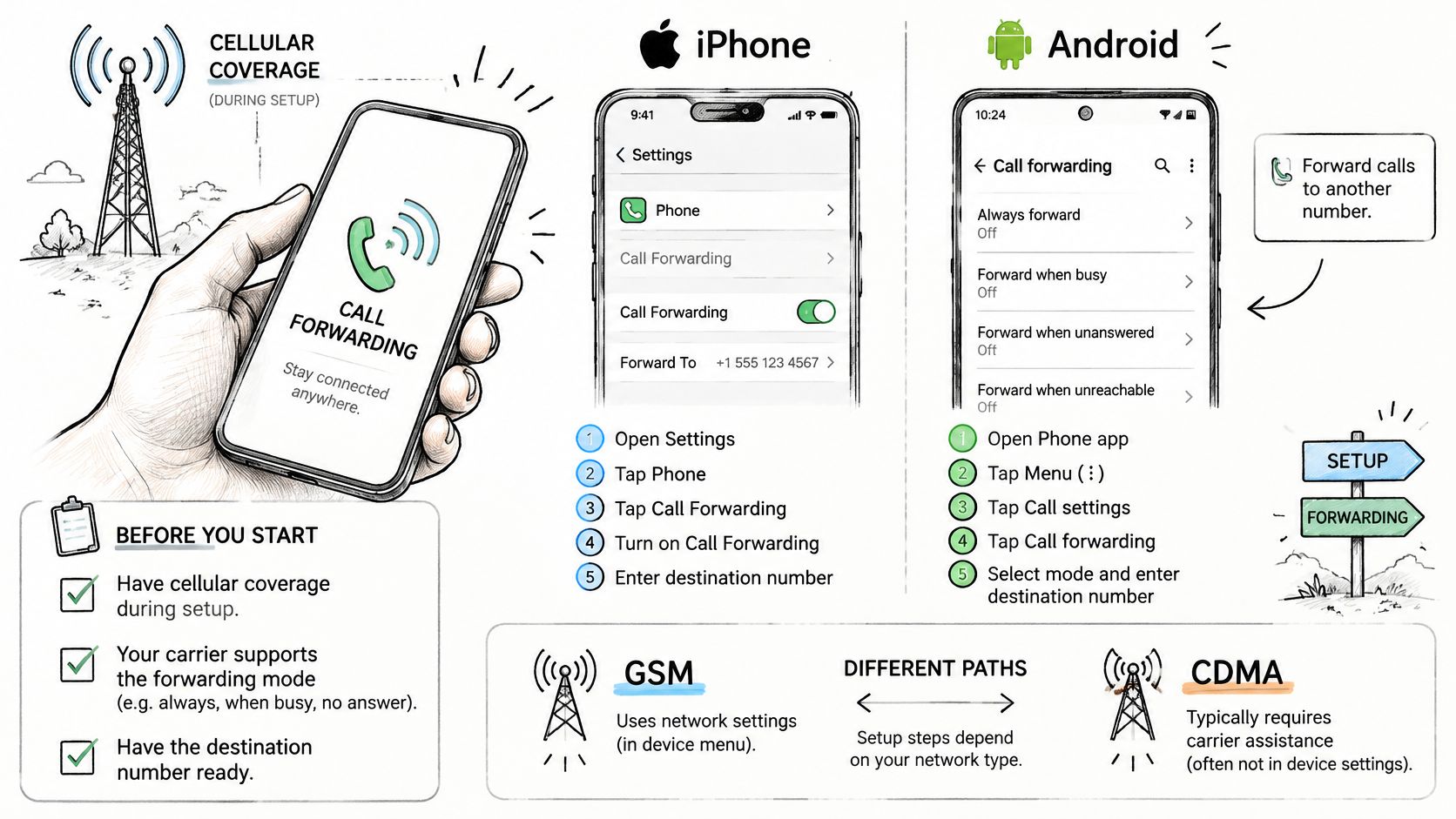
iPhone
- Open Settings. Do this on the iPhone that owns the number clients call. On a dual-SIM phone, the common slip is editing the personal line while the work line is the one that rings.
- Search for Call forwarding. Searching beats hunting through Phone menus that move between iOS versions.
- Turn on Call Forwarding. If the switch won't stay on, you're likely outside coverage, or the carrier hasn't enabled the feature.
- Tap Forward To. This is the field the network stores, not a contact nickname.
- Paste or type the destination number. For a VoxNote line, paste the number the app gives you. Dropping the country code is the usual typo.
- Go back to save. Leaving the screen stores the rule. A small forwarding mark in the status bar is a hint, not proof.
Android
- Open the Phone app. Use the app you call from, not a third-party dialer.
- Tap the three dots menu. Menu names shift by manufacturer, so look for the overflow icon.
- Select Settings or Call settings. If you see more than one line, stop and pick the line clients dial.
- Choose Call forwarding. If the option is missing, the carrier may not provision it on that plan.
- Select Always forward. That's the unconditional path. Conditional choices sit beside it, and each needs its own test later.
- Paste or type the destination number. Paste the VoxNote number rather than retyping it.
- Tap Enable or Turn on. Then leave the menu. An error here usually means coverage or an ineligible destination.
Landlines and business VoIP
A desk phone or a hosted business number usually stores the rule in the provider's online portal or phone-system admin page, not in a handset menu. Check that admin page before you follow the mobile steps, or you'll set a rule on a phone that isn't the number clients dial.
Call your number from a different phone before you rely on it. Then learn the off switch, because an old rule will keep diverting calls after you think you're done.
Why Forwarding Fails and How to Test It
The most common surprise is simple. Forwarding looks enabled, and calls still ring your phone, fall into voicemail, or never reach the service you chose.
| Symptom | Likely cause | Check or fix |
|---|---|---|
| Calls still ring your phone | Conditional rule not triggered or not active | Test busy and no-answer separately |
| Calls go straight to voicemail | Voicemail answers before forwarding rings | Check the ring count and voicemail settings |
| Forwarding will not turn on | No cellular coverage or wrong line on a dual-SIM phone | Move into coverage and select the correct line |
| Calls reach the wrong person | Destination number mistyped or outdated | Retype the number and place a test call |
| Calls still divert months later | Old rule left switched on | Review settings and turn off after testing |
Run the checks in this order
- Call your number from an outside phone while the rule is on. Calling yourself from the same handset doesn't exercise the network path.
- Test answered, busy, no-answer, and unreachable one at a time. Put the line on a call for busy. Let it ring out for no-answer. Power it off, or pull it out of coverage, for unreachable. One successful "always" test says nothing about the other three.
- Confirm the destination receives the call, and note the caller ID it shows. Presentation is a carrier choice, so write down what you see.
- Check who owns voicemail. If voicemail answers first, the forwarded leg never gets a chance to ring. Shorten the voicemail delay or lengthen the no-reply wait until the destination wins the race.
- Turn forwarding off when the test is finished if you don't want it left on. An abandoned rule is how calls vanish three months later.
When to test again
Repeat the same five checks after a carrier change, a plan change, or a phone update. Any of those can clear a supplementary service without a warning on screen.
A backup matters more than a perfect menu. If a client call can't be missed, keep a second number or a monitored fallback, and don't treat one routing rule as a phone system.
Unauthorized activation is a real failure mode too. Because the rule changes where the call ends, someone who can reach your line settings can point client conversations at a number you don't control. After any odd redirect, interrogate the setting with your carrier and replace the destination yourself.
What to Know Before Connecting an Existing Number
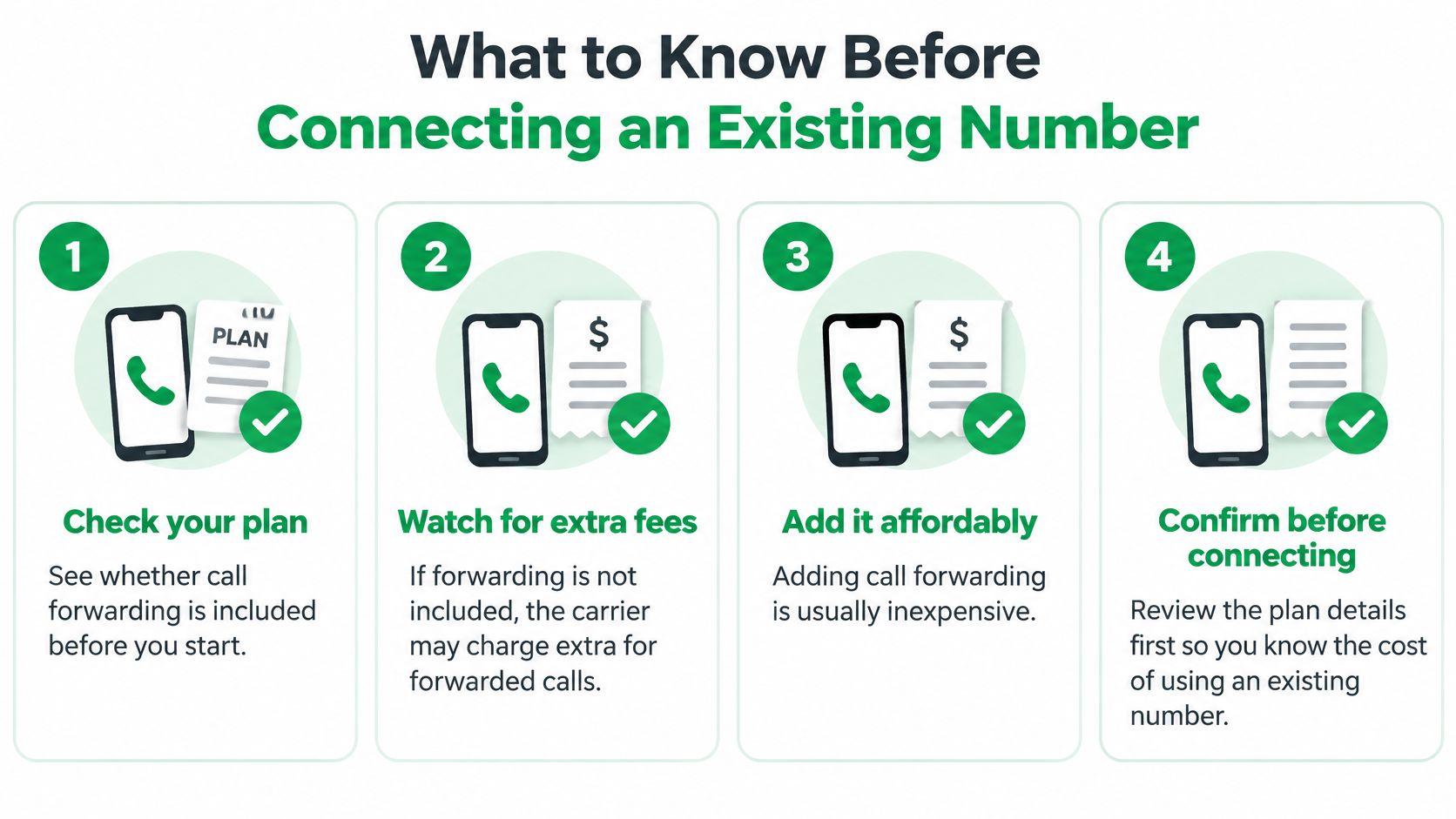
Forwarding is not automatically free, and it is not harmless. If the mobile plan doesn't include it, the carrier may charge extra for forwarded calls. Adding the feature is usually inexpensive, but you should read the plan before you point a client number anywhere.
What the caller and the stranger see
Whether a caller still sees your number, or some other identity, depends on the carrier and the setup. Place one test call and look at both screens. Don't assume the display you want is the display they get.
The security point is sharper. Forwarding changes where the conversation ends. An unauthorized activation can redirect client calls. A mistyped destination can hand a stranger a mortgage file, a policy discussion, or account details. The forwarding rule itself carries no audio. Any service that answers the redirected leg is the party that handles that audio, so confirm the number is yours before you save it.
Call forwarding is the only way we can take inbound calls on your personal number. You keep that number. Clients don't learn a new one.
Your duties don't move with the call
You are responsible for the call transcription rules that apply to you and your profession. Those rules change from place to place. A carrier that allows forwarding hasn't cleared recording or transcription for a regulated conversation.
Tick these off before you connect the number.
- Confirm the fee: Ask whether forwarded minutes are inside the plan.
- Confirm the destination is yours: Read the digits back, then call them.
- Check consent rules: Match them to your licence and your province or state.
- Exclude sensitive contacts: Keep family and private numbers off the destination.
- Set a review reminder: Reopen the rule after any plan or job change.
A Practical Example for a Mobile Broker
Maya is an independent mortgage broker. Clients already have her mobile number, and she isn't giving them a second one.
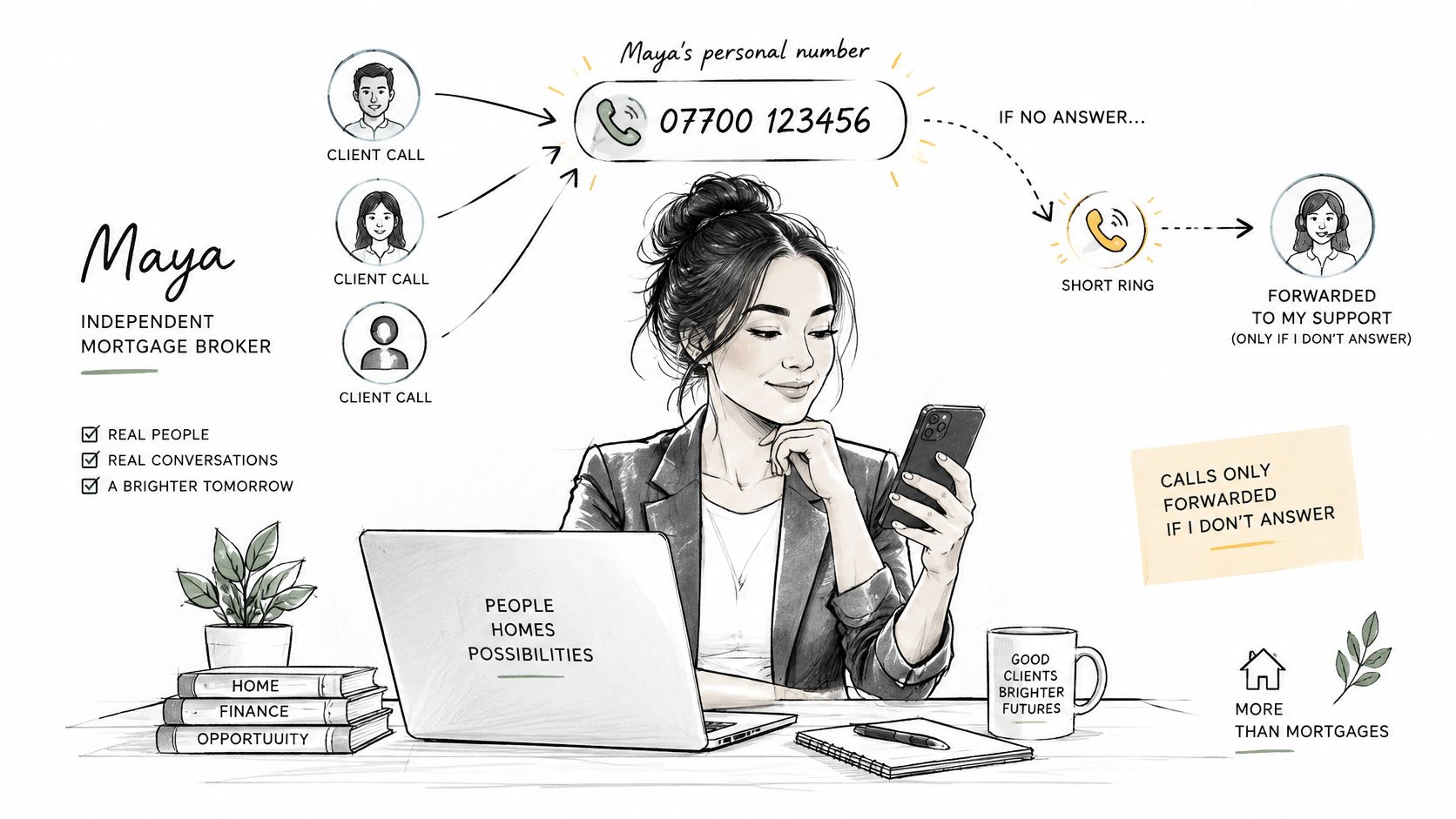
She wants only the calls she misses to leave her phone. She picks no-reply forwarding with a short ring count. Her phone still rings first. A monitored destination answers only if she doesn't. She can still pick up and talk exactly as she normally would, and she can turn the rule off any afternoon.
One Tuesday afternoon
At 2 p.m. she's in a client meeting with her phone on the table. Another client calls the same number. The handset rings through the count she set. She doesn't reach for it. The carrier then opens the second leg, the destination takes the call, and a note of who called is waiting when she looks.
She reads the summary after the meeting and calls the client back from her own number. The client notices no change in how they reach her. For brokers comparing ways to keep those notes, a phone call notetaker for mortgage brokers is a separate choice from the routing rule itself.
Before she saved the rule, she excluded her family's numbers. A call from her partner never reaches the destination. She can also stop a transcription mid-call if a conversation turns personal. The settings she can point to are plain. The mode is no reply, the ring count is short, and the exclusion list holds the private contacts.
She had already run a test from a colleague's phone, including a no-answer pass, before any client depended on it. Through the whole afternoon, clients kept dialing the number on her card.
Decide Whether Forwarding Fits Your Phone Setup
Forwarding fits when you want to keep a number clients already know and send only specific calls somewhere else. It's a weak stand-in for a monitored phone system that must never miss a call.
Check three things, then do one action.
- Keep the existing number, and confirm the plan supports the mode. If the carrier won't provision no-reply or unreachable, a menu toggle won't invent it.
- Choose the mode that matches the calls you miss, or unconditional if you want every call to leave.
- Retire the rule when life changes. A new job, a new carrier, or a new destination number all make yesterday's rule wrong.
Write the destination number and the mode on a note, then run the outside-call tests before you trust the setup. Keep voicemail as a backstop, because voicemail can still answer before a forwarded leg rings. Reopen the rule every few months and after any carrier or plan change.
Onboarding on an iPhone is short if you already know the path. You create an account, install the app, and turn forwarding on by following the steps in the app, which takes about 5 minutes. You keep your own number, connect once, and the first summary arrives by email. If a missed call would be a real problem, plan a second number or a monitored fallback instead of this rule alone. An AI call assistant only helps after the carrier delivers the call.
VoxNote transcribes and summarizes the calls that reach your existing number once forwarding is connected, then emails the summary and a follow-up draft you can edit. If you want that record without giving clients a new number, connect your line and try a test call with VoxNote.