

You're finishing a client file when your phone rings. A client changes a closing date, names a new amount, and asks you to send a document by Friday. You hang up, return to the file, and later realize you can't recall whether the date was the 12th or the 20th.
That gap is where incoming and outgoing calls cause trouble. The direction looks simple, but it changes what you're likely to lose. An incoming call arrives unplanned, so you can miss what the caller asked for. An outgoing call follows a plan, so you can forget what you promised. Each direction needs its own trigger for making a record, and a few checks before that record reaches the file.
Table of Contents
Incoming and Outgoing Calls Compared
| Factor | Incoming call | Outgoing call |
|---|---|---|
| Who starts the call | The client, a prospect or a third party | You |
| Preparation before the call | Usually none; the call arrives unplanned | Usually planned around a stated purpose |
| Number the other party sees | The caller's own number | Your own number, as usual |
| Most common record failure | Missed requests, names or figures | Promises made but never written down |
| Core details to record | Caller identity, reason for calling, requests, documents needed | Purpose, decisions, agreed actions, deadlines |
| Best time to capture the record | During the call and right after it ends | Right after the call, before the next task |
| Recording notice needed | Yes, at the start of the call where recording applies | Yes, at the start of the call where recording applies |
What Changes With Direction
An incoming call arrives on the caller's schedule, not yours. You don't choose the topic, the timing, or how much detail the caller gives you at once. The call itself becomes the first record, so your job is to catch the request before it slips away. Say a client calls while you're driving and names a renewal date, a beneficiary, and a new income figure. If you wait until the evening to write it down, you'll likely keep the general topic and lose the exact details.
An outgoing call starts with a purpose you set. You may call to confirm income, explain a rate, or ask for a missing document. Your record has to show whether you reached that goal and what changed along the way. The risk isn't a missed request from the other person. It's a promise you make in the moment, such as sending revised figures tonight, that never enters your task list.
Think of an incoming call like a receptionist taking a message and an outgoing call like an appointment setter making a booking. One captures what arrived. The other must prove what was agreed.
Direction also affects attention. A Microsoft field study on conversational interruptions found that telephone calls prompted 14% of reported task switches, while broader observational research found conversations, including phone calls, accounted for approximately 15 to 45% of switches away from a user's primary task. After you switch away, you may check email, open another file, or start a search. Details fade within minutes, even when the conversation felt clear.
That's why you shouldn't rebuild a call from memory hours later. Capture the record during the call or right after it. If you're comparing larger team systems for handling call volume, a call center software shortlist from TopToolAdvisor can help you see how different tools handle routing and logging before you choose a setup for individual client calls.
Both directions still need the same core fields. Record the date and time, both numbers, purpose, decisions, next steps, owner, and deadline. You capture them for different reasons. For incoming calls, those fields preserve what the caller asked for. For outgoing calls, they hold you to what you said you'd do next.
Recording Consent Rules for Cross-Border Calls
| Situation | Consent rule | Practical step |
|---|---|---|
| Caller or professional in Canada | One-party consent generally permitted under the Criminal Code | Give a recording notice and explain why the call is recorded |
| US calls under federal law | One-party consent generally permitted | Check the client's state before recording |
| US calls in California, Florida, Illinois, Pennsylvania or Washington | All-party consent required | Get every participant's consent at the start of the call |
| Canadian adviser calling a US client in an all-party state | Follow the client's state rule | Ask for consent on the recording before the substance of the call begins |
| Calls with several participants or transfers | Stricter applicable rule applies | Restate the notice when a new person joins |
Why One-Party Consent Is Not the Whole Answer
You'll often hear that Canada or the United States is one-party consent. That shortcut can mislead you. A guide to the legality of recording sales calls notes that Canada's Criminal Code generally permits a participant to record a private communication with the consent of one participant, but commercial organizations still have privacy obligations to explain that recording is occurring and why. It also notes that US federal law generally permits one-party consent, while California, Florida, Illinois, Pennsylvania, and Washington require consent from all parties.
Cross-border work makes the gap practical. Say you're a Canadian advisor calling a client in California. Your usual habit at home may not be enough for that client's state. Use the stricter rule, give the notice first, and wait for a clear answer before you discuss figures or advice. For background on how recording fits a normal phone workflow, see this guide to phone call recording.
Legal permission to record isn't the same as permission to keep, reuse, or share the transcript. A recording made for an accurate client record shouldn't be sent to a colleague, uploaded to an unrelated tool, or kept longer than your policy allows just because the recording itself was lawful. Keep personal notes separate from business records too. A private reminder to call someone back isn't the same as a transcript placed in a client file.
A Notice You Can Adapt
Use plain words at the start of the call.
"This call is being recorded and transcribed so we can keep an accurate record of our conversation."
If the other person refuses, don't argue or keep recording. Stop the recording, continue with handwritten or typed notes if they agree to talk, and log the refusal, the time, and who was present. If a new person joins or the call transfers, restate the notice for that person.
This is general information, not legal advice for your situation. Confirm your own workflow with a qualified adviser, especially if you serve clients in several provinces or states.
How to Document an Incoming Call Step by Step
The steps below turn an unplanned call into a usable record.
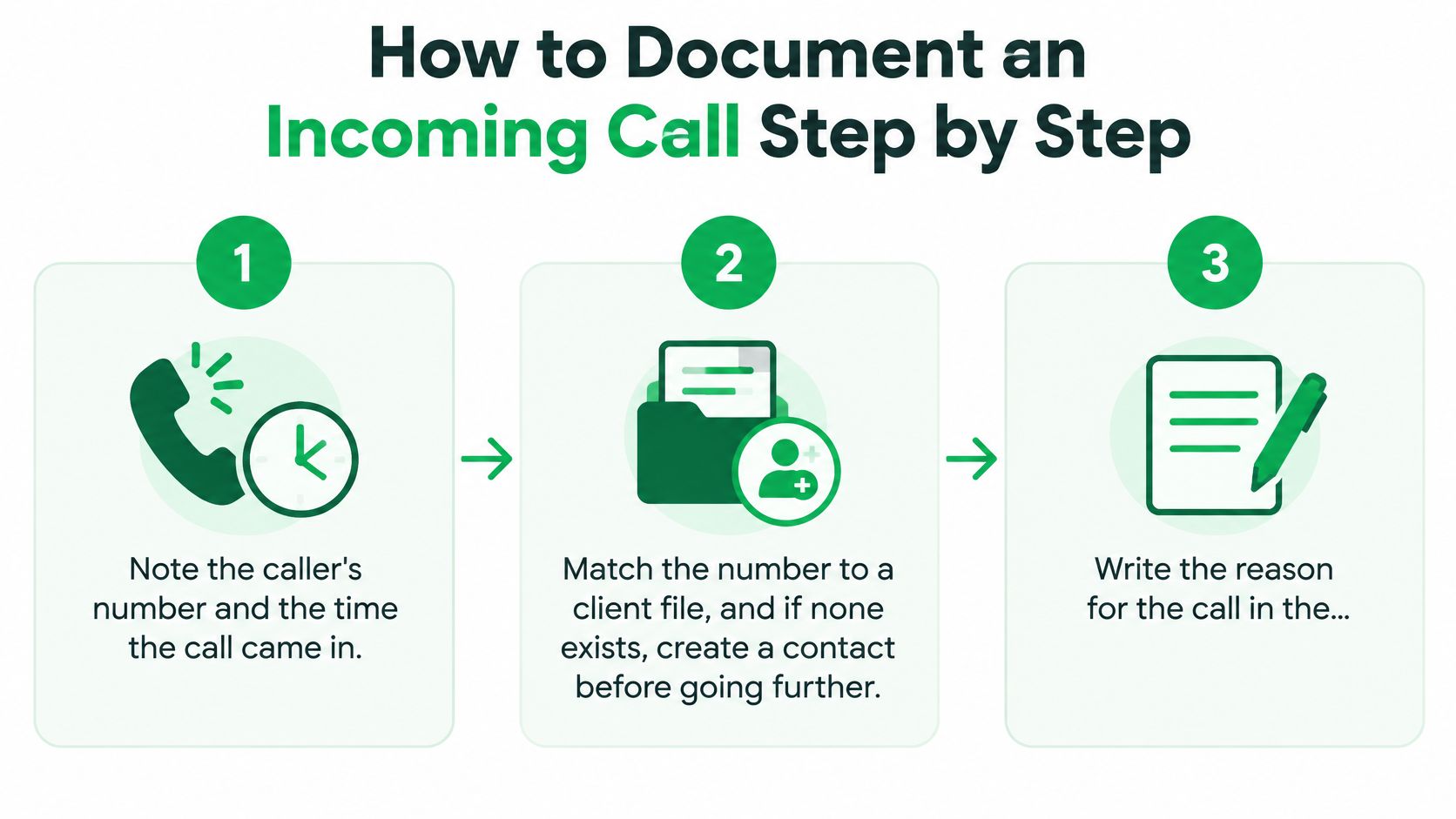
Note the number and time. Write down the caller's number and when the call came in. That anchors the record if the same client calls twice in one day about different matters.
Match the number to a client file. If no file exists, create a contact before you go further. Then treat caller ID as a signal, not proof. A client may call from a spouse's phone, and a forwarded call may show a service number instead of the client's own number. Where a call carries STIR/SHAKEN authentication, identity passed along the call path is more reliable than on an unauthenticated call, but you should still confirm who is speaking.
Write the reason in the caller's words. "Wants to move closing because the sale fell through" tells you more than "called about mortgage." The stated reason decides the follow-up, so keep it close to what the caller said. A short note on focused note taking can help you keep that reason separate from your own interpretation.
Capture every figure, date, and document mentioned. Amounts, policy numbers, income, deadlines, and document names are where errors cost the most. Repeat key figures back during the call when you can.
Mark anything you couldn't confirm. Flag a name or amount heard on a noisy line instead of guessing. Unmarked uncertainty has a way of becoming a fact later, because the next person who reads the file won't know you were unsure.
Set the next action, owner, and deadline. Write who will do what and by when. "Send updated income letter, owner Ana, by Thursday" is a task. "Follow up" isn't.
Save the record to the client file. Don't leave it in a notebook, text thread, or personal notes app. The file is where you and your team will look when the client calls again.
Incoming calls are captured automatically once call forwarding is set up, so automatic capture can create the transcript while you focus on checking identity, figures, and flags. A complete record is short. It shows the time, number, reason, figures, any flags, the next step, and the owner.
How to Document an Outgoing Call Step by Step
For outgoing calls, the record starts before you dial. The image below shows a simple desk setup for planning the call and capturing what you agree to do.
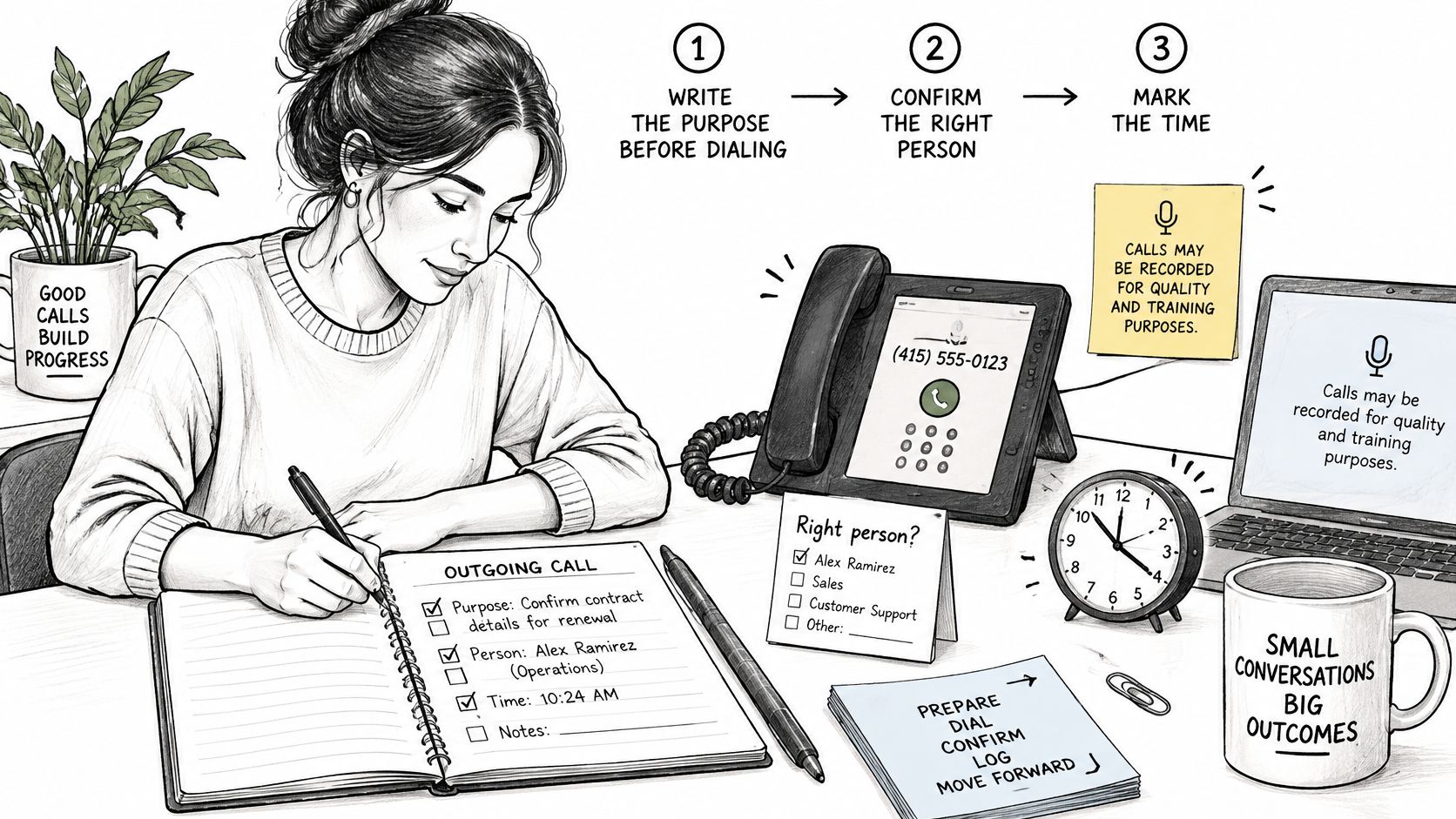
Write the purpose before you dial. One line is enough, such as "Confirm employment letter and closing funds." A clear purpose keeps the call focused and gives you a standard to check the result against.
Confirm you reached the right person. Note the number dialed and the time. If someone else answers, record who you spoke with and don't share client details until identity is clear.
Give a recording notice where recording applies. Check the consent rule for both locations before the substance begins. Log that you gave the notice and what the person said.
State the decision you need. Say it plainly during the call. "I need your choice between the two term lengths today" makes the outcome easier to record than a general discussion with no clear ask.
Record every promise you make, with a date. A promise written during the call is the only one you can track later. Watch the last minute of the call closely, because that's where quick commitments often slip in and get forgotten by the next appointment.
Note what the other party agreed to. Include documents they'll send and documents they asked you to send. Keep their commitments separate from yours so ownership stays clear.
Send a recap email the same day. A short recap lets the client correct a date or figure while the call is still fresh. It also creates a second record outside your notes.
The short video below walks through the same habit from a different angle, with emphasis on preparing before you dial.
Watch your setup as well. Outgoing calls placed through the standard phone app do not go through VoxNote, so they need a manual note. Once call forwarding is set up, incoming calls are captured automatically. For outgoing calls, you dial from the VoxNote app and your client still sees your own number.
A good recap line fits in one sentence.
"I'll send the revised payment options by 3 p.m. Friday, and you'll return the signed disclosure by Monday."
That line names the promise, the date, and both owners. Anyone opening the file later can see what should happen next.
Logging Missed and Returned Calls
A missed incoming call is an unknown request. You know someone tried to reach you, but you don't yet know what they need. A returned call is different. It's an outgoing call with a stated purpose, even if that purpose is to find out why the person called.
Log every unanswered call. Record the time and number and mark it as missed, even when no conversation happened. That entry proves the contact attempt and stops the call from disappearing into your recent calls list.
Record any voicemail message. Write the request in the caller's words where you can. Mark words, names, or figures you couldn't confirm instead of filling gaps from context.
Log the callback as an outgoing record. Note the attempt, time, outcome, and whether you left a message. If you only write "called back," the next reader won't know whether you reached the client.
Set a callback deadline with a named owner. Missed calls drift when everyone assumes someone else will return them. A named owner and a date make the work visible. Busy practices that hand off routine follow-up sometimes look at services where you can Hire Medical Virtual Assistants from MedicalVirtual for appointment and message handling, which shows why clear ownership matters even when another person makes the callback.
Link the returned call to the original missed call. Keep the chain in one place. An unlinked callback looks like a brand new contact and loses the original request, so you may solve the wrong problem.
Don't mark a call as handled when you only left a voicemail. Handled means the request was heard, answered, or clearly assigned with a next step. A voicemail you left is an attempt, not a result.
Missed call 10:12 from client Lee, voicemail asks for the policy renewal date; callback by Thursday, owner Ana.
That single line holds the time, the person, the request, the deadline, and the owner. It's enough for a colleague to pick up the work without asking you to explain it again.
Checking Call Summaries Before They Reach Your File
The direction of the call tells you where errors tend to hide. On an incoming call, details arrive unplanned: a caller spells a name once, reads an account number quickly, mentions a figure you did not expect. On an outgoing call, the risk sits in what you promised, a date, a callback, a quoted amount. Check each direction where it tends to fail.
Automation triages your attention so you spend checking time on the details that can cause harm. A fast summary helps you follow up sooner, and it can also move an error into the file sooner.
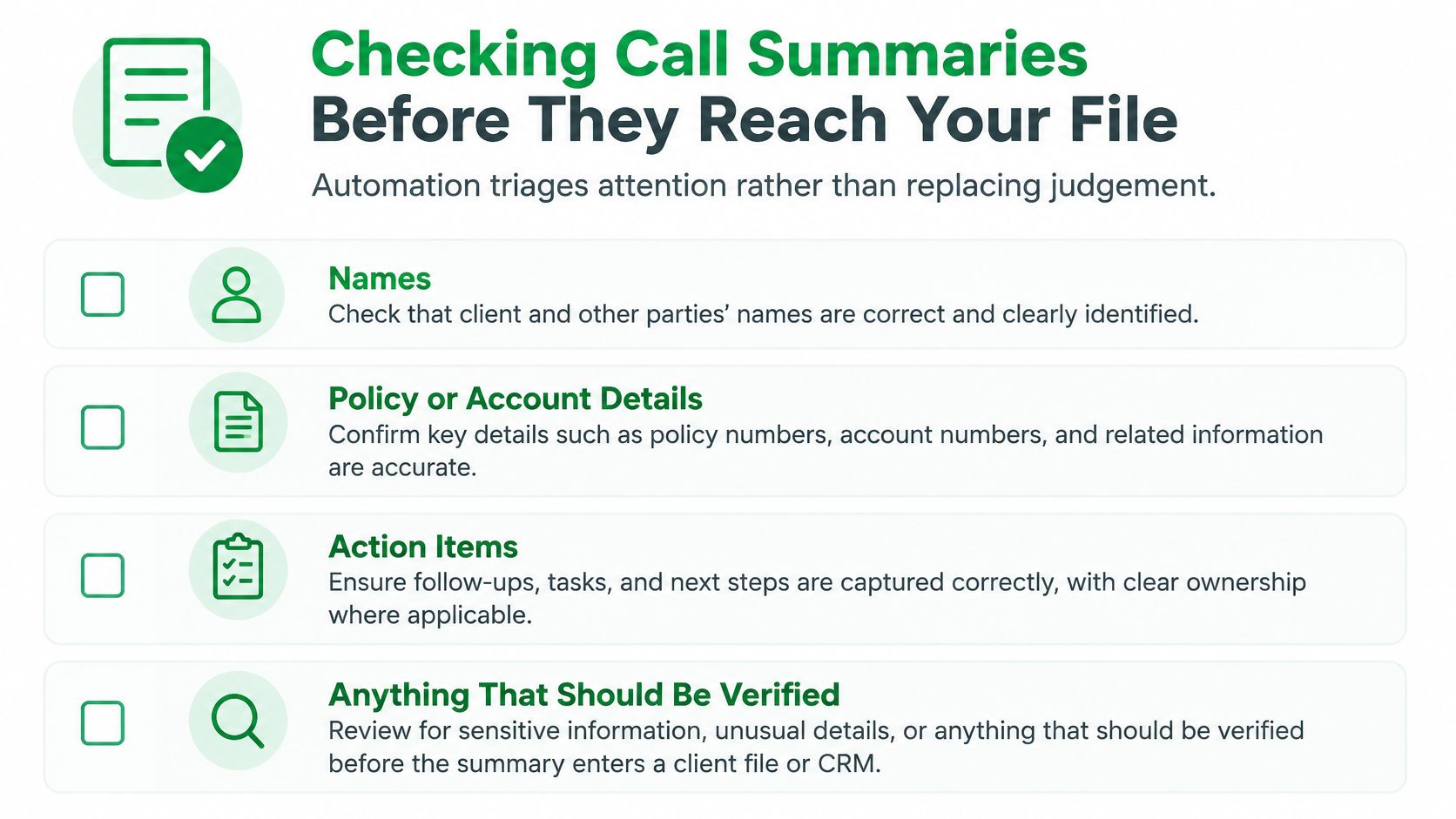
What to Verify Every Time
Before a summary enters a client file or CRM, check these items against what you heard and, where needed, against the transcript described in this overview of phone call transcription.
- Names: Confirm spelling for clients, beneficiaries, employers, and third parties.
- Policy or account numbers: Compare each digit, especially when the caller read the number quickly.
- Dollar amounts: Check income, balances, premiums, deposits, and payment figures.
- Dates: Confirm closing dates, renewal dates, birthdays, and deadlines.
- Regulated or financial advice: Make sure the summary matches the advice you gave.
- Consent statements: Confirm who agreed to recording and what they agreed to.
- Deadlines and next steps: Check the action, the owner, and the date together.
A call summary is generated automatically, seconds after the call ends. That speed is useful only if your check is just as prompt. Every transcript has limits. Fast speech, a noisy line, or several people talking can leave gaps, and a transcript can look complete while missing a culturally specific name or a mixed-language meaning. Check hardest on the calls where one wrong figure changes the advice or the next step, such as mortgage, insurance, investment, and field sales conversations.
Mark Uncertainty Instead of Guessing
If a word or number is unclear, flag it. Write "amount unclear, confirm with client" rather than choosing the figure that seems likely. Keep the original audio or transcript separate from your edited summary so the source stays available if a question comes up later.
Use a 60-second routine before you file. Compare each number with what you heard, confirm each date, delete any item the call didn't contain, flag unclear items, then file. On incoming calls, give extra attention to details the caller supplied without warning. On outgoing calls, check what you committed to, the promised callback date, the figure you quoted.
A summary reviewed this way is a reliable record. An unreviewed one is a risk sitting in the client file.
Set One Call Log Standard This Week
Don't build separate systems for each direction. Adopt one shared log standard for incoming and outgoing calls, then use the direction-specific checks you've just read inside that standard.
Choose the required fields. Every record should hold the date, time, direction, both numbers, purpose, decisions, actions, owner, deadline, and whether a consent notice was given. If a field is missing, the record isn't finished.
Write your consent notice. Decide when it's used and apply the stricter rule on mixed-jurisdiction calls. Keep the wording short enough that you'll say it at the start of every recorded call.
Decide who checks summaries. Name the person who reviews a summary before it reaches the file and what they check. Use the verification list from the previous set of checks so names, figures, dates, and consent statements don't pass through unchecked.
Run a one-week test. Audit five records against the calls they describe. Look for missing owners, unclear figures, unlinked callbacks, and promises with no date. Fix the standard where the same gap appears twice.
If you take many calls on a mobile number, VoxNote works on the professional's own phone number, capturing both incoming and outgoing calls, so clients keep calling the number they already know. Users keep their own phone number and connect VoxNote once, then receive their first call summary by email. Test that on your own setup before you rely on it.
Any tool is only as reliable as the review that follows it. Take one action today. Write the field list and share it with everyone who logs calls.
If you want incoming and outgoing calls on your existing number turned into transcripts, summaries, and follow-up drafts you can check before filing, visit VoxNote to connect your number once and receive your first call summary by email.