

It's 6:40 on a Tuesday. The last call ended ten minutes ago, two more sit on tomorrow's calendar, and the note you just typed reads: "Client wants a lower rate. Will think about it."
Three weeks from now that note tells you nothing. You won't remember which rate, which property, who else has a say, or what you promised to send. Multiply it by forty calls and the file becomes a pile of sentences that sound like something happened.
A sales call notes template fixes that, but only when the fields sit in a useful order and the entries carry figures, owners and dates. What follows is the version I'd hand to a mortgage broker, an insurance advisor or a field rep who takes most calls on a phone. It also covers the two things most templates skip: how to label what you're unsure about, and where to record consent when a call gets recorded.
Table of Contents
- Sales Call Notes Template at a Glance
- How to Capture a Call Step by Step
- Turn Commitments Into Action Items and Follow-Up
- Keep Notes Accurate and Handle Consent
- Test the Template on Your Next Three Calls
Sales Call Notes Template at a Glance
Eight fields, written in this order, fit on one screen. Every row below has a real shape to it: no field starts with "discussed" and ends with a vague impression.
| Template field | What to write | Example entry |
|---|---|---|
| Call details | Date, contact, company, participants | Mar 4, Maria Chen, Chen Renovations, 2 participants |
| Situation and goal | Why the client called and what they want | Refinance a rental property before the July rate reset |
| Quantified needs | Exact figures, dates and limits | $412,000 balance, $9,200 monthly income, funds needed by July 15 |
| Objections | The concern and your response | Fee concern; offered to waive the first-year fee |
| Decision process | Who decides and how | Spouse must approve; decision expected Friday |
| Commitments | What each side agreed to do | We send three rate options; client sends two pay stubs |
| Next action | Task, owner and due date | Send rate options; broker; Wednesday 9 a.m. |
| Follow-up channel | Email, call or meeting, and timing | Email summary within 2 hours; call Thursday |
Why the Fields Sit in This Order
The first three fields are facts. Date, goal, numbers. Nobody can argue with them, and they're the part you'll need when the file reopens in six weeks.
Fields four and five are about the client's reasoning: what they pushed back on and who else has a vote. Fields six through eight are the only part a colleague acts on. Put them last and they stay empty. Put them in the note and the file moves without you.
Skipping structure has a price. A Sibson Consulting productivity study of 1,200 sales personnel at 60 major technology and telecommunications companies found average performers spent 35% of their time selling, with 65% going to administrative and other non-selling work, according to this research brief on sales force time. Top performers in the same study spent 55% of their time selling. Notes are part of that admin load. A template doesn't remove the work, it stops the same call being documented twice, once from memory and once in the CRM.
If your firm splits prospecting between people and software, the role split for AI SDR teams matters here, because the handoff only holds when the note carries the figures and the decision-makers.
The test that matters: hand the note to a colleague who wasn't on the call. If they can't say what the client wants, what was agreed and what happens next, a field is missing or too vague.
One Call, Filled In
Here is the whole record for a single call, the way it should read on one screen before you close the laptop.
Call details: Mar 4, 10:15 a.m., Maria Chen, Chen Renovations. Maria and her business partner on the line.
Situation and goal: Refinance a rental property before the July rate reset. Her words: "I don't want the payment to jump again."
Quantified needs: $412,000 balance, $9,200 net monthly income, funds needed by July 15, payment must stay under $2,650.
Objections: Fee concern. Response: waive the first-year fee if the file funds before June 30.
Decision process: Spouse co-owns the property and must approve. Decision expected Friday.
Commitments: We send three rate options. Client sends two pay stubs and the current mortgage statement.
Next action: Send rate options, broker, Wednesday 9 a.m.
Follow-up channel: Email summary within two hours of the call, phone call Thursday at 4 p.m.
How to Capture a Call Step by Step
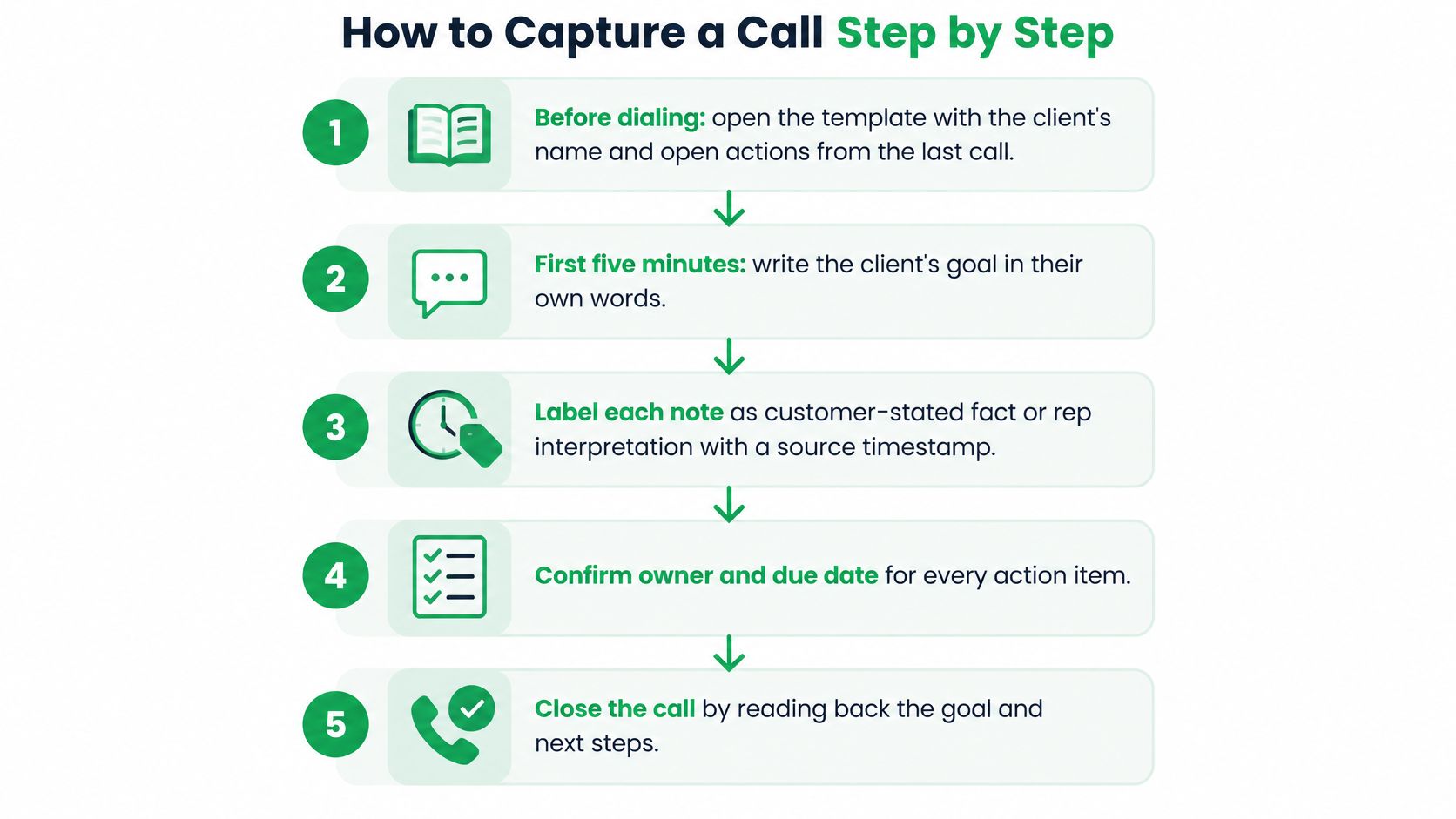
What to Do Before, During and After
1. Fill the top row before you dial. Name, company, date, and the open actions left over from last time. Two minutes of preparation means you open the call with "you were going to send the pay stubs" instead of "so, where were we". The common slip is starting a blank page mid-conversation, which guarantees the first two minutes of the call never get written down.
2. In the first five minutes, write the client's goal in their own words. Not your goal for the call. If they say they want the payment stable through a renovation, write that sentence, in quotation marks. The slip: writing "pitch refinance options", which records your activity instead of their problem.
3. Record figures exactly as stated. Loan amounts, income, dates, percentages, product names, the specific policy or term. When a topic comes up and stays open, write "not discussed" rather than leaving a blank or guessing. The common slip is "client wants a lower rate" with no number attached, which is unusable a month later.
4. Put the objection and your reply on one line each. The concern in column one, what you said in column two. Reps who record only the objection end up answering it from scratch on the next call, and usually answer it differently.
5. Before the call ends, confirm the decision process out loud. Ask who else needs to see the proposal before a decision gets made, and when. The slip is assuming the person you spoke to is the person who signs. A spouse, a business partner or a lender's underwriter can hold up a file for a week.
6. Read the commitments back, then write each one with an owner and a date. "So I'll send three rate options by Wednesday, and you'll get me the pay stubs by Friday." Reading it back catches the mismatch while the client can still correct you. Writing "I'll send that over" with no day is how follow-up dies.
7. Within ten minutes of hanging up, check the figures and finish the next action. Compare the numbers in your note against what you heard, then complete the owner and due date. Left until end of day, half the detail is gone and the note becomes a summary of a summary.
A good capture routine only works if the note itself stays short. If you want the underlying method for keeping a page of notes clean while someone talks, this guide to focused note-taking is a short read worth the ten minutes. For a longer walkthrough of writing discovery notes in one pass, the Podcast von PreSales Unleashed covers the same discipline in German.
The record is finished when every field holds either a value or the words "not discussed". Blank means you forgot.
Turn Commitments Into Action Items and Follow-Up
“Send info” leaves too much to memory. A useful action item says what will happen, who owns it, and when.
| Weak entry | Strong entry | Why it works |
|---|---|---|
| Send info | Send the loan pre-approval checklist to Maria; you; Thursday 5 p.m. | Names the document, owner and deadline |
| Follow up soon | Call Dev to confirm the Q3 budget figure; you; Friday 10 a.m. | Gives a specific task and a fixed day |
| Client to think about it | Client to confirm one of the two options by email; client; Monday | Turns a stall into a request with a date |
| Check the policy | Confirm the 5-year fixed rate and fee policy with the lender; you; Tuesday 2 p.m. | Names the product and the figure |
Timely follow-up helps keep a conversation active. In a 721-person sales-time study, representatives rated following up on sales calls as their most effective activity, at 79.0%, according to this time management research for sales teams. Send the agreed summary while the details are fresh, and update the client record consistently so the next person who opens it can see what was decided.
The Timing Rule That Follows
Send the summary email the same day. For anything due within three days, set a calendar reminder when you record the action item. That keeps the deadline attached to the task instead of relying on memory.
A clear pipeline depends on clear records. Teams that define stages and track metrics need notes that support each stage, including the decision-maker and the next agreed date.
When a Client Stalls
“Let me think about it” is a status, not an action. Agree on a specific request and date: “I'll send the two options in writing tonight. Can you tell me by Monday which one your partner prefers?”
The client has a clear task, and you have a reason to follow up. If Monday passes without an answer, record that the decision is still open and note when you'll revisit it.
For help shaping the message, these professional follow-up email examples show how to keep the email clear and focused.
Each commitment needs an owner, a date, and a record of when it was agreed.
Keep Notes Accurate and Handle Consent
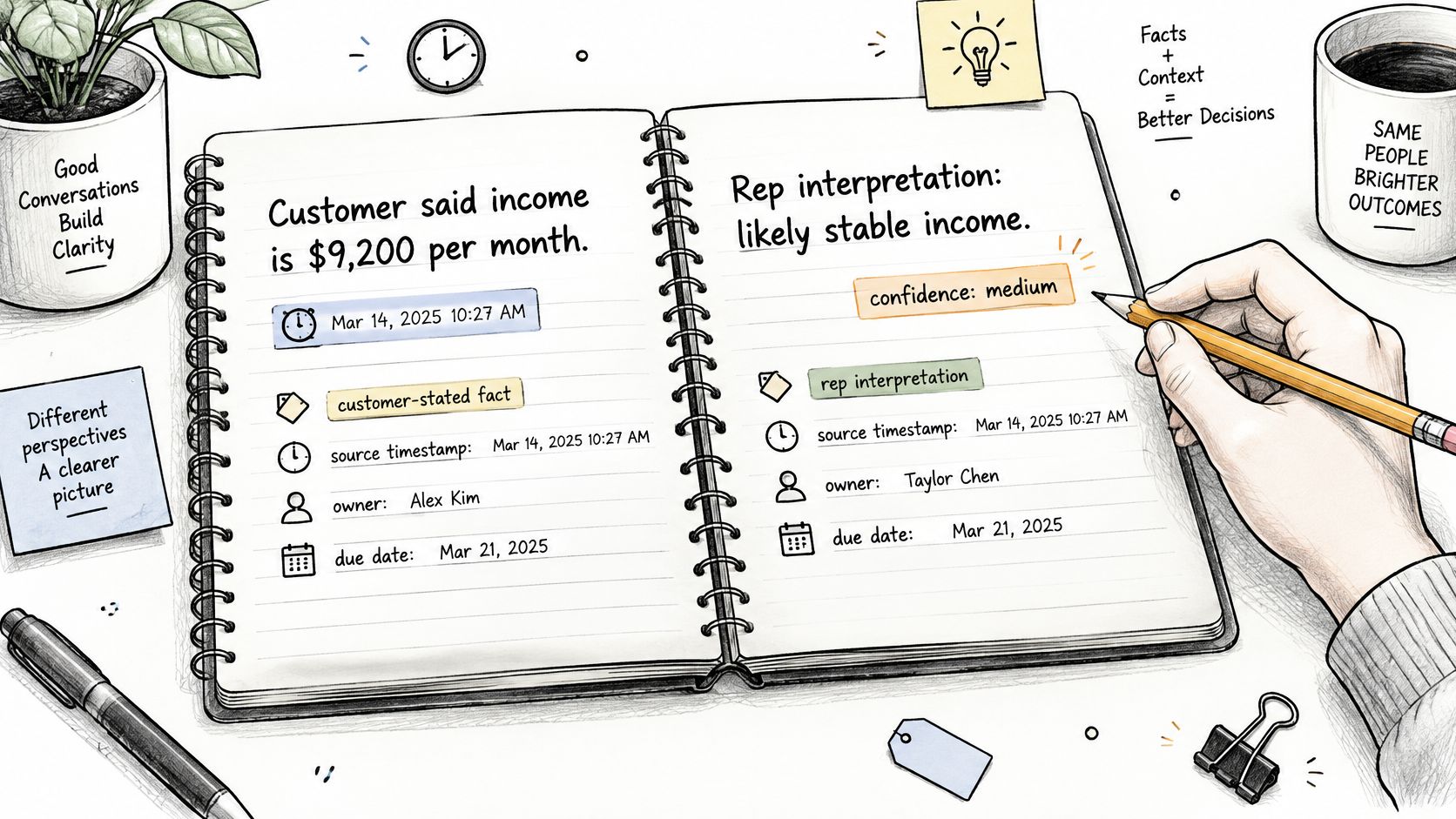
Most templates treat a note as a record of what happened. That standard is too low. A note is a record of what you know, and the valuable part is being able to tell your knowledge apart from your guess.
Label What You Know and What You Think You Know
Customer-stated fact (10:22): net income $9,200 a month, stated by the client.
Rep interpretation (10:31): likely to move this quarter because of the July reset. Confidence: medium.
That pair takes ten seconds and saves an hour. The fact is defensible in a file review. The interpretation is your read, and it's allowed to be wrong because it's labelled.
Most templates fail at this point. Common fields like buyer priorities and budget are only useful when they contain verifiable values, owners and dates rather than impressions. The scale of the problem shows in a survey of CRM users in the United States, United Kingdom and Australia, where 76% said less than half of their organization's CRM data was accurate and complete, even though 90% considered that data central to operations, as Cirrus Insight's sales productivity statistics report.
Two habits close that gap. Mark any topic the call didn't cover as "not discussed" instead of leaving it blank or guessing. And run a check before the note reaches a client file or CRM: names spelled correctly, amounts matching what was said, dates that match the calendar, compliance-sensitive statements quoted accurately, and a next action with an owner.
A shorter template with honest gaps beats a full one that invites invented answers. Blank fields get filled by the next person with a real conversation. Fabricated ones never do.
Consent Belongs in the Template
A recorded or transcribed call becomes a record with its own obligations, and that belongs in the note rather than in someone's memory of the call. Canadian organizations may need to notify callers about recording, explain the purpose and offer a meaningful choice, while Quebec's privacy regime adds stricter transparency and governance expectations. In the United States, federal law generally permits a participant to record, but several major states require all-party consent, as this overview of whether it's legal to record sales calls sets out. A mobile call with participants in three places can pull in three sets of rules.
Add six short fields to the template: recording or transcription disclosure given, purpose stated, consent or objection, sensitive information captured, retention location, and sharing permissions.
| Call situation | What to note | What to avoid |
|---|---|---|
| Caller agrees to recording | Date, consent given and disclosure stated | Recording before consent is clear |
| Caller declines recording | Agreed actions and key figures only | Writing a full transcript from memory |
| Caller shares account or health details | That sensitive detail was shared and where it is stored | Copying full account numbers into CRM notes |
| Participants in different locations | Location of each participant and the rule that applies | Assuming one state or province rule applies everywhere |
When someone declines, the fallback is simple: minimal manual notes, no unnecessary sensitive details, and only the actions both sides agreed to. A short note taken with permission beats a complete transcript taken without it.
Rules vary by profession and by place, and this isn't legal advice. We tell VoxNote customers plainly that they're responsible for following the call transcription rules that apply to them and their profession, which vary from place to place. Confirm the specifics with your compliance team before you record a client call, and check the call recorder software you use against those rules rather than after.
Test the Template on Your Next Three Calls
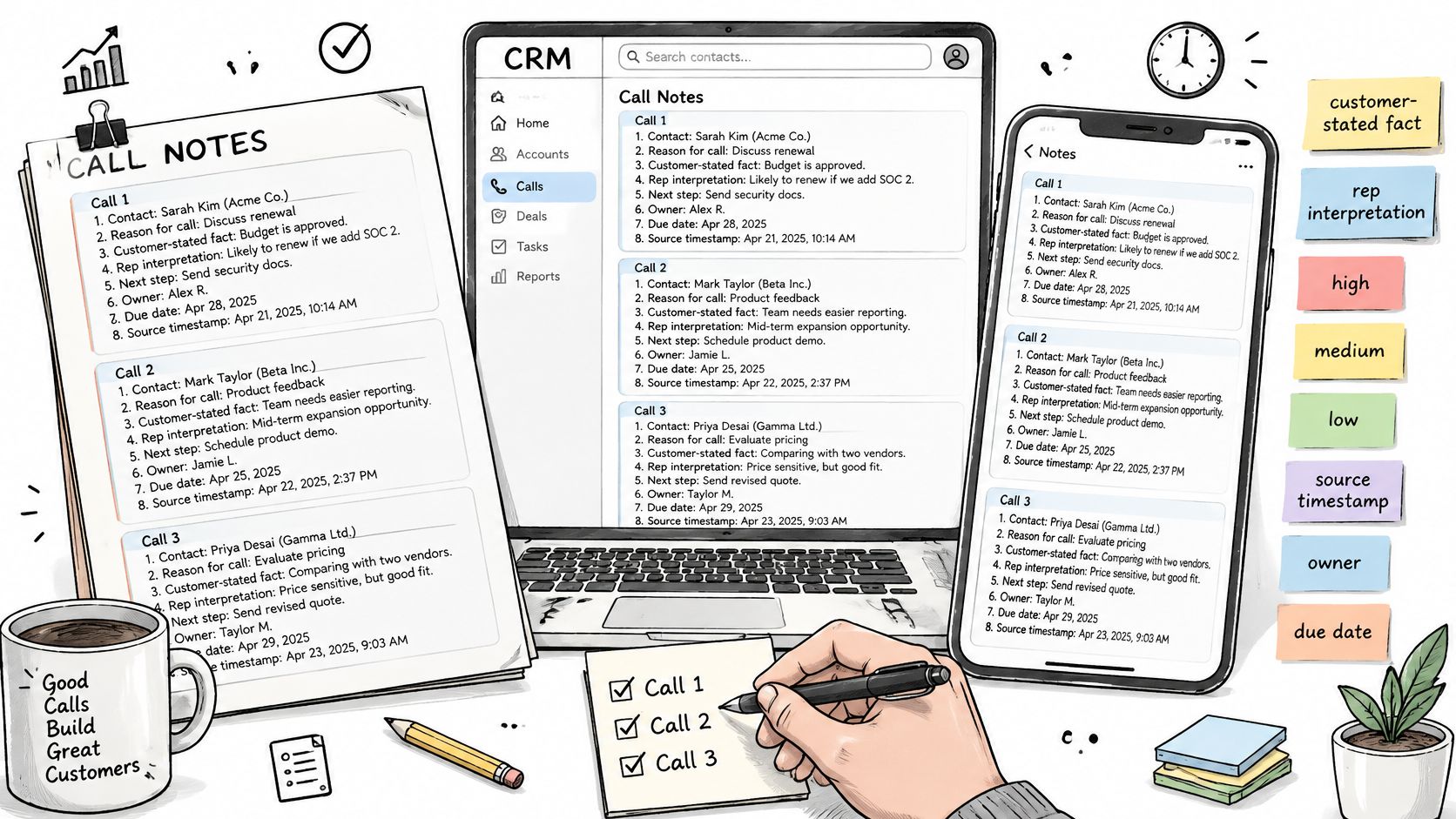
Don't rebuild your process. Copy the eight fields into a CRM note, a document or a notes app, add the uncertainty labels and consent lines, and run it on the next three client calls. That's enough to tell you whether it survives a busy week.
Then count three things. How many entries ended with an owner and a due date? How many figures were written exactly as stated, not rounded? How many times did "not discussed" replace a guess you would have made six months ago?
Ask a colleague to read one file and say back what the client wants and what happens next. If they can, the template is working. If they can't, the gap tells you which field to fix.
Drop any field nobody filled in and add one where a gap appeared. A nine-field template you use beats a twenty-field template you abandon in a fortnight.
If most of your calls land on your phone rather than a laptop, a tool such as VoxNote can write the first pass: a call summary with a title and summary appears in the Notes tab seconds after you hang up, and the same summary is emailed to the mailbox you already use. Check the figures and the next action before you save it to a client file.
Your three-call test is the proof. Not the tool, not the template.
The blank page after a call is where good client detail goes missing, and that's the part VoxNote handles: it records and transcribes calls on your existing number, then sends a titled summary to your inbox and the app seconds after you hang up, in a format matched to the type of call. You get the first pass already written, so your job is checking names, amounts and the next action against the template above rather than typing it all from memory. Visit VoxNote to see how the summaries and follow-up drafts work on the phone you already use.