
A client calls between appointments and confirms a rate, a closing date, and a document they still owe you. You hang up. Ten minutes later the dollar figure is already fuzzy, and the promise you made is only half written in your notes.
That's the moment many people look up recording conversations on iPhone. The Phone app can capture some calls. A voice memo on speaker can capture others. A forwarding setup can write the conversation down without a button press. None of those answers a second question: are you allowed to keep what you recorded, and is the written version accurate enough for a client file?
This guide separates what the phone can do from what you should keep. You'll compare methods, match a disclosure to Canada and the US, then check, store, and test the record before a client depends on it.
Table of Contents
- Choose the Right iPhone Recording Method
- Consent Rules for Calls in Canada and the US
- How to Record a Call with the Built-In iPhone Feature
- How to Set Up Automatic Transcription on Your Number
- Checking Transcripts Before They Reach a Client File
- Keeping Call Records Secure and Deleted on Schedule
- Run a Pre-Go-Live Check on Your Setup
Choose the Right iPhone Recording Method
Built-in recording is the quickest option for a one-to-one call. It is the wrong tool if you need every client conversation captured without tapping anything during the call.
Apple added native call recording in iOS 18.1, released in October 2024, as described in Apple's iPhone user guide. Before that release, the standard Phone app had no general recording control for ordinary cellular calls. The feature works only in supported regions and languages, and only on a call with one other person. Audio is saved in a Call Recordings folder inside Notes. Where a transcript is offered, it can take extra time to finish.
| Method | Calls it covers | What you get | Setup effort |
|---|---|---|---|
| Built-in iPhone recording (iOS 18.1 or later) | One-to-one calls in supported regions and languages | Audio saved in Notes, with a transcript where supported | None beyond the Phone app |
| Call forwarding to a transcription service | Incoming and outgoing calls on your own number | Full transcript, summary and follow-up drafts | One-time forwarding setup |
| Speakerphone with a voice memo app | Any call or in-person conversation | Audio only unless transcribed separately | Manual start each time, and audio quality varies |
The trade-off is coverage versus effort. Built-in recording needs no extra account, but a conference call or an odd carrier route sits outside that design, so test those calls on their own. Speakerphone plus the Voice Memos app works for an in-person meeting, yet you start it by hand and room noise changes the audio. Forwarding is the route when you want a record of client calls on your own number and you don't want to press record mid-sentence. For occasional notes on personal calls, the built-in option is usually enough.
Consent Rules for Calls in Canada and the US
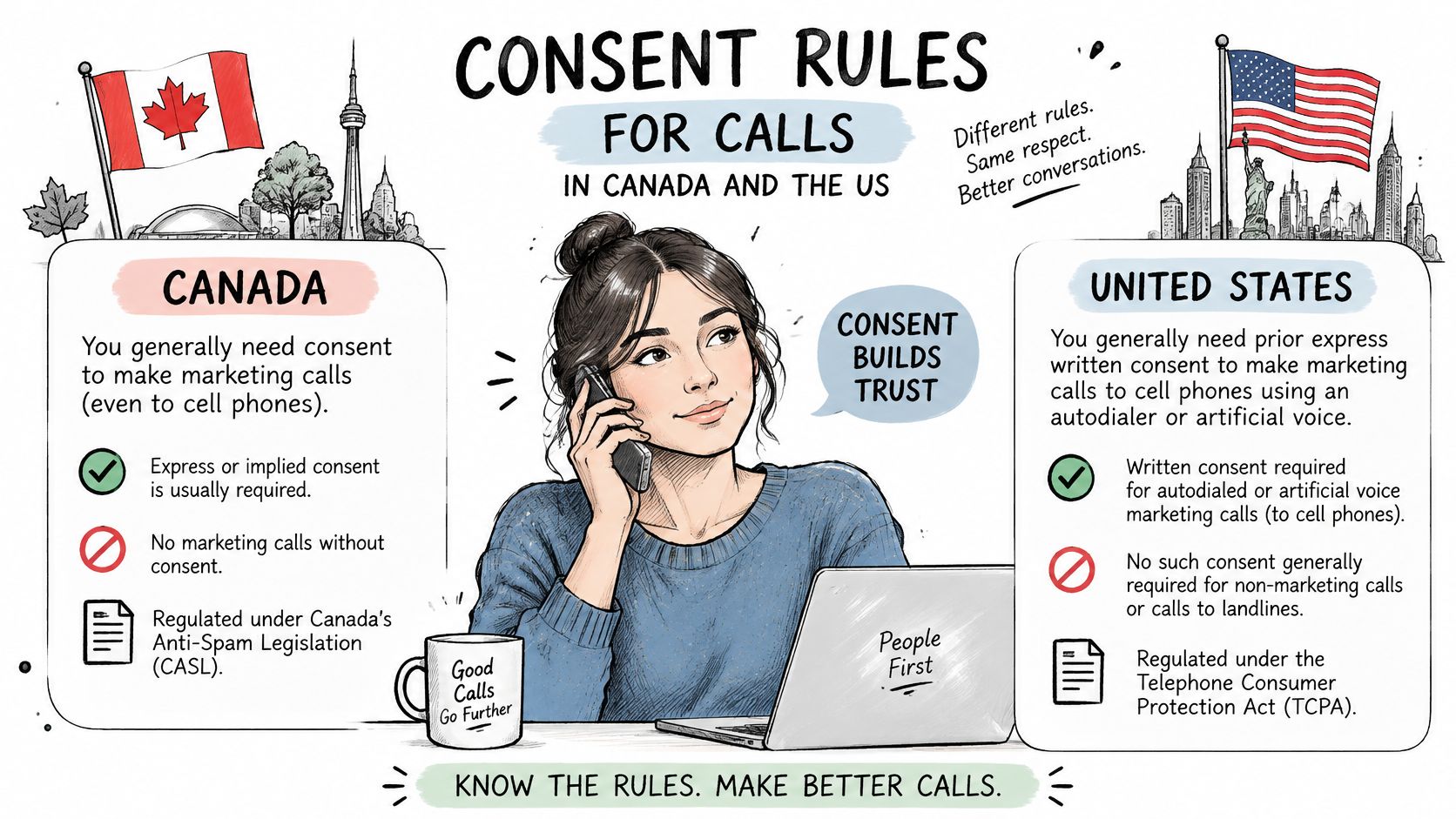
A call can be technically recordable while still being unlawful to record or keep. The rules depend on where each participant is located, so a recording control or automatic notice does not replace your responsibility to disclose and obtain any required consent.
Canada's federal Criminal Code generally permits a participant to record a private conversation with the consent of one participant, according to Recording Law's summary of Canadian recording rules. US requirements vary by state, and some require everyone on the call to agree. The built-in iPhone feature is unavailable in some regions, including the European Union and South Africa. That technical limit is separate from the rules that apply to other recording methods.
Match the disclosure to the stricter place
| Call situation | Consent standard | What to do |
|---|---|---|
| Canada, federal Criminal Code | One participant's consent can make recording lawful | Disclose anyway and note the consent in the file |
| US state with all-party consent (for example California, Florida, Illinois) | Every participant must agree | Get a clear yes from everyone and repeat it when someone joins |
| Other US states | Some states use one-party consent | Check the rule for each participant's location |
| Cross-border call between Canada and the US | Follow the stricter rule of each participant's location | Use the disclosure that satisfies the strictest location involved |
| EU or South Africa | Built-in recording is unavailable | Check local law before using any recording method |
Keep the disclosure plain: “This call is being recorded and transcribed for your file and follow-up. Do you agree to continue?” Pause for a clear yes. If another person joins, explain the recording to them too and wait for their agreement.
Before contacting someone who does not use VoxNote, obtain their consent and make clear that the conversation will be recorded and processed by the app and third parties. The person you call receives no notice that the call is being recorded, so tell them yourself.
Use the same care for in-person conversations captured on speakerphone or with a voice memo. Identify where each participant is located, follow the strictest applicable consent rule, and record the agreement in the client file. A compliance contact can help confirm local requirements, privacy notices, retention practices, and any professional duties that apply. This is general information, not legal advice.
How to Record a Call with the Built-In iPhone Feature
On a supported iPhone, the native path is short, and Apple's call recording guide is explicit about what it covers. Open the Phone app, place or answer a one-to-one call, tap the recording control, and stop by tapping it again or ending the call. iOS plays an audio notice to both people, then saves the audio in a Call Recordings folder in Notes. Where a transcript is supported, you open it from the same note.
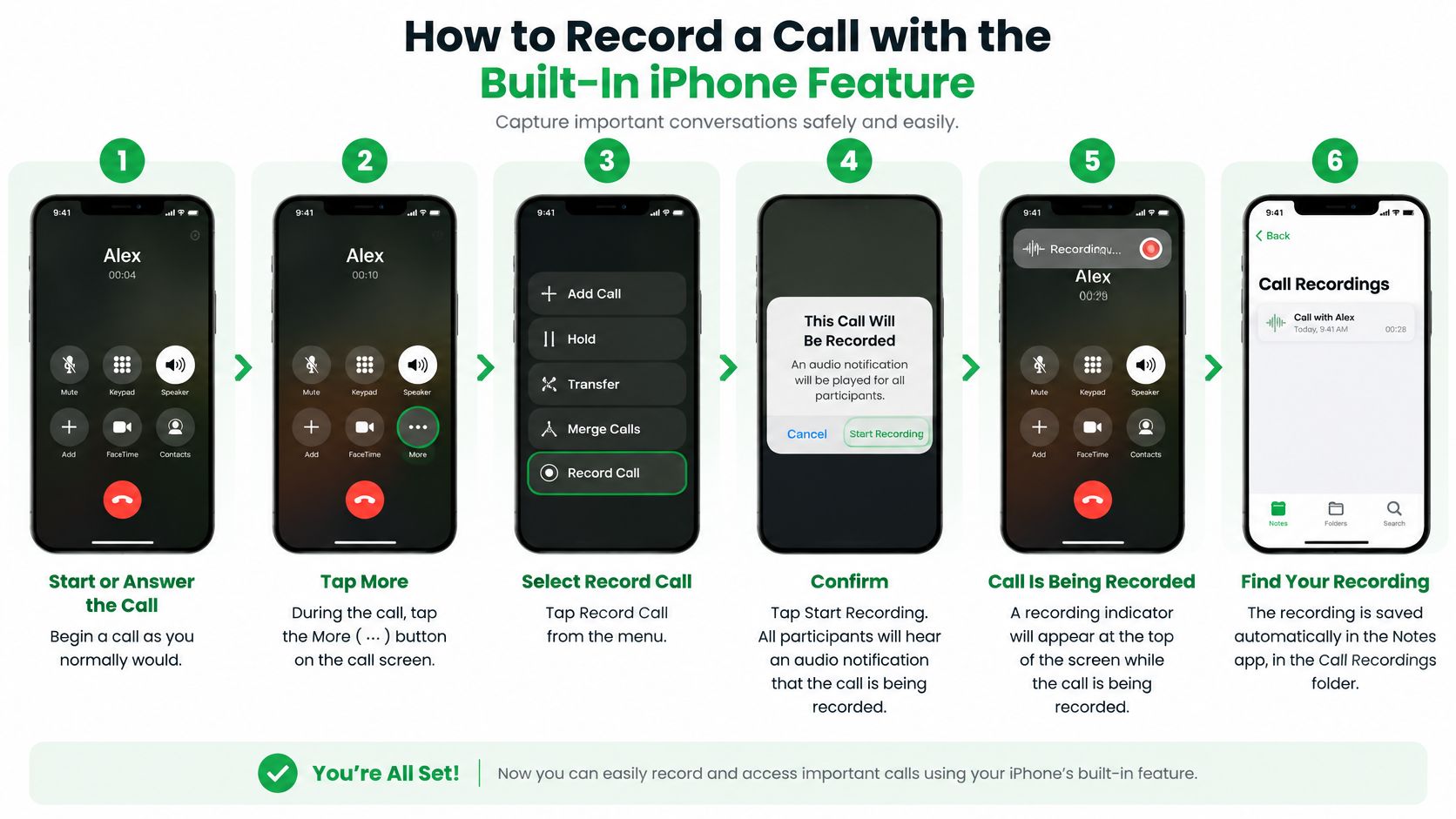
Run one test call before a client depends on it. Apple lists exclusions that include the European Union and multiple Middle Eastern, African, and Asian markets. The control can be missing on a current phone if the region, language, software, or call type isn't supported.
- Check the requirements first. You need iOS 18.1 or later, a supported region and language, and a call with one other person. The common slip is blaming the phone when the control is missing. Check region, language, and call type before you assume a fault.
- Open the Phone app and place or answer the call. Stay inside the Phone app so the recording control is on the call screen. A call handled by another app, or a conference, follows a different flow and should be tested on its own.
- Tell the other person, then tap record. iOS plays an audio notice to both of you when recording begins. Say your disclosure before you tap, not after the notice has already started. Waiting until the beep treats the notice as a substitute for a clear yes.
- Stop by tapping the control again or by ending the call. Either action ends the capture. If you only lock the screen, you haven't given yourself a clean stop, so end the recording on purpose.
- Find the audio in Notes. Open the Call Recordings folder. The phone files it for you. If the note isn't there, the call type may have been unsupported, so don't assume a silent save.
- Open the transcript if your language supports one. Transcription can take extra time, so don't refresh in a panic after a few seconds. Read the opening lines against what you said before you trust the rest.
Finish with a three-point check. The note holds the audio. The transcript matches the opening sentences you said. The file is named by client and date so you can find it later.
How to Set Up Automatic Transcription on Your Number
Forwarding is the setup for people who can't tap a button on every client call. Once it's connected, we transcribe incoming and outgoing calls on the number you already use, and you don't press anything during the call. Clients keep calling the number they know.
- Open Settings and search for Call forwarding. iOS hides the control until you look it up, so the search box is faster than hunting through menus.
- Turn Call forwarding on. This tells the carrier to send calls onward instead of ringing only on the handset.
- Tap Forward To and paste the number we give you. A mistyped digit sends calls to the wrong place, so paste rather than retype.
- Go back to save the setting. Leaving the screen is what stores it. If you force-quit Settings first, the change may not stick.
- Call your number from another phone. Confirm a transcript appears. A setup you haven't tested is a guess.
Incoming calls are captured from the moment forwarding is on. For outgoing calls, dial from our app. Your client still sees your own number. You can keep a call out of the record by excluding that contact ahead of time, or by stopping transcription mid-call.
Before you leave forwarding on overnight, confirm your carrier allows it and that voicemail still answers a missed call. A forwarding error can send calls somewhere you didn't intend, with no alert on the lock screen.
If the menu labels on your iOS version don't match this sequence, the call forwarding options walkthrough shows the same path in more detail. You don't need a second phone, a spare SIM, or a charging routine for a separate recorder.
Checking Transcripts Before They Reach a Client File
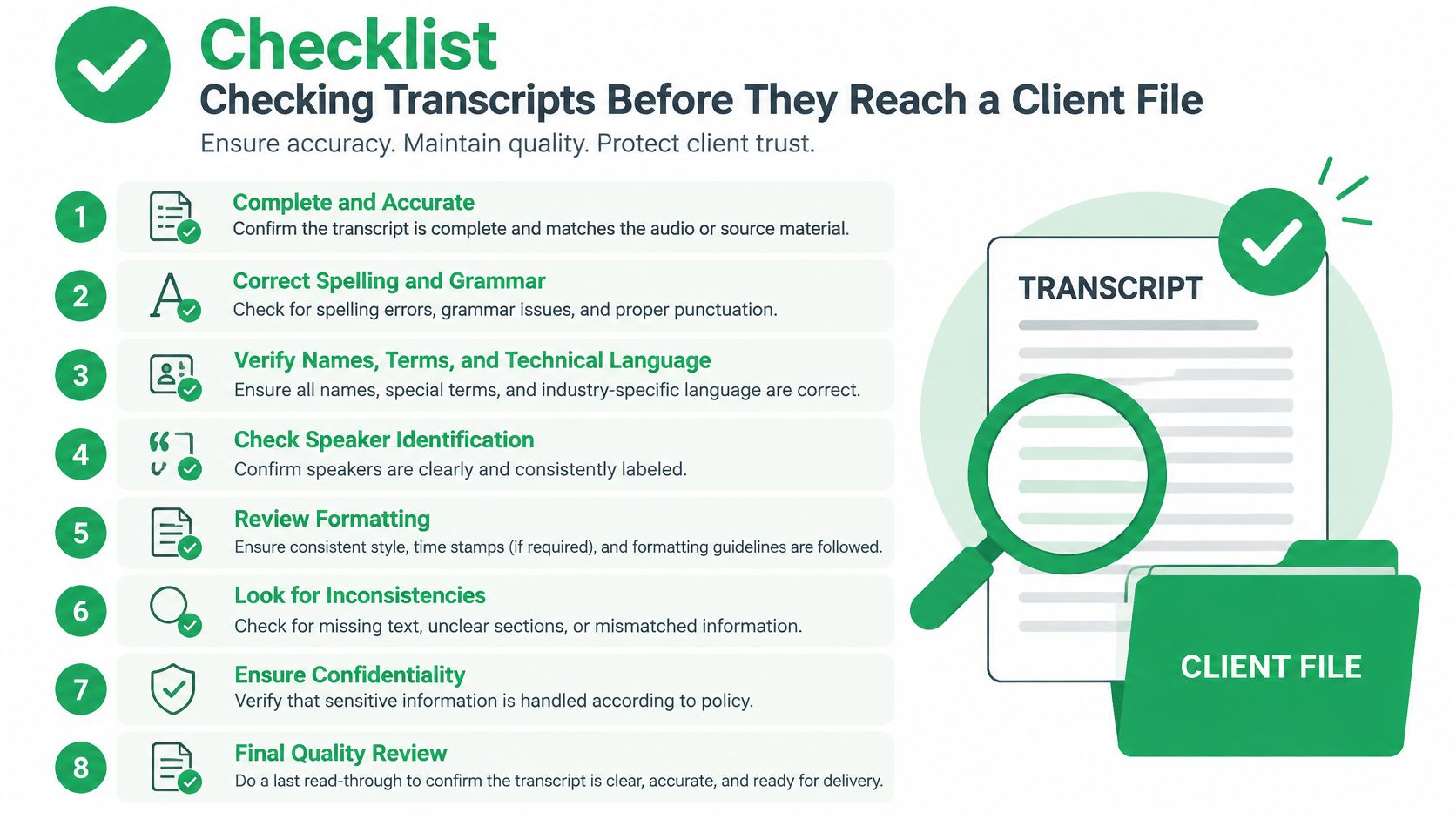
A transcript is a working draft, not a verbatim record. Check it before relying on it or adding details to a client file. Recognition can falter when people speak over one another, have strong accents, use specialist terms, or call over a weak connection with background noise.
| Field | Common error | How to verify |
|---|---|---|
| Names and spellings | Surnames misheard or misspelled | Check the audio at that point and your contacts |
| Dollar amounts and rates | Digits swapped or dropped | Listen to the figure again and compare with the written quote |
| Policy or account numbers | Digits dropped or merged | Confirm against the source document |
| Dates and deadlines | Day and month swapped | Check against your calendar |
| Commitments and next steps | Owner or deadline assigned to the wrong person | Compare with your own notes from the call |
Three passes, then a signature
First, check the risky details against the audio. Listen to the part around each figure, date, and name. Compare what you hear with the written quote, calendar, or contact record.
Second, compare the summary with the transcript. A summary can carry forward a word or number the transcription misheard. Check the full transcript before trusting a concise recap.
Third, confirm who agreed to do what. Match each commitment and deadline to your own notes. If the transcript assigns a task to the wrong person, correct it before using the note.
Mark the note as verified, with your name and the date, before adding it to a CRM or client file. Keep unverified drafts out of advice, disputed figures, and follow-up promises. A human review remains important even when the text looks finished. Read more about phone call transcription and its role in reviewing call records.
Keeping Call Records Secure and Deleted on Schedule
A team can end up with four different records from one conversation. They are the original audio, the machine transcript, the edited client note, and the final advice record. Only the edited note and the final advice record belong in the official file. The audio and the machine transcript are working materials. Engadget's walkthrough of iPhone call recording is typical of coverage that stops at the button. The harder problem is whether an unverified summary is safe to treat as the file. Automation can stop you forgetting a commitment. It can also create a compliance problem if that summary is filed as fact.
Phone call recordings are securely stored and then completely deleted and destroyed after 30 days. That vendor window is a starting point, not your policy. Write your own retention period for audio and for transcripts, and don't assume the default matches your regulator or your E&O carrier.
Who can see the file
Other people on our service who took part in the same call may access that shared record. Review access before you share anything wider than the people who were on the line. If a third-party assistant will read transcripts, the firm has to approve it and list it in policy. We can connect transcripts to Claude, ChatGPT, and similar tools, which is useful only after that approval exists. If client notes later land in a CRM, check HighLevel's HIPAA compliance limits before you assume a marketing platform is an appropriate store for regulated files.
- Review access for each teammate. Remove anyone who doesn't need the shared call.
- Set a retention period in writing. Cover audio and transcripts separately from the final advice note.
- Keep copies and corrections in one place. A corrected figure that lives only in email will be lost.
- Don't forward transcripts by ordinary email. Share them through a controlled system instead.
When a client asks for a copy or a correction, confirm who they are, send the verified note rather than the raw transcript, and log the change with the date and the reason. Keep the original transcript until your retention schedule says to destroy it. If summaries need to reach a CRM after that review, a CRM integration is the path that avoids pasting private text into a random inbox.
Run a Pre-Go-Live Check on Your Setup
Don't put a client on a setup you haven't tried today. Use the test call from the forwarding steps as the first check, then run the rest with someone who has agreed to help.
Make one incoming call and one outgoing call. Dial the outgoing call from the app. At the start of each call, say the disclosure line and keep the reply, so you can show consent later.
Test the exclusion next. Keep one contact out of the record, call them, and confirm nothing is saved. If you also plan to use the built-in Phone control, test that path on its own and confirm your region, language, and call type.
Check voicemail on a missed call, and confirm your carrier allows forwarding. A bad forward can send calls to the wrong place with no warning.
Compare the transcript with what you said. Names, figures, and next steps should match. A summary should reach your inbox and the app seconds after the call ends, in a format matched to the type of call.
Write down three rules and keep them where the team can see them.
- Which calls get recorded. Name the clients and the call types.
- Which tools may read transcripts. List only approved assistants.
- Where verified notes are filed. Point to one system, not a personal inbox.
If a check fails, or the built-in feature isn't available where you work, pick a fallback that still meets your consent rule before anyone relies on it.
A recording is useful only when the disclosure, the check, and the filed note are all done.
VoxNote records and transcribes incoming and outgoing calls on the iPhone number your clients already use, then sends a transcript, a summary, and a follow-up draft you can check before it reaches a file. If recording conversations on iPhone has turned into a records problem rather than a button problem, that workflow is built for the calls you already take. Visit VoxNote to connect your number and run the test call before the next client conversation.