

Phone call log software keeps a usable record of every client conversation, not just a list of numbers and timestamps. Think of it as a flight recorder instead of a departure board. A departure board only tells you a flight left at 9:15, while a flight recorder lets you piece together what actually happened.
Table of Contents
- Understanding the Record Behind Every Call
- Who Benefits Most from Call Logs
- Matching Each Layer to Its Question
- When the Call Leaves No Trace
- From Paper Notes to Searchable Records
- Why Good Intentions Are Not Enough
- Four Gaps Behind Every Lost Call
- Starting From the Number Clients Already Know
- Working From the Phone You Already Carry
- What Appears After You Hang Up
- Keeping Call Recordings Secure
- Where Follow-Ups Quietly Disappear
- The Handoff Chain, Step by Step
- A Mortgage Broker Call in Practice
- Making the Next Step Happen Today
- Reviewing Past Calls from Your Computer
- Why Records Must Carry Context Forward
- Connecting Calls to Your CRM
- Working as a Team on the Pro Plan
- Where the Software Stops
- A Life Insurance Advisor Between Appointments
- A Financial Planner Across Two Languages
- A Field Sales Representative on a Busy Day
- Common Misconceptions to Clear Up
- Do Clients Need to Call a Different Number?
- How Long Are Recordings Kept?
- Does the Software Work for a Brokerage Team?
- Can Summaries and Follow-Ups Go to Clients Automatically?
Understanding the Record Behind Every Call
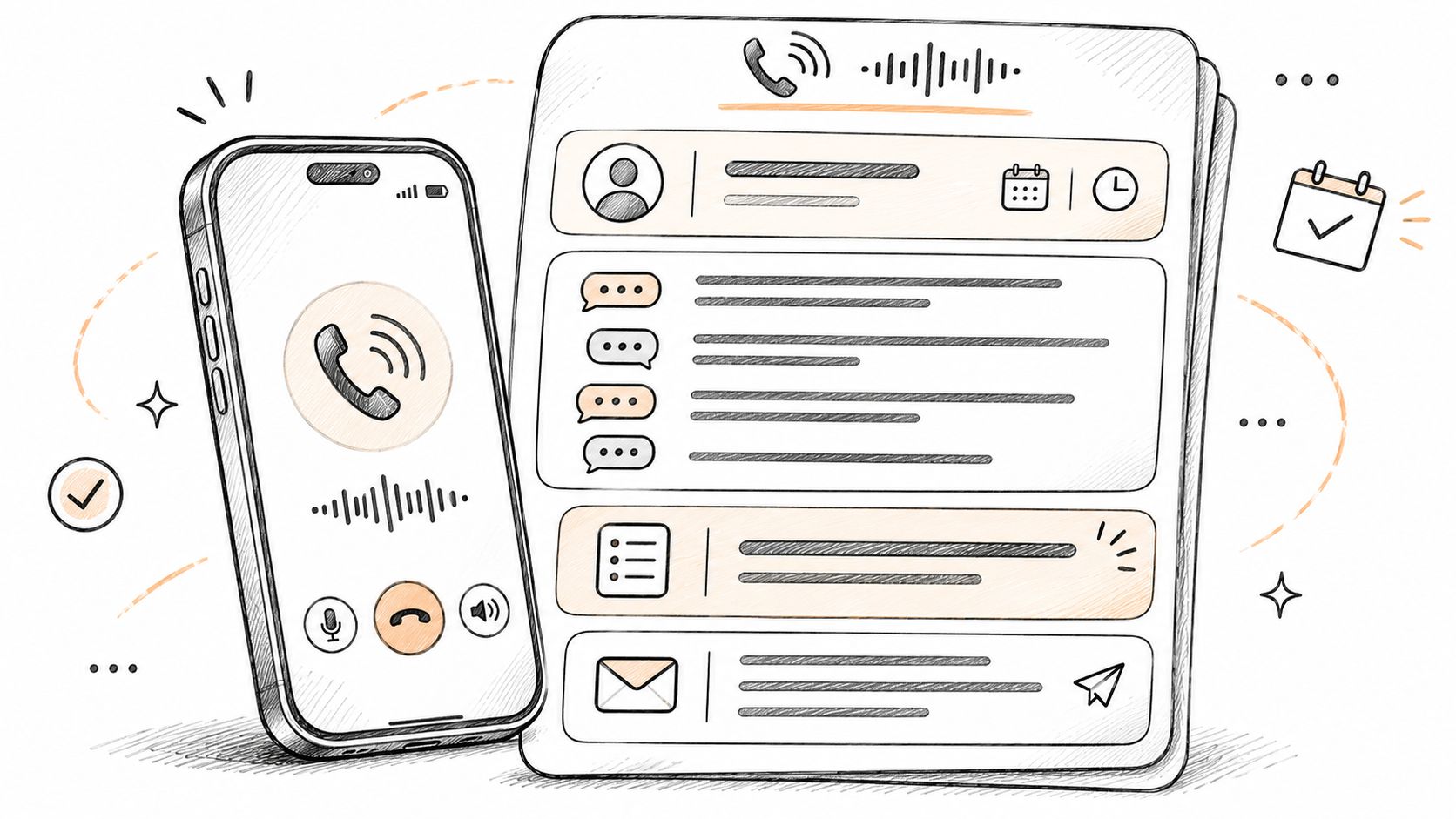
The same idea applies to phone calls. The software captures who called, what they asked, which figures came up, and what was promised.
Every call is built from four layers. You will see each one again as we go through this guide:
- Call entry: the number, time, and direction of each call
- Transcript: the full written record of the conversation
- Summary: a titled overview of decisions and figures
- Follow-up draft: a starting email to check and send
Who Benefits Most from Call Logs
If your day is mostly spent talking to clients, this matters a lot. Independent mortgage brokers, life insurance advisors, financial planners, field sales reps, and small business owners who run everything from their phones all fit this pattern. Each of them depends on accurate records, not just memory.
Picture a field sales rep driving between three meetings before lunch. Each call with a buyer might hold a price, a deadline, or a promise. By the afternoon, those details have a way of slipping away.
Matching Each Layer to Its Question
Each layer answers a different, practical question. Check the table below to see where your current process tends to break down first.
| Record layer | Question it answers |
|---|---|
| Call entry | Who called, when, and in which direction? |
| Transcript | What exactly was said? |
| Summary | What was decided, and what figures came up? |
| Follow-up draft | What should happen next, and what should I send? |
A clear record turns a finished call into a next step you can actually take.
Up next, we'll look at how these layers get created, how they help with follow-ups, and how they fit alongside your CRM. Each section focuses on one part of the workflow. Real examples from advisory and sales workdays come later in the article.

A missed call hardly ever feels like a big deal in the moment. A small red badge pops up on your screen, you glance at it, and then the day pulls you somewhere else.
For many client-facing professionals, that one call could have been a mortgage question, a request for an insurance document, or a clear instruction to buy or sell. A technical sales lead can also slip away quietly, often to a competitor who simply answered first.
When the Call Leaves No Trace
Imagine a voicemail you can barely make out over the sound of traffic. The caller left a name, a number that might be right, and something about a rate or a deadline.
A few hours later, you are trying to piece the conversation back together. Who was it? What did they actually ask? Which figures came up, and what did you promise to send?
If you cannot document a call, you cannot reliably act on it.
From Paper Notes to Searchable Records
Not long ago, most professionals kept a notepad beside the phone. Voicemails stayed on the handset, and the important details ended up scribbled on the back of an envelope.
That system worked when calls were few. On a busy day, though, conversations spread across several devices and inboxes, and paper simply cannot keep pace.
The real change is less about nostalgia and more about what counts as proper records. Today, a searchable record of who said what is the expected standard for serious client work.
Why Good Intentions Are Not Enough
Most advisors do not forget calls on purpose. Memory just makes a poor filing system when your calendar is packed with back-to-back meetings.
Missed and forgotten calls can cause the same lost-opportunity problem as unanswered inquiries, especially when call details are not captured reliably. If you want a sense of how carefully that risk should be weighed, this piece on judging AI receptionist reliability is worth reading.
Read also: how logging phone calls keeps client details on record before those details fade.
Four Gaps Behind Every Lost Call
Most missed or forgotten calls can be traced back to four workflow gaps. Each one is simple on its own, but together they explain why good conversations so often go unfollowed. The rest of this guide looks at each one in turn:
- Divided attention between listening and writing
- Forgotten details such as figures, commitments, and requested documents
- Slow follow-up after the conversation ends
- Scattered information spread across voicemail, recent calls, and personal notes
Picture a stenographer sitting quietly beside you during every client call. She never interrupts, and she never asks anyone to repeat themselves. When the conversation ends, she slides a neatly typed set of notes across the desk.
That is the basic idea behind phone call log software that writes its own notes. It all starts with the number your clients already dial.
Starting From the Number Clients Already Know
Connect your existing business number through call forwarding, and incoming calls are captured automatically. Your clients keep dialing the number they have always used, so nothing changes on their end.
Outgoing calls take a slightly different route. You place them from the VoxNote app, but your client still sees your own number.
Nothing needs pressing during the call. No notetaker joins the line, so the conversation stays between you and your client.
Working From the Phone You Already Carry
The setup works with devices you already own:
- iPhone: runs on the phone already in your pocket
- AirPods: keeps your hands free during walking meetings
- Car: handles calls on the road without extra equipment
- No extras: no separate recording device or SIM card needed
Everything familiar stays where it is. Contacts, recents, and the keypad behave just as they always have, with a notes tab added beside them.
Conversations often jump between languages, and automatic language detection keeps up with that. This matters a lot for advisors who work with multilingual clients. Since the process runs quietly in the background, you can give your full attention to the person on the other end.
What Appears After You Hang Up
The output arrives in a clear order, so you always know where to look first:
- A titled summary appears in the app within seconds of the call ending.
- The full transcript sits alongside it for word-level reference.
- The same summary lands in your existing mailbox.
Because the summary comes first, you can skim the key points before digging into the full transcript. Once your calls are logged, a calls intelligence product can turn each recording into transcripts and summaries automatically. That is how raw audio becomes notes you can actually use. You can read more about conversation intelligence for growing sales teams.
The call ends, and the written record is already waiting in your inbox.
The infographic below walks through the full path from the first ring to the stored record, showing how each stage hands off to the next.
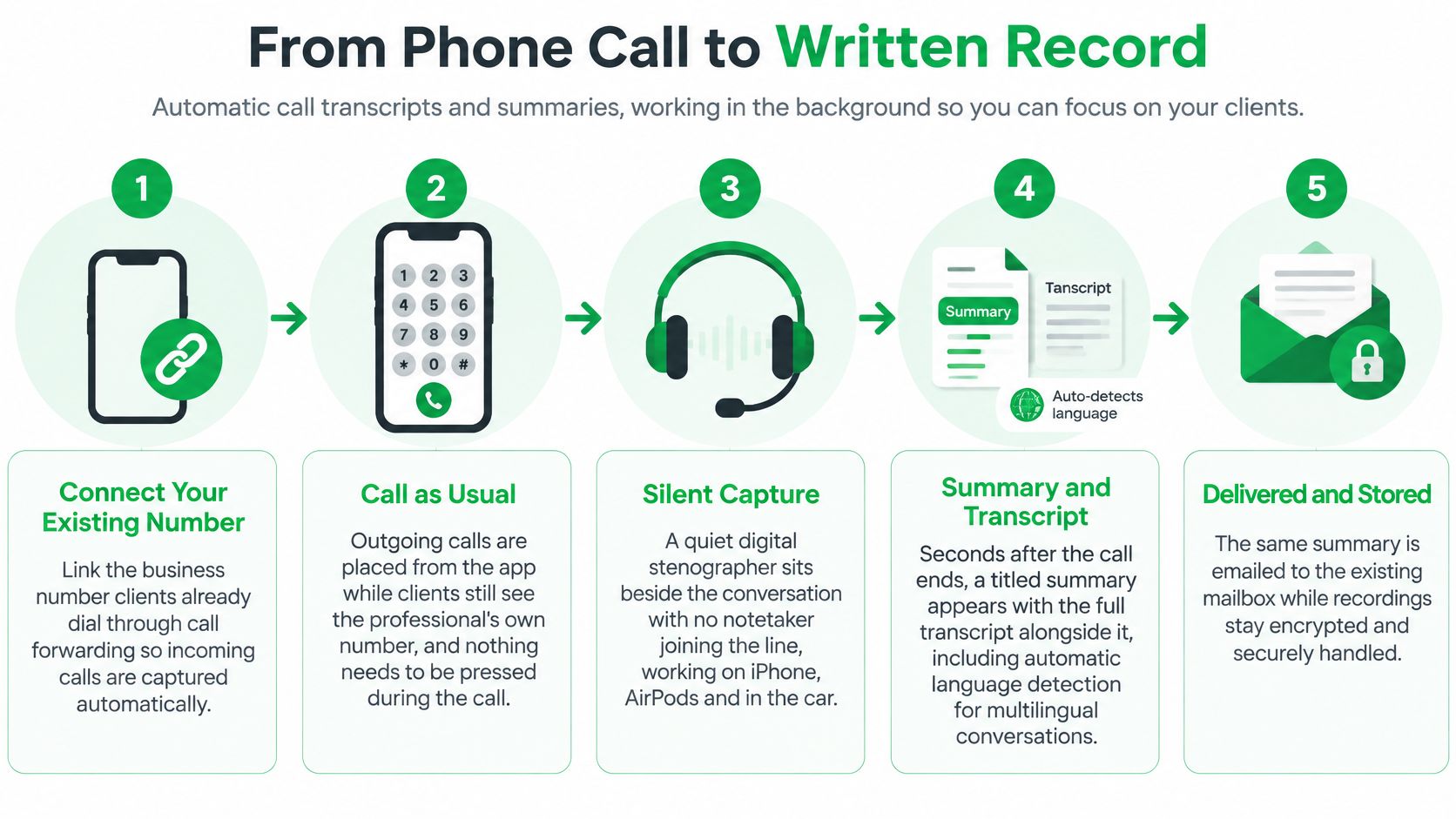
Each stage runs on its own once the call connects. You never have to remember to start a recording or save a note.
Keeping Call Recordings Secure
Transcripts and summaries are encrypted using AES-256, and the company states they are never sold or shared. Recordings are stored securely and then fully deleted after 30 days.

Logging a call is only half the job. The other half is doing something with it before the moment slips away.
Where Follow-Ups Quietly Disappear
Plenty of missed calls never get a callback. Research across many industries points to this pattern, though the numbers cover businesses from every sector, so they don't tell you the rate for your own field.
Responsibility tends to fade when the details are scattered. A name lives in a voicemail, a number lives in the recent-calls list, a figure is written on a sticky note, and the promise lives in your head.
Each place holds one piece. None of them holds the full story.
The Handoff Chain, Step by Step
A good record moves the work forward one stage at a time:
- The transcript keeps the exact wording and figures.
- The summary pulls out the decisions and the next steps.
- The contextual email draft gives you something to check, tweak, and send.
You stay in charge at every link. You confirm the accuracy, make sure the advice fits this particular client, and protect private information before anything leaves your outbox.
The software shifts the default from "I'll remember to follow up later" to "I can review the next step right now."
A Mortgage Broker Call in Practice
Imagine a broker who wraps up a call after talking through a rate change and asking for a recent payslip. The table below shows how that same follow-up looks when it depends on memory versus when it relies on a written record.
| Stage | Memory-based routine | Documented routine |
|---|---|---|
| Recall | Rebuild the rate and payslip request from memory | Open the summary, which lists the rate and document request |
| Drafting | Write an email from scratch and hope nothing is missing | Edit a contextual draft that already mentions the payslip |
| Verification | Dig through old notes or voicemail for the exact rate | Check the rate against the transcript's exact wording |
| Filing | Copy details into the client file later, if at all | Save the transcript and sent email to the client record |
The memory route only works if you hold every detail until the end of the day. The documented route lets you check a written record in a few minutes.
Making the Next Step Happen Today
This matters because the next step stops being a vague intention. It turns into a clear task you can review while the conversation is still fresh.
Read also: How to Send a Professional Follow-Up Email when you're ready to polish the draft.
Your memory still counts, but it no longer has to carry everything. The record handles the remembering, and you handle the deciding.
That's the real difference between hoping to call back and knowing exactly what to send next.
Once the call ends, the record doesn't stay trapped in the app. It moves into the client file you already keep.
Reviewing Past Calls from Your Computer
The web application puts your full call history on a computer screen. Transcripts, summaries, and follow-up emails all live in one place.
That matters more than it sounds. Typing details into a client file is far easier at a desk than on a phone between appointments.
Picture a mortgage broker who needs the rate she discussed last Tuesday. She opens the call from her laptop, reads the exact figure, and copies it into the file in under a minute.
Why Records Must Carry Context Forward
Clients call back more often than most professionals expect. A record that only proves a call happened won't help much in the next conversation.
A useful record carries context forward. It usually answers three questions:
- What the client asked, in their own words
- Which figures or documents came up
- What happens next, and by when
Think of it as a handover note rather than a receipt. A receipt proves a payment went through. A handover note tells the next person what actually matters.
Connecting Calls to Your CRM
Many teams already track clients in a CRM or customer-service system. Those platforms work best when call details arrive on their own. Without that link, someone ends up retyping everything by hand.
The Pro plan can send summaries to a CRM through integrations built by the VoxNote team.
"I connected it to my CRM: every call is logged on the right record, and the transcript files itself in the client's folder." – Jason
That's the result you're after. The call lands on the correct contact, and the transcript sits where your team expects it. Nobody has to dig through three inboxes to find it.
Read also: how the CRM integration works
Working as a Team on the Pro Plan
The Pro plan also adds team features. You can invite colleagues and decide who has access to call records.
This helps when a colleague covers a call or picks up a client file while you're away. Everyone with access sees the same summary instead of piecing things together from separate notes.
Where the Software Stops
Transcripts and summaries support your judgment. They don't replace it.
You still review accuracy, check compliance rules, and confirm client consent before anything gets shared. The record makes that work easier, but the responsibility stays with you.
Stories tend to stick better than feature lists. Here are three ordinary workdays, each showing how phone call log software fits into a different job.
A Life Insurance Advisor Between Appointments
Dana is a life insurance advisor, and she takes a client call while driving to her next appointment. Her hands stay on the wheel, and her attention stays on the conversation.
When she pulls into the parking lot, the summary is already waiting in her inbox, with the document list the client asked for. She doesn't have to retype anything before the meeting starts.
- Gap closed: remembering exactly what the client asked for
- Record relied on: the emailed summary
A Financial Planner Across Two Languages
Marco is a financial planner, and his client switches between two languages in the middle of a call. Automatic language detection keeps up, so the conversation never stalls.
Later, he opens the full transcript in the web application and copies the exact instruction into the client file. The client's own words are on record, not a reconstruction from memory.
- Gap closed: losing a precise instruction in translation
- Record relied on: the full transcript with its original wording
A Field Sales Representative on a Busy Day
Priya is a field sales representative, and she makes five short calls before lunch. Between stops, she has no time to write anything down.
By late afternoon, she can't remember which buyer received which quotation. She opens the Recents list, which shows the number, time, and direction of each call, and then checks the notes tab. Her replies go out faster because she isn't guessing, and every quotation matches what the buyer actually heard.
- Gap closed: mixing up promised quotations across several calls
- Record relied on: the Recents list and notes tab
Common Misconceptions to Clear Up
Three myths come up again and again, and each one is easy to correct.
- A new business number is required. Your existing number works once call forwarding is connected.
- Someone has to start recording manually. Every call is transcribed automatically, so there's nothing to press during the call.
- Summaries can go straight to clients. You review each summary and follow-up draft before anything is sent.
The record does the remembering, so you can focus on the deciding.
Your memory still helps, but it no longer has to carry every detail.
Do Clients Need to Call a Different Number?
Not at all. Once call forwarding is set up, clients keep dialing the number they already have saved. Nothing shifts on their end, so you won't need to send them a new number or ask them to update their contacts. When you call them from the VoxNote app, they still see your own number on their screen.
How Long Are Recordings Kept?
Recordings are stored securely and then permanently deleted after 30 days. If you need a recording for your files, download it before that window closes. The summary, on the other hand, stays in your mailbox, so you can keep it on hand as long as you need it.
Does the Software Work for a Brokerage Team?
It does. The Pro plan lets you invite colleagues and decide who can see call records. Picture this: you're out of the office, and a colleague picks up your client's file. They see the same summary you do, so there's no need to piece together a conversation from scattered notes. Everyone stays on the same page, and handoffs go much more smoothly.
Can Summaries and Follow-Ups Go to Clients Automatically?
No, and that's by design. Summaries land in your own mailbox, and follow-up drafts wait for your review. Before anything reaches a client, you check it for accuracy, suitability, and confidentiality. The software is there to support your judgment, not stand in for it.
Reviewing every summary and draft protects both you and your client. It also builds a steady routine, so your standards stay the same on busy days as they do on quiet ones.
Start by connecting your existing number through call forwarding. Then compare your first summary with the actual call before you rely on it for any client decision. That quick check tells you how much you can trust the tool and where it might need a closer look.
Ready to get started? VoxNote keeps every client call on record. Visit VoxNote to connect your number today.