
You've finished a client call, another caller is waiting, and the CRM still shows yesterday's information. The client promised to send a document, mentioned a change in employment, and asked you to follow up. Some of that is in your memory. Some is on a notepad. None of it is ready for a colleague to use.
Connecting your phone workflow to your CRM can help. But the important question isn't just whether a summary arrives. It's what that summary is allowed to add, change, or hold for your approval. Those rules separate useful automation from a client file you can't trust.
Table of Contents
What CRM Integration Services Actually Include
CRM integration services are the setup and upkeep work that connects a CRM with other tools, such as phone systems, email, calendars, and document folders, so client information can reach the right place.
The work is easier to understand when you tie each service to a client task.
| Service component | What the provider does | Mortgage broker example |
|---|---|---|
| Discovery and planning | Maps which systems hold contacts, calls, and tasks | Lists the CRM, phone app, email, and loan-document folders in use |
| Connector setup | Links the CRM to other tools with a native or custom connector | Connects call summaries to the client's contact record |
| Data mapping | Matches fields such as name, phone number, and loan stage | Maps a caller's phone number to the CRM's contact phone field |
| Workflow configuration | Sets triggers, owners, and task rules | A promised document creates a follow-up task |
| Data migration | Moves existing records into the CRM cleanly | Imports an old spreadsheet client list after duplicate checks |
| Testing and monitoring | Checks synchronization success, errors, and timing | Flags failed deliveries to an administrator |
| Ongoing support | Repairs connections after software or field changes | Repairs a mapping after a CRM field changes |
A connection isn't a complete workflow
Small brokerages, advisory firms, and sales groups can use this work when they already have a CRM but still need to transfer client details from other tools. Buying another subscription doesn't resolve who checks a new phone number or who receives a document request.
Think of the connector as a pipe. Data mapping determines which tap it feeds. Workflow rules determine whether someone needs to inspect what comes through before using it.
For example, connecting a phone tool might let a summary reach the CRM. Mapping determines whether it lands against a contact or a mortgage opportunity. The write rules determine whether a newly mentioned loan amount becomes a note or replaces an existing value.
Practical rule: Define the destination and permitted action for each piece of information before connecting the systems.
Integration is also only part of broader CRM services. Implementation establishes the CRM, customization adapts it to your practice, and migration moves existing records. An integration project may involve all of these, but they shouldn't be treated as interchangeable deliverables.
Start with an inventory of the tools your team uses today. Mark where client information most often gets lost, then describe the missing handoff in plain language: the document request stays in email instead of becoming a task.
Why Client Calls and CRM Records Drift Apart
A broker finishes a client call, scribbles down financial details, and enters them into the CRM the following morning. The figures make it across. The promise to send an updated employment letter doesn't.
Nobody deliberately ignored the commitment. The broker remembered the conversation's main topic and lost one action during the handoff.
The same thing happens in a restaurant when a server takes an order and never sends the ticket to the kitchen. The CRM is the kitchen. Calls, emails, and handwritten notes are the tables. Staff can't act on information they never receive.

The handoff needs context
A note that says "employment letter" leaves questions unanswered. Was it requested, received, or rejected? Who acts next, and what did the client agree to provide?
When a record arrives without that context, someone has to interpret it. Interpretation is where new errors enter. An assistant reads the fragment as a request still waiting, a colleague reads it as a document already received, and now two versions of the same task live in one file.
Research roundups on CRM data management describe the same recurring complaints: limited integration between systems, inconsistent manual entry, and customer records that disagree across tools. Incomplete handoffs and mismatched data are everyday occurrences in CRM work, not edge cases.
Write rules are what decide whether that pattern repeats. Before any call summary touches a client record, define what it is allowed to do: add a note, update a field, or wait in a review queue until a person confirms it. A new closing date mentioned on a call should never quietly overwrite the date already on the file. Drift begins the moment an unreviewed write lands in a record.
Count the separate places holding one client's details, then identify which handoffs depend on someone remembering to copy them.
That gives you a more useful starting point than asking which applications can connect. You're looking for the missing transfer of responsibility, not just the missing transfer of text.
Integration Approaches Compared Side by Side
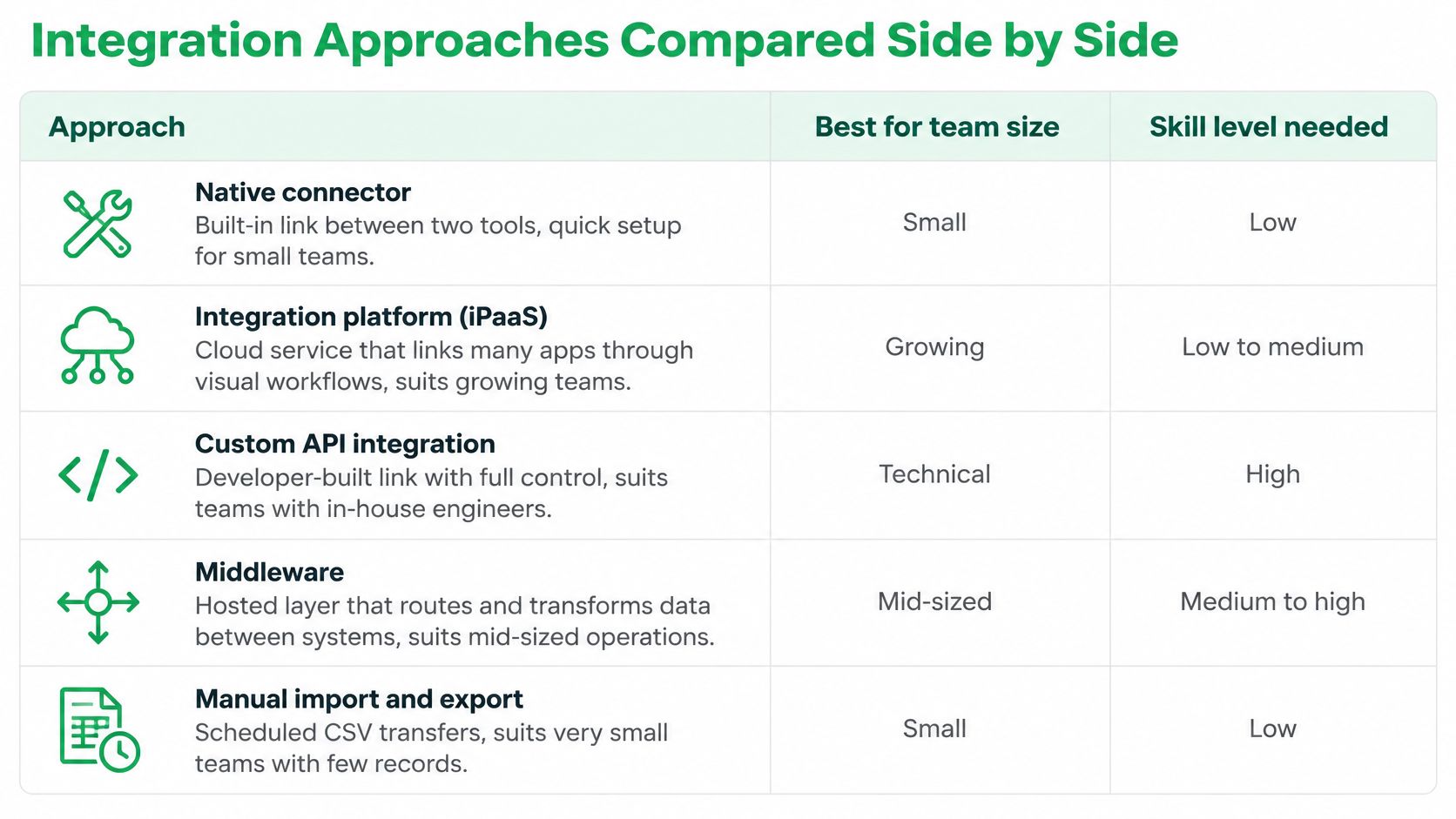
There are several ways to connect systems. Use this comparison as a planning guide, not a guarantee of effort: a simple connector can still require careful field rules.
| Approach | How it works | Best for | Setup effort | Ongoing upkeep |
|---|---|---|---|---|
| Native connector | Built-in connection between named products | Teams using a common CRM and supported tool | Low when requirements fit | Low if vendor maintenance covers the connection |
| Integration platform (iPaaS) | Middleware connects apps through prebuilt workflows | Teams connecting several tools with technical support | Medium | Workflow monitoring and connector maintenance |
| Webhook | An application sends an event to a receiving web address | Teams with a developer who can receive and process data | Medium | Receiving service and failure handling |
| Custom API build | Developers write code against the CRM's interface | Firms with unusual data or approval rules | High | Continuing developer involvement |
| Vendor-built managed integration | A provider builds and maintains the agreed connection | Teams wanting provider-led setup | Low for the customer | Provider upkeep within the agreed scope |
The visual below groups related connection methods, including middleware and manual transfers. The table above focuses on options for an automated call workflow.
Choose by ownership, not just setup effort
A helpful comparison is what happens when the connection fails before your team starts work.
- Native connector: Check whether it supports your actual activity fields and approval steps. A built-in connection isn't necessarily a complete fit.
- Integration platform: Assign someone to inspect workflow logs. A visual workflow still needs an operational owner.
- Webhook: Require delivery monitoring. If the receiver goes offline, the sender needs a defined recovery path.
- Custom API build: Budget for changes after launch. The developer's responsibility shouldn't end when the first test succeeds.
- Managed integration: Confirm the supported CRM and agreed maintenance scope. Provider-led setup works best when your requirements fit that scope.
For a calendar-and-email workflow, our CRM integration and Outlook guide provides a related starting point.
We offer webhook integration, and our Pro plan includes CRM delivery through an integration our team builds. Those are different implementation routes, so establish which route matches your intended workflow rather than assuming they require the same customer involvement.
Shortlist the approaches your team can realistically operate. Before committing, document who maintains each connection after a software update, who investigates a failed delivery, and which changes fall outside the agreement.
How Call Summaries Flow Into Client Records
A call summary reaching the CRM is like mail reaching an office: arrival is one event, correct filing is another, and approval is a third. Treat the route as plumbing to configure and test. Generating a summary, delivering it, and accepting its contents stay separate.
The diagram compresses the route; use these six stages as the working checklist.
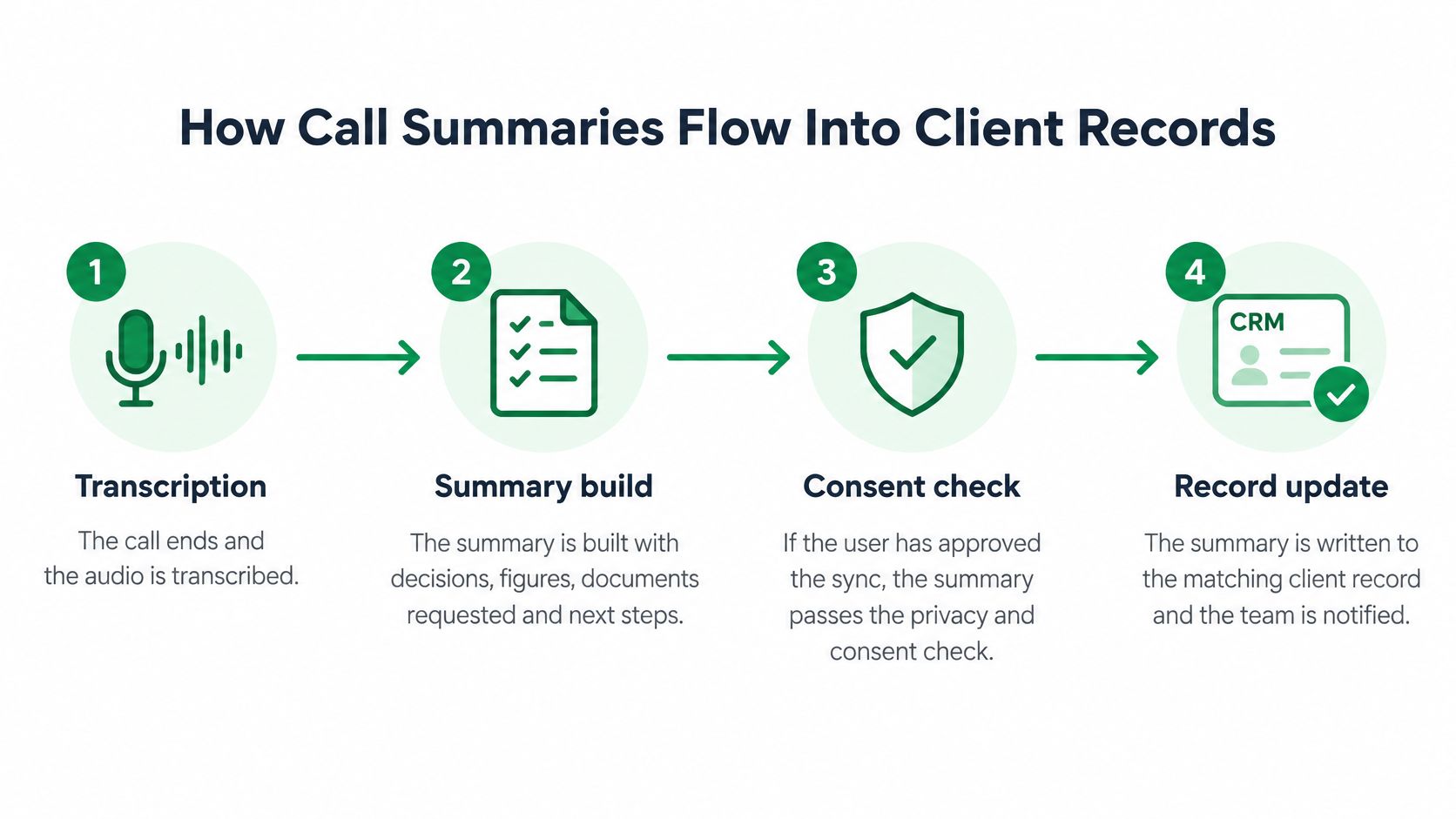
- The call ends and transcription begins. The conversation becomes text that can be used to prepare a summary.
- The summary organizes the discussion. Decisions, figures, requested documents, and proposed next steps become easier for the adviser to inspect.
- Enabled synchronization sends the payload. When a user enables or manually triggers our CRM synchronization, we send the summary title and content, call identifier and duration, caller and recipient telephone numbers, available names, our user identifiers, and the event timestamp.
- The connector checks the contact match. Configure it to compare the phone number with existing contacts and hold ambiguous matches rather than selecting someone arbitrarily.
- The destination rules apply. A summary may land as a labeled activity, a draft task, or a review item, depending on what the field is allowed to receive.
- The adviser reviews the entry. Approval should be distinguishable from successful delivery, so colleagues know whether the information has been checked.
Our summaries arrive in the app and by email a few seconds after the call ends. That timing describes VoxNote's own delivery, so measure the connector's CRM timing separately. Our daily phone call summary guide explains the documentation workflow around each call.
Failed delivery needs a recovery path
A sound design stores outbound events in a durable queue. Temporary failures should receive retries with increasing waits; permanent permission or validation failures should go to an exception list for a person to resolve.
Use the call identifier as an idempotency key, a stable reference that lets the connector recognize an already processed event. Replay becomes safer because a second attempt updates the same activity instead of adding a twin.
For operational health, track transaction success, latency, error rate, and timeout rate; Salesforce's reliability guidance is a useful reference for monitoring those signals. Use near-real-time delivery for urgent follow-up records, and scheduled bulk processing for historical backfill and reconciliation. Administrators should be able to inspect delivery status, the last successful synchronization, the destination record identifier, and replay controls.
For another view of the call-documentation workflow, watch the video below.
If a number matches no contact, route it to a provisional contact for review. An unmatched caller is a reason to verify identity before anything enters the client file.
Writing Summaries Without Duplicates or Overwrites
Automation can duplicate notes, replace an adviser's verified figure, or make an unchecked summary look authoritative. Write rules define what each type of information may do when it reaches the CRM.
The need is substantial: in a 2025 survey of 602 CRM users and administrators, 76% believed less than half their CRM data was accurate and complete, 37% linked poor data quality directly to revenue loss, legacy systems and incompatible tools contributed to silos for 50% and 44% respectively, and only 20% had formal governance policies.
| Content type | Safe write mode | Rule | Example |
|---|---|---|---|
| Call date, time, and duration | Append as activity | Create a distinct activity keyed to the call ID; replay updates that activity | Logged without changing contact facts |
| Phone numbers from the call | Match to existing contact | Permit updates only without conflict; otherwise review | An unfamiliar number is flagged |
| Adviser-entered income or loan amount | Never overwrite | Send the summary value to review or a labeled note | Reported income differs from verified income |
| Commitments and next steps | Create an unassigned draft task | Owner confirms before activation | Send the rate sheet on the agreed day |
| Summary text | Append as labeled note | Mark as AI-generated and pending review | Auto summary, pending review |
| Sensitive financial details | Hold for review | No automatic write to authoritative fields | Credit details await approval |
Keep evidence separate from verified facts
Suppose a summary reports a higher income than the CRM's verified value. Keep the existing field unchanged and preserve the new statement with its source and timestamp. The adviser can then establish whether the client described a raise, a different income period, or something the summary misunderstood.
Our AI summaries and suggested actions require user review. They aren't professional advice or certified records.
Security and integrity also belong in these rules: a 2025 survey of CRM, compliance, and data professionals found 91% were concerned about security and 80% reported accuracy or integrity problems linked to fragmented systems.
Approval boundary: A summary may record what was discussed without certifying that the underlying statement is true.
Choose the fields your team relies on most and assign each a write mode. Include who can approve an exception and how a correction remains visible afterward.
Privacy and Consent Checks Before Automatic Sync
Removing manual note-taking doesn't automatically reduce compliance risk. An automated workflow can distribute excessive information just as efficiently as necessary information.
The security and integrity concerns noted above make privacy a launch condition, not a cleanup task. For mortgage, insurance, and investment conversations, have a compliance adviser confirm the applicable requirements for your jurisdiction and workflow.
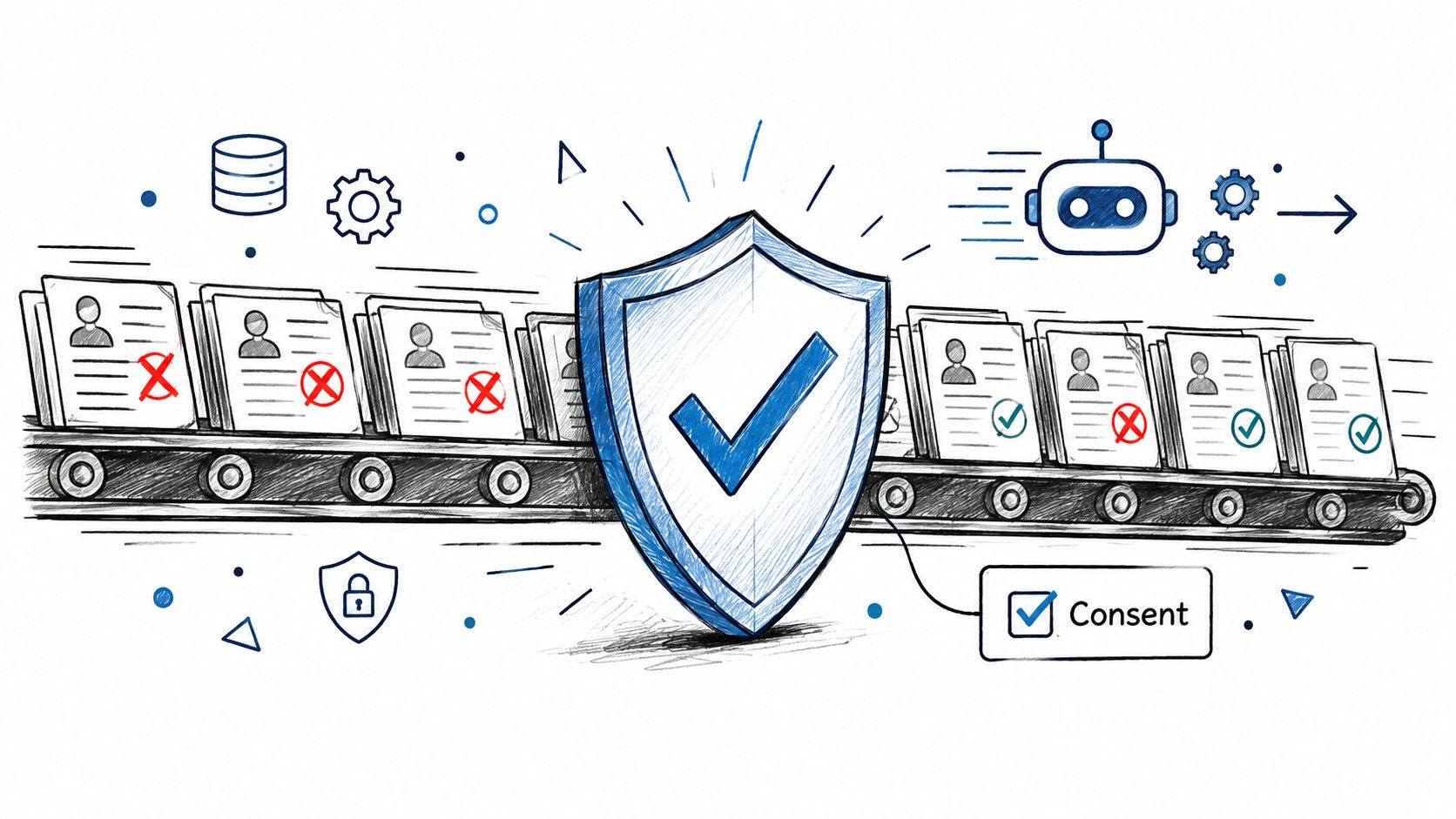
Use a consent gate before enabling delivery
- Recording consent: Establish how consent will be obtained and documented before recording begins, following the rules applicable to the conversation.
- Field purpose: State why each field is necessary. Don't transfer the full transcript merely because the connector can.
- Role-based access: Limit what each employee can view. An assistant handling appointments may not need detailed investment information.
- Retention: Set documented retention rules for recordings, transcripts, summaries, and destination copies rather than assuming they share a lifecycle.
- Deletion requests: Document who receives requests and how connected systems are checked. Our support records are retained while needed to provide support and maintain a reasonable business record, and users may request their deletion.
- Automated processing disclosure: Establish what clients should be told about transcription, summarization, and subsequent use.
- Approval history: Preserve who approved a client-file entry and when. Apply the sensitive-content review rule before releasing that entry.
Our optional contact-name sharing, email delivery to recipients, and CRM or webhook synchronization require the user or organization to enable, configure, or initiate them. Enabling a feature is an operational choice, not proof that every legal or professional requirement has been satisfied.
Our phone call monitoring guide offers related workflow context. Before switching on automatic delivery, have your compliance adviser confirm the permitted fields, recipients, review requirements, and regional handling arrangements.
Confirm Your Integration Scope Before You Buy
Compare a written scope, not just a demonstration. A summary appearing in a test contact proves delivery, but it doesn't establish maintenance responsibilities or acceptable write behavior.
Put the agreement into a testable checklist
- Name the fields. List summary text, commitments, telephone numbers, call duration, and any other required content. Mark the approval requirement for each.
- Confirm delivery and ownership. Our Pro plan includes CRM delivery, with the integration built by our team. For any alternative, establish who builds and maintains the connection.
- Document failure handling. Specify where failures appear, who receives alerts, and the agreed response arrangements. Our Pro customers receive direct support from the founders, but that shouldn't be interpreted as an unstated recovery guarantee.
- Compare the full cost. VoxNote Pro billed annually costs US$349.99 per year, equivalent to US$29.17 per month. Include required plan tiers, seats, and access controls when comparing options.
- Agree on the review and consent gates. Turn the rules above into acceptance criteria rather than leaving them as informal expectations.
- Run representative client-call tests. Use an approved test setup to check matching, duplicate prevention, conflicting facts, and failed delivery. Enable automatic writing only for fields that pass.
Keep the test results with the agreed scope. If a behavior isn't demonstrated or written into the service terms, don't assume it's included.
VoxNote records, transcribes, and summarizes client calls, and our Pro plan includes CRM delivery through an integration our team builds. Visit VoxNote to discuss your CRM, the fields you need delivered, and the write rules your team wants to apply before launch.