
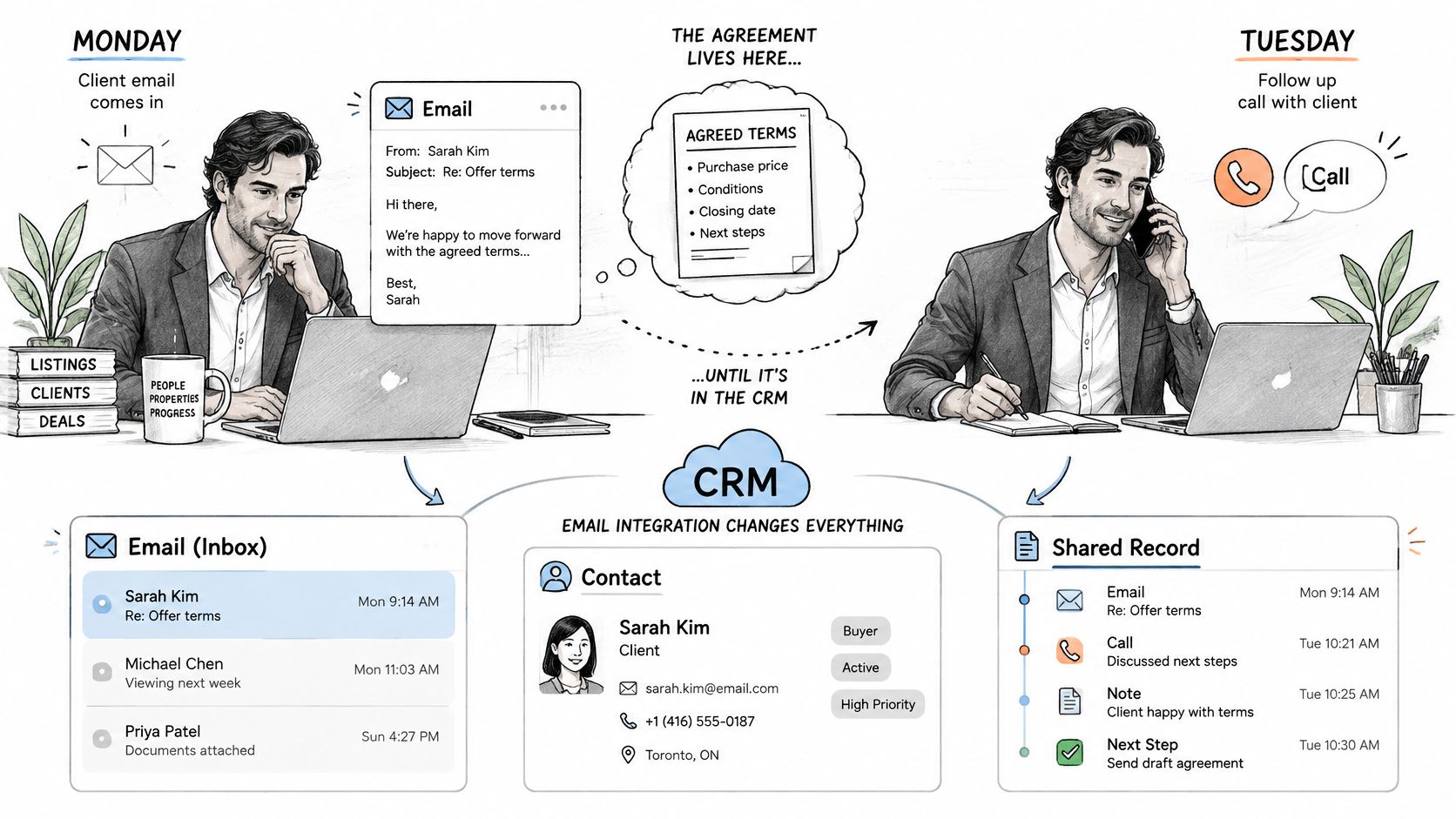
You read a client's email on Monday, take their call on Tuesday, and promise to send a document afterward. By Wednesday, the email is still in your inbox, the call details are in your head, and your colleague can't tell what you agreed. For a busy broker or advisor, that's a familiar gap between having the information and having a usable client record.
CRM email integration helps close that gap. The useful outcome isn't only that messages move between tools. It's that the next person opening the client file can understand what happened, what's been checked, and what needs to happen next.
Table of Contents
What CRM Email Integration Is and What It Changes
CRM email integration connects an email account to a CRM so messages, contacts, and activities can be saved automatically against the right client record.
Think of it as a mailroom clerk who checks each letter's address and files a copy in the correct client folder. The essential parts are the mailbox, the CRM record, and the matching rule, usually based on an email address.
CRM isn't only for large companies. Eurostat figures reported by Market Intelligence Tools show that 28.51% of EU enterprises with at least 10 employees used CRM in 2025, including 24.69% of small enterprises with 10–49 employees and 65.43% of large enterprises.
Those figures describe adoption, not administrative workload. Still, a small brokerage without dedicated administrative staff has a practical reason to eliminate repeated copying.
What changes in everyday work
A well-configured connection offers:
- Less copying: Employees don't have to move correspondence between inboxes and spreadsheets.
- A shared timeline: Email and call records sit alongside the client's other activities.
- Faster follow-ups: The relevant thread is already attached.
- Clearer commitments: Colleagues can find promised documents and agreed actions.
- Less administration: Staff spend less effort reconstructing conversations.
The gap remains substantial: a 2025 analysis of the State of Business Email report found that only 34% of organizations had integrated business email with CRM, while 31% of IT leaders identified integrating email with other tools as a major source of email-related time and productivity loss.
For a mortgage broker, the difference is concrete. A client emails a rate question before a call, and the broker opens the client record with that thread visible before dialing.
MakeAutomation's explanation of how CRM integration connects business apps provides useful context if you're deciding which other systems belong in the same workflow.
Practical rule: Judge the connection by what a colleague can understand from the client file, not by how much information it collects.
Benefits still depend on logging and review. During a trial, track time spent copying notes and client threads missing from the record.
How Email Reaches Your CRM Step by Step
An integration doesn't necessarily move your mailbox into the CRM. Usually, your email stays in its original account while the CRM stores a copy, an activity entry, or a reference to it. Establish which model your connector uses before assuming that deleting something in one place deletes it everywhere.
The process follows a simple path, but each handoff needs a clear rule.
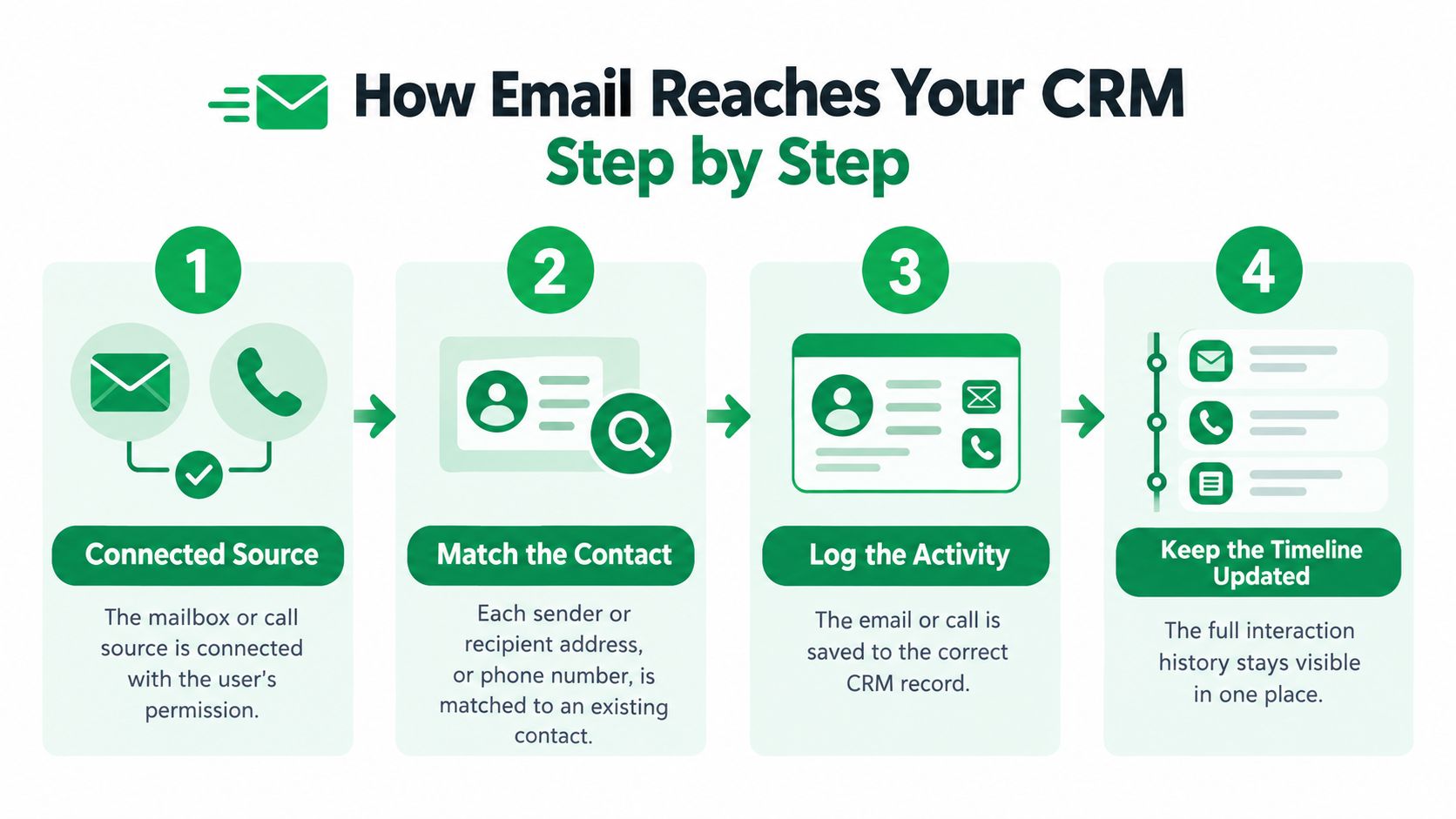
- Connect the source with permission. You authorize access to the mailbox or call source. Confirm whether the connection can read messages, create records, send email, or perform only some of those actions.
- Match the participants. The system compares sender and recipient addresses, or telephone numbers, with existing contacts. This establishes whose history should contain the interaction.
- Handle unmatched items explicitly. Configure the system to create a contact under defined rules or send the item to a review queue. It shouldn't guess a client because a name looks familiar.
- Save the interaction as an activity. The message or summary becomes an entry on a contact, company, or deal. A contact identifies the person; a deal identifies the particular piece of business.
- Place documents and details deliberately. Attachments belong in an accessible file location, while extracted dates or amounts may belong in fields. Keep their source available so someone can check the extraction.
- Hold follow-up drafts for approval. A generated draft should remain unsent until a person checks it. Creating a draft and authorizing a client communication are different actions.
Why matching needs special attention
Matching is a particularly sensitive step because a valid address doesn't always identify a single person. Say a couple shares a family email account, but each person has a separate insurance application.
An address match alone can't determine which application a message concerns. The safer approach is to flag the ambiguity and require the user to select the contact and deal.
The same distinction matters when an existing client starts a new mortgage application. The contact may be correct while the opportunity is wrong.
Record types and where they land in the CRM
| Record type | Source | Where it lands in the CRM | Matching key |
|---|---|---|---|
| Inbound client email | Connected mailbox | Contact activity timeline | Sender email address |
| Outbound follow-up email | Sent folder or sending tool | Contact activity and deal notes | Recipient email address |
| Phone call summary | Call transcription service | Activity note on the contact | Caller and recipient phone numbers |
| Follow-up draft | Drafting step | Pending task until a person approves it | Contact and call identifier |
| Attached proposal or document | Email attachment | Files section of the client record | Message identifier |
Use these destinations as a mapping checklist, not a promise that every connector supports them automatically. A message identifier ties an attachment to its parent email; the parent email's verified contact match determines the client folder.
Also distinguish sync direction from record placement. A connection that copies new messages into a CRM doesn't necessarily update your mailbox when someone edits a CRM note.
How Call Follow-Ups Fit Into Client Records
A phone conversation can change the meaning of an earlier email. A client might revise their preferred closing date, explain that a document is unavailable, or ask you to pause an application. If you record only the email thread, your colleague may act on instructions that are no longer current.
The call and the mailbox hold one client history. Judge an integration by the record a colleague opens afterward: accurate, reviewed, and attached to the right client. A sync that ran proves only that text moved somewhere.
Consider a mortgage broker speaking with a client about outstanding paperwork. During the call, the client agrees to send an employment letter, the broker promises to check a lender requirement, and they arrange another conversation.
The call is transcribed, then summarized. With VoxNote, summaries arrive a few seconds after each call ends, both by email and in the app. The professional reviews the follow-up draft, adjusts the wording, and sends it.
Turn the conversation into usable work
A readable summary is helpful, but the next actions also need appropriate homes:
- A quoted figure: Save it in an activity note or the relevant deal field, with enough context to distinguish an estimate from a confirmed amount.
- A promised document: Create a task with an owner and the agreed due date.
- A decision: Record it on the activity timeline, including any condition attached to it.
- The next call: Create a scheduled activity rather than leaving the date buried in prose.
In the broker scenario, the client's employment letter and the broker's lender check are separate responsibilities. Putting both into an undifferentiated paragraph makes it harder to see who owes what.
A daily phone call summary can anchor a broader review routine, but each actionable commitment stays attached to its individual client record.
A summary records the conversation. A task assigns the work. You need both when someone has promised to act.
Keep the phone familiar and check exceptions
VoxNote users keep their own phone number, connect once, and receive their first summary by email. Clients continue calling the number they already know, so the documentation workflow asks nothing new of the person on the other end of the line.
Exceptions still need an owner. A call from an unfamiliar number should wait for a person to confirm which client it belongs to, and a conversation with several participants needs a name check before anyone files statements under an individual record.
Separate what the applicant said from what a spouse, assistant, or other participant contributed. Each speaker may hold different authority to approve the same action.
Practices running document-heavy consultations sometimes bring in outside help for the sales side of that work. Dreamond's sales support for immigration businesses serves one such niche. Whether follow-through is handled in-house or outsourced, the same question applies: does the person picking up the next step have the context to do it correctly?
After each call, check the record against these questions: What was agreed? Who owes what? When do we speak next? If the file doesn't answer them, the documentation isn't ready for a handoff.
Setup Considerations Before You Connect
| Method | Best for | Setup effort | Main limit |
|---|---|---|---|
| Connector built into the CRM | Teams on one CRM with standard mailboxes | Low | Works only with the mailboxes and fields the CRM supports |
| Email sync built into the CRM | Small teams with common inbox types | Low | Often syncs only standard contact and activity types |
| Automation middleware | Teams linking several tools | Medium | Extra cost and one more point of failure to monitor |
| Webhook or direct API build | Teams with developers and custom rules | High | Needs token handling, retries, logging and monitoring |
| Provider-built CRM delivery | Teams that want the provider to manage the CRM link | Low to medium | Limited to the CRMs and plan tiers the provider supports |
Start with the simplest method that supports your actual records. A built-in connector isn't enough if it can save emails but can't attach call summaries to the correct opportunity.
If you're still choosing the system itself, UI Lib's comparison of agency CRM and project software options can help distinguish relationship tracking from project delivery. For call-record implementation, our guide to CRM integration services provides additional context.
Decide access and ownership first
Write down the destination field for each record type and name the person responsible for failed or ambiguous items. Decide whether older messages will be imported or only new interactions captured.
Before authorizing access, confirm:
- Mailbox scope: Identify individual accounts and shared inboxes, excluding unrelated personal or internal correspondence.
- Stored content: Specify whether the CRM retains message bodies, attachments, transcripts, or summaries.
- Retention and visibility: Establish how long records remain and which roles can read them.
Our optional features, including contact name sharing, emailed summaries or reminders, and CRM or webhook synchronization, require the user or organization to enable, configure, or start them. Don't assume that connecting a phone also activates every destination.
Account continuity matters too. Our users agree to receive registration codes by text message and phone call, and continuous use requires continued access to the registered mobile number.
Ask how failures are handled
A reliable integration needs more than an initial successful connection. Apollo's CRM integration testing guidance describes acceptance targets including at least 99.5% integration uptime and under 0.5% request errors, alongside token, retry, and logging checks.
Give your implementer this checklist:
- Restricted authorization: Use OAuth with least-privilege permissions, managed secret storage, and automatic access-token renewal.
- Duplicate prevention: Persist a unique key combining the message identifier and CRM record identifier.
- Controlled retries: Respect rate-limit instructions and use exponential backoff with jitter for rate limits or temporary server failures.
- Visible failure handling: Put repeatedly failed events into a dead-letter queue, a holding area someone can inspect and replay.
- Traceable delivery: Use correlation identifiers and audit logs to follow an event through receipt, record creation, and review.
Before rollout: Ask the implementer to demonstrate a failure and its recovery, not just a successful transfer.
Pilot with a single team member and compare real calls with their resulting records. Include an unmatched caller, a repeated event, revoked access, and an unavailable destination so the test covers exceptions as well as ordinary traffic.
Checking Email Records for Accuracy and Delivery
A successful sync proves neither inbox placement nor factual accuracy. Your CRM can accept a message that a mailbox later filters into spam. It can also store a polished summary containing a statement the client never made.
Start with delivery authentication. SPF authorizes sending infrastructure, DKIM signs outbound messages, and DMARC establishes an authentication policy and reporting.
A B2B benchmark cited by DMARC Report found that domains implementing SPF, DKIM, and DMARC were 2.7 times more likely to achieve inbox placement than unauthenticated senders. Treat that as directional, not a guarantee, because mailbox provider, reputation, content, and sending volume affect results.
Use a dedicated authenticated sending subdomain where appropriate. Monitor DMARC reports and track delivery, bounces, and complaints separately rather than interpreting an accepted API request as proof that a client received the email.
Require evidence for consequential statements
Security and privacy were selected as a leading challenge by 44% of respondents in industry research cited in Conversational Geek's analysis of email and IT operations. Reviewing the recipient and content belongs alongside connectivity checks, especially when financial details could reach a shared mailbox.
For every material claim, retain an identifiable source passage from the call. Require explicit confirmation of amounts, dates, coverage, approvals, and promised documents, and log who reviewed the draft.
Track correction rate, unsupported-claim rate, time-to-review, and CRM-field completeness. These measures reveal whether automation saves useful work or merely produces records that someone must repair.
Email record symptoms, causes and fixes
| Symptom | Likely cause | First fix |
|---|---|---|
| Follow-up lands in spam | Missing or misaligned SPF, DKIM or DMARC | Authenticate a dedicated sending subdomain and review DMARC reports |
| Summary missing from the CRM | Contact not matched or sync not enabled | Check the matching key and confirm sync is switched on |
| Duplicate activities in the record | Retried event with no unique key | Use a message ID plus record ID as the unique key |
| Summary attached to the wrong contact | Shared mailbox or similar addresses | Confirm the recipient before sending and correct the match |
| Draft states a figure not said on the call | Error in the summary or draft | Check the source passage and confirm the figure before sending |
Don't replace an uncertain statement with a confident one. If the transcript doesn't establish whether a figure was approved, leave it unconfirmed and resolve it with the responsible professional before sending.
Choose Your Integration Path This Week
- Email-led team: Start with built-in CRM email sync when it supports your mailbox and the records you need.
- Phone-led team: Start with a call-to-email workflow, then confirm the CRM destination before going live.
- Custom workflow: Choose a webhook or API build when developers need to implement specialized matching and field rules.
For mortgage brokers, life insurance advisors, and financial planners, VoxNote emails each call summary after the conversation and drafts a follow-up for professional review. On the Pro plan, our team builds the integration that delivers call summaries to your CRM.
If you're also considering changes to your calling setup, our guide to Aircall alternatives can help frame that separate decision. Choose based on how your team handles client conversations, rather than replacing a working phone arrangement just to capture notes.
Make the pilot accountable
Send sales, team, or partnership questions to our dedicated sales email address, or arrange a video call with founder Dannick Villeneuve. Email support is answered within one business day, in English or French, by the team that builds the service.
Start with a small team and a defined review owner. Track correction rate, unsupported-claim rate, and time-to-review, while checking that required CRM fields are complete.
Expand only when colleagues can rely on the records without reconstructing the conversation themselves. A useful integration should make the client history easier to trust, not merely easier to populate.
Keep client calls and email follow-ups connected with summaries and drafts you can review before they become part of the client history. Visit VoxNote to discuss your CRM delivery requirements and plan a pilot around your team's real calls.